The 2026 LinkedIn Event Marketing Playbook

- Why LinkedIn Events matter: They connect you directly with decision-makers. LinkedIn Live videos get 7x more reactions and 24x more comments than regular posts. Plus, tools like Event Ads and CRM integrations simplify lead generation.
- New features in 2026: Event Ads now include lead-gen objectives, cutting registration costs by up to 40%. Formats include LinkedIn Live, Audio Events, and external links, all optimized for mobile (70% of viewers tune in on their phones).
- Promotion strategy: Start promoting 2–4 weeks in advance. Use organic posts, speaker networks, and Event Ads to drive sign-ups. Paid ads can lower costs by up to 40%.
- Keeping attendees engaged: Use live polls, Q&A, and networking tabs. Assign moderators to manage comments and flag potential leads.
- Post-event follow-up: Act within 48 hours. Segment leads by engagement level (attended, partial attendance, or no-show) and tailor your outreach. Tools like RevBoss automate follow-ups, saving time and boosting engagement.
LinkedIn Events have evolved into a powerful B2B tool. Whether you’re hosting webinars, product launches, or live panels, combining LinkedIn’s features with tools like RevBoss can help you connect with decision-makers, generate leads, and drive results.
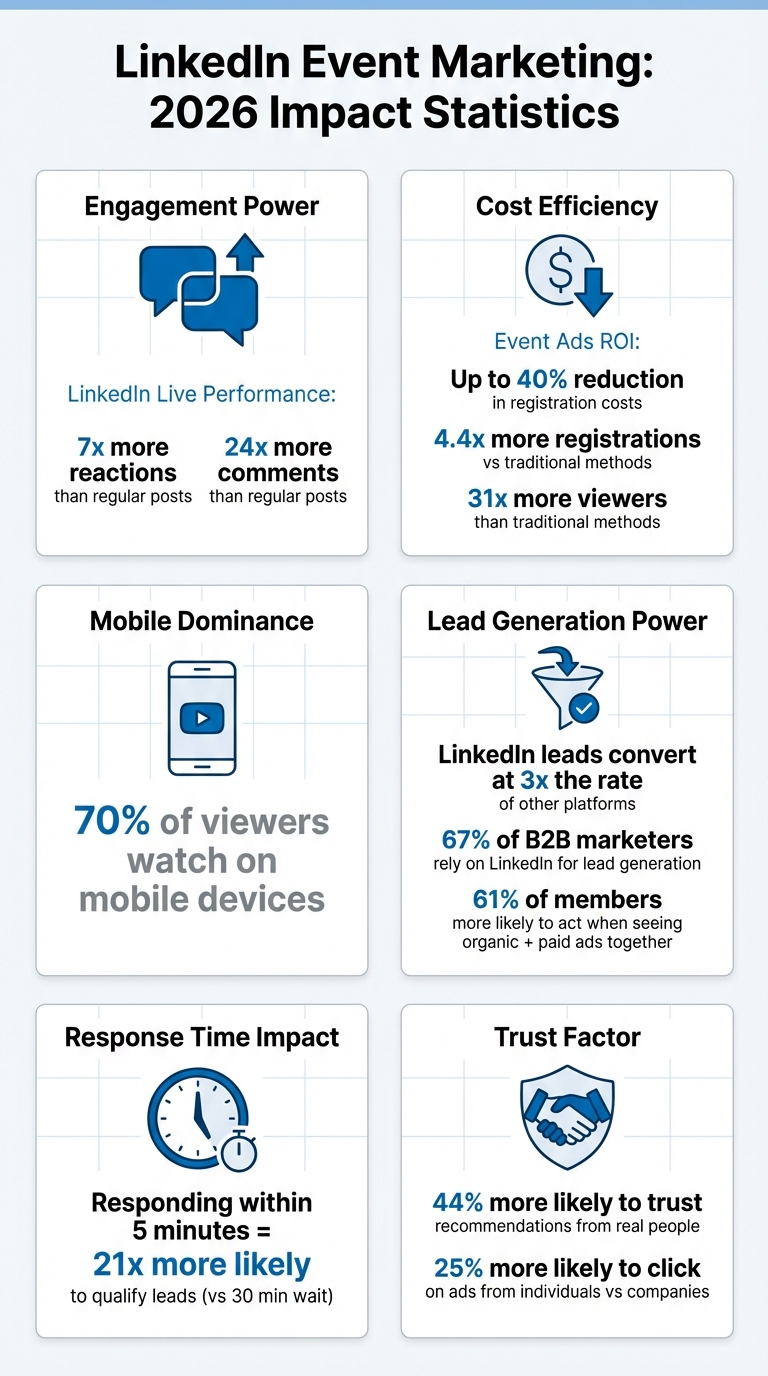
LinkedIn Event Marketing Statistics and ROI Impact 2026
How to Run a Successful LinkedIn Event/Webinar
How to Create LinkedIn Events That Get Results
If you're a LinkedIn Page admin, you're the one who can create events - so double-check your access before diving in. Once your event is live, certain details like the organizer, event type (online or in-person), and format (LinkedIn Live or external link) cannot be edited, so plan carefully upfront.
Step-by-Step Event Setup Guide
First, pick your event format. LinkedIn offers three options: LinkedIn Live for video broadcasts using tools like Restream or StreamYard, LinkedIn Audio Events for audio-only discussions, or External Event Links if you're hosting on another platform. Schedule your event 2–4 weeks in advance to allow enough time for organic and paid promotion.
Input the event dates using the MM/DD/YYYY format and craft a title that grabs attention and highlights the value. For instance, instead of a generic title like "Marketing Webinar", go for something specific like "AI-Powered Lead Generation Strategies for B2B Founders." Be sure to enable the "LinkedIn registration form" option to collect attendee details like name, job title, and company. Keep in mind, you'll need to provide a privacy policy link to activate this feature.
Upload a 16:9 cover image (minimum 480 pixels wide; 1280×720 recommended) and add alt text for accessibility. If you’re featuring speakers, connect with them on LinkedIn beforehand. This way, you can tag them during the setup, which not only invites them automatically but also links their profiles to your event page. Admins should also test their LinkedIn Live setup using the "LinkedIn Live test event" feature to ensure everything runs smoothly, without notifying attendees.
Finally, focus on crafting an engaging event description and selecting visuals that stand out.
Writing Event Descriptions and Choosing Visuals
Your event description should answer this: "Why should someone spend their time here instead of doing something else?" Be clear and specific - include a detailed agenda, speaker bios, and the key takeaways attendees can expect. Professionals want to know their time will be well spent, so highlight the value they'll gain.
For visuals, remember that 70% of LinkedIn viewers watch live events on mobile. Keep your cover image simple, with minimal text and high-contrast colors to make it pop in busy feeds. Test your image on a phone screen to ensure it looks sharp before publishing.
Audience Targeting and Segmentation
With your event details locked in, it's time to focus on reaching the right audience to drive engagement.
Use LinkedIn's targeting tools to tailor your organic posts. You can segment by job function, industry, seniority, language, and location. This allows you to post about the same event multiple times, but with messaging tailored to different groups - for example, a post for CFOs might focus on ROI, while one for marketing directors could emphasize tactical strategies.
From your personal profile, you can invite up to 1,000 first-degree connections per week. Focus on connections who have engaged with similar content or are part of your target accounts. For paid promotion, Event Ads are a smart choice - they can lower registration costs by as much as 40% compared to other methods. Use LinkedIn Campaign Manager Analytics to track registrant data, such as professional roles and industries, to refine your targeting for future events and identify which audience segments convert best.
| Event Type | Promotion Lead Time | Primary Targeting Strategy |
|---|---|---|
| Short-form Virtual Events | 2–3 Weeks | Organic Page posts & Connection invites |
| Webinars & Panels | 3–4 Weeks | Event Ads & Speaker network sharing |
| Product Launches | 4–6+ Weeks | CRM Integration, Thought Leader Ads & Retargeting |
How to Promote Your LinkedIn Event
Filling your seats takes more than a single announcement - it’s all about steady, consistent promotion. In 2026, staying on top of the game means maintaining a regular posting schedule throughout your event’s timeline.
Organic Promotion Methods
Start your promotional efforts as soon as your event page is live. A quick way to get the ball rolling? Send out 10 direct invites right away to spark initial interest.
Plan ahead with a 6-week content calendar. Post daily during weeks 6 to 4, focusing on the industry challenges your event will address. As the event approaches (weeks 3 to 1), shift gears to highlight solutions, include testimonials, and build excitement. During the event, keep the momentum going with live updates. LinkedIn’s organic post targeting is a powerful tool here, letting you zero in on specific audiences based on job roles, industries, seniority levels, and locations - all without spending a dime.
Don’t forget to tap into your speaker networks. Share content templates with speakers so they can promote the event on their own profiles. A few days before the event, encourage them to post in the event’s "Networking" tab to engage attendees and build anticipation. LinkedIn also lends a hand by notifying a portion of your Page followers and all registrants when the event kicks off, giving you an instant audience boost.
A real-world example? Back in October 2019, Automation Anywhere used LinkedIn Live to launch "Enterprise A2019", their cloud-native automation platform. Gabriel Carrejo, their Head of Global Social Marketing, led this effort, connecting with a global audience in real time. They later repurposed the live video content, turning it into thousands of additional leads.
While organic tactics are essential for building engagement, paid ads can take your reach to the next level.
Running LinkedIn Ads for Events
Pair your organic strategies with targeted paid campaigns to maximize your impact. LinkedIn Event Ads can lower registration costs by as much as 40% compared to other promotional methods. For best results, launch your paid campaigns 2–4 weeks before the event, or 4–6 weeks out if it’s a major product launch.
To keep things organized, create three separate ad sets in LinkedIn Campaign Manager:
- Pre-event registrations: Use "Website Visits" or "Brand Awareness" objectives with static images and a clear RSVP call-to-action.
- Live viewership: During the event, focus on "Engagement" objectives and enable accelerated delivery to boost visibility.
- Post-event follow-up: Retarget registrants and ad engagers with video replays and thought leadership content.
Using RevBoss for Event Promotion
If juggling all these strategies feels overwhelming, platforms like RevBoss can streamline the process. RevBoss combines content creation, audience growth, and direct outreach into a single workflow. Their Content + Coaching + Activation plan ($4,000/month) is tailored for trade shows, webcasts, and professional events.
RevBoss helps establish a strong, founder-led content strategy that builds trust quickly. When it’s time to promote, they handle personalized outreach via email and LinkedIn DMs, ensuring each message feels relevant to the recipient’s role and interests.
After your event, RevBoss doesn’t stop there. They help you repurpose live content into highlights and set up retargeting campaigns to nurture attendees. For those who prefer a hands-on approach, their Coaching plan ($1,500/month) offers weekly strategy calls to guide you through building your own campaigns with expert advice.
Keeping Attendees Engaged During Events
Getting people to show up is just the first hurdle - keeping them actively engaged is where the magic happens.
Interactive Tools for Live Events
LinkedIn Live is a powerhouse for real-time interaction, generating 7x more reactions and 24x more comments than standard native videos. It’s a platform designed to spark conversations and keep your audience involved.
Start with live polls to keep things dynamic. These quick, two-minute polls not only grab attention but also provide instant insights into your audience's preferences. Ask about their challenges, interests, or solutions they’ve tried. It’s a simple way to keep the energy up and the focus sharp.
For audio-only events, take things up a notch by letting attendees "join the stage" and contribute to the conversation. Even if they’re not speaking, encourage them to use emoji reactions to share their thoughts. This keeps the vibe lively and helps you gauge the mood. Another pro tip? Use the Networking Tab. Have your speakers hop on about 15 minutes before going live to chat with attendees - it’s a great way to build anticipation and set the tone.
Don’t forget to assign a moderator. This person can sift through the comment feed, spotlight the best questions, and even flag potential leads based on engagement. With 70% of LinkedIn viewers tuning in from mobile devices, ensure your interactive features and visuals are mobile-friendly for a seamless experience.
Here’s a real-world example: In April 2025, Automation Anywhere used LinkedIn Live for a product launch, and the results were electric. Within minutes of going live, they racked up 400 positive comments, which ballooned to 1,000 by the end of the hour. Julian Foster, their Global Head of Paid Social Media, summed it up:
"When the broadcast started, within just a few minutes, we had about 400 positive comments. Then by the end of the hour-long presentation we had one thousand comments."
They later repurposed clips from the event into targeted ads, turning that buzz into thousands of leads.
While interactive tools can spark engagement, personalized outreach takes it to the next level.
Real-Time Personalization with RevBoss
RevBoss steps in to keep the momentum alive with personalized follow-ups during and after events. Their Content + Coaching + Activation plan, priced at $4,000/month, includes tailored event support campaigns for webcasts and live events.
Using AI, RevBoss identifies high-intent attendees - those who stick around for the entire session, ask questions, or interact with speakers. From there, it triggers personalized LinkedIn DMs and follow-up emails that reference specific moments from the event. This makes every message feel timely and relevant, moving beyond generic "thanks for attending" notes.
The goal? To create meaningful, human-like touchpoints that make attendees feel valued. These small but impactful gestures help turn engagement into high-quality leads. For those who prefer a hands-on approach, the Coaching plan offers weekly strategy calls for $1,500/month, helping you build your own personalized workflows.
How to Capture Leads During Events
Engagement is great, but turning it into actionable leads is the real win. Every interaction - whether it’s a comment, a question, or a connection - can signal a potential lead. The key is identifying high-intent prospects, like attendees who stay for the full event, participate in Q&A, or network with speakers.
After the event, export your list of engaged attendees. This gives you a pre-qualified pool of warm leads ready for follow-up. Use LinkedIn’s Matched Audiences feature to retarget these individuals with ads designed to convert their interest into pipeline opportunities.
For better results, segment your leads into three tiers:
- High-Intent: Full attendance and active participation in Q&A.
- Medium-Intent: Partial attendance.
- Low-Intent: Registered but didn’t attend.
This segmentation allows you to tailor your follow-up approach based on their level of engagement.
Take Salesforce’s 2026 Dreamforce event as an example. By combining Event Ads and Thought Leader Ads, they tracked engagement across multiple touchpoints. The result? They reached over 53% of their total pipeline, translating into billions of dollars in attributed revenue. The takeaway? Lead capture isn’t just about collecting names - it’s about tracking every interaction and using that data to drive smarter follow-ups.
sbb-itb-9354cf2
Post-Event Follow-Up and Analysis
After a live event wraps up, the real work begins. Timely follow-up actions play a critical role in turning attendee interest into measurable results. Acting within 48 hours is key to maintaining momentum and maximizing your return.
Automating Follow-Up Messages
Fast responses matter. Did you know that responding to an inbound inquiry within five minutes makes it 21 times more likely to qualify that lead compared to waiting half an hour?. Your follow-up strategy should kick off with an automated message within 48 hours of the event. Start with a thank-you note and include links to helpful resources like slide decks, event recordings, or case studies.
A solid follow-up plan involves five touchpoints spread over 7–10 days. Skip the generic messages - every interaction should deliver something useful. Combine LinkedIn direct messages, emails, and social engagement (likes or comments) to connect with prospects where they’re most active.
Segment your attendees based on their engagement levels:
- High-Intent Leads: Those who attended fully and asked questions should get immediate, personalized outreach.
- Medium-Intent Leads: Partial attendees benefit from educational content and case studies.
- Low-Intent Leads: Registrants who didn’t show can be retargeted with on-demand recordings via LinkedIn Event Ads.
For leads who aren’t ready to buy, schedule automated check-ins about 2.5 months later. This keeps you on their radar without being overbearing. Sprinkle in soft engagement actions like comments or likes to increase reply rates by over 30%. The goal is to create a well-timed communication plan that smoothly transitions leads from interest to action.
Once follow-ups are in motion, it’s time to measure how well your event performed.
Measuring Event Performance
Measuring ROI from events can feel like a challenge - 70% of event organizers say it’s tough to do effectively. Thankfully, tools like LinkedIn Campaign Manager make it easier. Its "Event Stage" breakdown lets you track key metrics like spend, impressions, and clicks across pre-, live, and post-event phases. Plus, as of April 2025, LinkedIn extended its click attribution window for event registrations from 7 to 30 days, giving you a clearer view of long-term conversions.
Here’s what to monitor:
- Pre-Event: Registrations, cost-per-registration, and conversion rates.
- During-Event: Live viewers and engagement like Q&A participation.
- Post-Event: Leads generated, pipeline value, and closed deals.
To calculate ROI, use the Incremental Revenue formula: (Event Revenue - Event Expenses) / Event Expenses. For attribution, the W-shaped model works well, assigning 30% credit to the first touch, lead creation, and opportunity creation stages. As Katie Noe, Product Marketing Manager at Bizzabo, puts it:
"Event ROI encompasses more than revenue; it's the net value you gain from your event relative to the total investment."
Don’t stop at numbers. Qualitative feedback matters too. Post-event surveys can help you gauge Net Promoter Score (NPS) and attendee satisfaction, which are strong indicators of customer loyalty. Dive deeper into attendee data, like job titles and industries, using LinkedIn Campaign Manager to ensure you hit your target audience.
With these insights, you can refine your follow-up and lead nurturing strategy.
RevBoss Workflows for Lead Nurturing
RevBoss takes the heavy lifting out of lead nurturing. Starting at $1,500/month for the Coaching plan and $4,000/month for full-service support, it automates follow-ups so no lead slips through the cracks. The Coaching plan includes weekly strategy calls to tailor follow-up sequences based on your event data, while the Content + Coaching + Activation plan provides full-service nurturing, including direct outreach via email and LinkedIn DMs.
The platform uses behavioral triggers to alert your sales team when a lead shows high intent, like clicking a recap email link or downloading a resource. This allows for timely, personalized follow-ups. By automating early-stage networking tasks, RevBoss helps you focus on sealing deals instead of chasing leads.
For longer sales cycles, RevBoss keeps prospects engaged with automated touchpoints that don’t feel intrusive. This approach can boost qualified leads by as much as 451%. It’s a powerful way to scale your follow-up efforts while staying efficient.
Using AI-Driven Event Marketing with RevBoss
AI isn’t here to take over event marketing - it’s here to supercharge it. As Jodi Whitehead from Bizzabo puts it:
"AI isn't here to replace event pros, it's here to scale your impact".
This shift brings AI-powered tools to the forefront, enabling smarter audience targeting and deeper personalization.
AI-Powered Audience Growth and Personalization
RevBoss leverages AI to pinpoint the right decision-makers and deliver highly tailored outreach. Instead of blanketing your network with generic invites, the platform studies behavioral signals - like profile views and past interactions - to find the ideal moment to connect. This precision is key, especially as 71% of today’s decision-makers are Millennials and Gen Z, who expect concise, relevant, and personalized content.
Violet Lumani from Salesforce highlights this shift in approach:
"It's not about forcing form-fills. It's about showing up where customers are already spending their time and looking for content".
With this strategy, attendees are 1.5x more likely to respond to your follow-ups and 3.6x more likely to accept an InMail. These AI-driven methods work seamlessly alongside real-time engagement tools and automated workflows, creating a cohesive marketing experience.
RevBoss Plans for Event Marketing
RevBoss’s AI tools are designed to streamline event marketing from start to finish. Their Content + Activation plan is tailored for event-focused campaigns, offering solutions for every stage: pre-event promotions, real-time engagement during live events, and automated follow-ups afterward. This approach taps into the power of LinkedIn Event Ads, which can drive 4.4x more registrations and 31x more viewers than traditional methods.
Scaling Founder-Led Marketing with RevBoss
RevBoss doesn’t just help teams - it also empowers founders to scale their personal brand into a powerful marketing engine. Personal connection matters: LinkedIn users are 44% more likely to trust recommendations and 25% more likely to click on ads when they come from a real person. By automating repetitive tasks like targeting, personalization, and follow-ups, RevBoss frees founders to focus on high-impact activities like speaking engagements or closing deals. This is especially crucial in B2B marketing, where 67% of marketers rely on LinkedIn for lead generation, and those leads convert at three times the rate of leads from other platforms.
With RevBoss, AI becomes more than just a tool - it’s a way to amplify your voice and drive meaningful connections.
Conclusion: LinkedIn Event Marketing in 2026
LinkedIn Events have grown into an essential tool for founder-led B2B businesses, offering unmatched access to decision-makers among its 1 billion members. With LinkedIn Live providing deeper engagement metrics, the platform has proven its ability to facilitate meaningful interactions with key players. Combined with budget-friendly ad strategies, the potential return on investment is hard to overlook.
To make the most of this opportunity, it's all about preparation and execution. Start promoting your event 2–4 weeks in advance with genuine, engaging content. Treat your event like a product launch - focus on capturing leads and nurturing them effectively. Remember, a multi-channel approach is crucial. Data shows that 61% of LinkedIn members are more likely to act when they see both organic posts and paid ads working together.
Platforms like RevBoss simplify this process by automating tasks like research, content creation, and scheduling. This ensures your event remains visible at every stage, from promotion to post-event follow-up. With AI-driven targeting, RevBoss identifies attendees most likely to engage and convert, taking care of everything from pre-event buzz to retargeting campaigns. This allows you to focus on delivering value during the event itself.
Virtual and hybrid event formats continue to dominate. Marketers have significantly increased their spending on virtual events - up 66% since 2022 - and this trend is still going strong in 2026. With 70% of attendees joining via mobile devices, the focus on accessibility and scalability is more critical than ever. These formats let you connect with global audiences without the logistical challenges of physical venues, making them a must for staying competitive.
Success in LinkedIn event marketing boils down to consistency, genuine engagement, and smart use of automation. Whether you're rolling out a new product, hosting a webinar, or building a community through audio events, LinkedIn provides the tools, while RevBoss takes care of the heavy lifting. The real challenge isn't deciding whether to use LinkedIn Events - it’s about how quickly you can implement these strategies and let RevBoss help you execute them flawlessly.
FAQs
How can LinkedIn Event Ads help lower registration costs by 40%?
LinkedIn Event Ads are a smart way to trim registration costs - by as much as 40%! How? By zeroing in on the people who are most likely to care about your event. Instead of casting a wide, expensive net, you’re targeting the right audience with precision, making every dollar count.
With LinkedIn's advanced targeting tools, you can filter by job titles, industries, or company sizes to attract high-quality leads. This means you're not wasting money on ads for people who aren’t interested. The result? Lower costs and a better return on your investment, as your event reaches the folks who actually want to engage.
How can I effectively engage attendees during a LinkedIn Live event?
To keep your audience engaged during a LinkedIn Live event, aim to create an experience that feels interactive and personal. Start by building excitement early - promote the event ahead of time to ensure a solid turnout. Once live, take advantage of LinkedIn's interactive features like live polls, Q&A sessions, and real-time comments. These tools keep things lively and help your attendees feel like active participants rather than passive viewers.
Before you go live, double-check your streaming setup to avoid any tech hiccups. Make sure the agenda is clear, and provide easy-to-follow instructions on how attendees can join the conversation. After the event wraps up, don’t let the connection end there. Send personalized follow-up messages, share the event recording, or offer helpful resources. This extra effort not only keeps the momentum going but also strengthens the relationships you’ve built during the session.
How does RevBoss help with follow-up and lead nurturing after events?
RevBoss takes the hassle out of post-event follow-ups and lead nurturing by providing strategies and tools that keep your audience interested and engaged. Through automation of key outreach tasks and detailed interaction tracking, it helps you maintain connections and keep the energy alive after your events.
Its features allow you to focus on the right leads and craft personalized communication, making it simpler to turn event attendees into lasting business opportunities. The result? A stronger, more productive sales pipeline.