The B2B Content Repurposing System: Turn One Expert Interview into 10+ Assets

Stop wasting time creating new content for every platform. With one 30–45 minute expert interview, you can generate 10+ pieces of content - blog posts, videos, social clips, and more - while cutting production time by up to 40%. Here’s how:
- Plan smart: Structure interviews into clear segments (e.g., pain points, tips) for easy repurposing.
- Record efficiently: Keep it to 30–45 minutes with solid audio/video tools like Riverside.fm.
- Transcribe quickly: Use AI tools like Descript or Rev for fast, accurate transcripts.
- Create assets: Turn the interview into multiple formats - short clips, blogs, infographics, and newsletters.
- Build a workflow: Use tools like ClickUp or Notion to document and automate the process.
This system saves time, maximizes reach, and keeps your message consistent across platforms. Start planning your next interview now and turn one conversation into weeks of content.
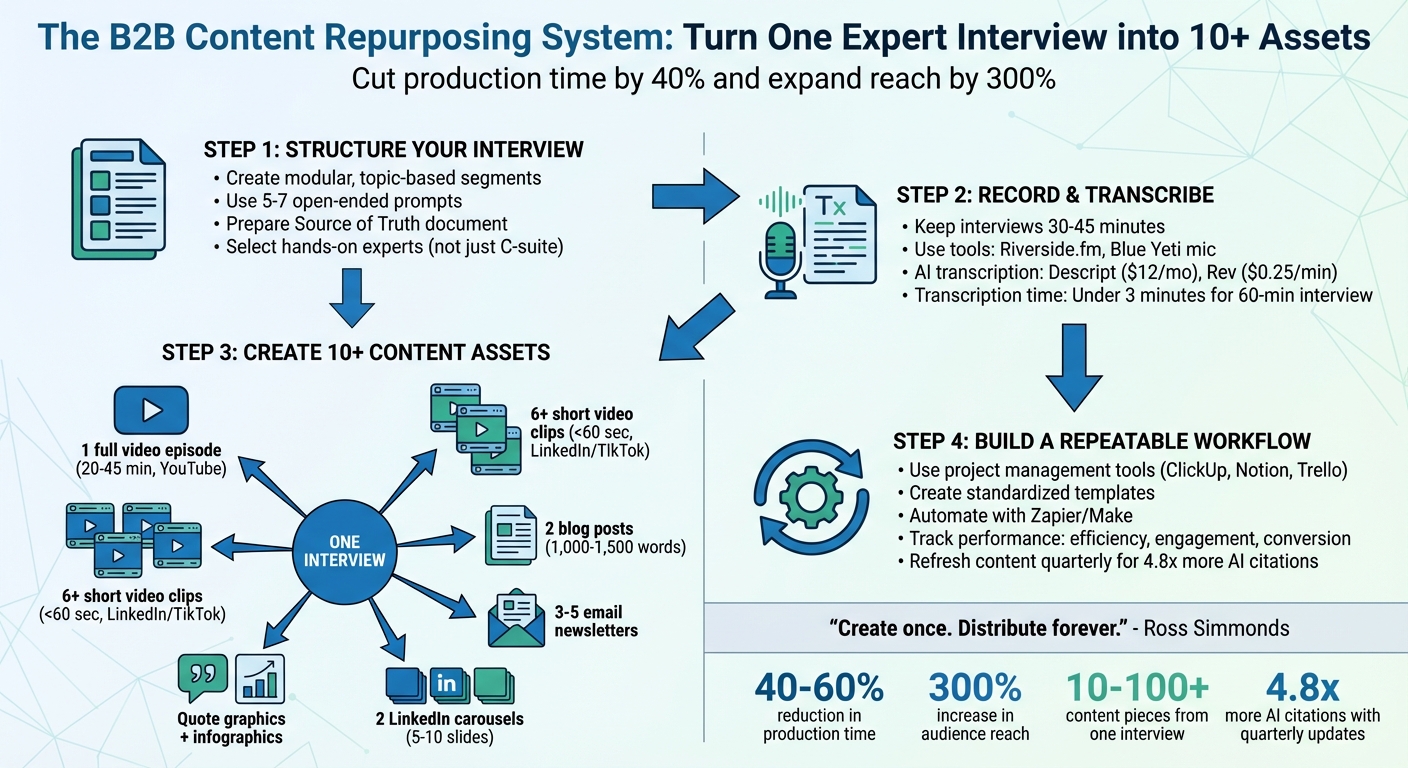
4-Step B2B Content Repurposing System: Turn One Interview into 10+ Assets
What is Your Favorite Content to Repurpose? 11 B2B Marketing Expert Opinions
sbb-itb-9354cf2
Step 1: Structure Your Interview for Easy Repurposing
If you want to turn one interview into 10+ pieces of content, it all starts with smart planning. The key is to structure your conversation into modular, standalone segments. Think of each segment - whether it’s about pain points, frameworks, success stories, or actionable tips - as a self-contained asset. These segments can later become LinkedIn clips, blog sections, or even email newsletters.
Create a Modular Interview Format
Divide your interview into clear, topic-based chapters to make editing a breeze. Instead of letting the conversation wander, dedicate specific time blocks to different themes. For example, spend 10 minutes discussing customer pain points, another 10 on a step-by-step framework, and wrap up with a success story. This method creates natural breakpoints, making it easier for editors to pull out bite-sized content for multiple platforms.
Before you hit record, prepare a Source of Truth document that includes verified claims, stats, visuals, and citations. This ensures every asset you create stays consistent. For instance, if your guest says, "real-time inventory data cut stockouts in half", that exact stat should appear word-for-word in any blog post, social media graphic, or sales material you produce.
Select the Right Expert for Your Audience
You don’t need a C-suite leader to deliver a great interview. Often, the best insights come from people with hands-on experience - technical experts, frontline team members, or anyone who deals directly with customers. Look for someone who can explain complex ideas in a way that’s easy to understand and actionable.
Start by reviewing recent sales calls or website inquiries to pinpoint the challenges your audience cares about most. Then, choose an expert who can address those specific issues. For example, instead of a broad topic like "Using AI in Business", focus on something more targeted, like "How We Use AI to Forecast Inventory 5x Faster". As Content 10x highlights:
"Any member of your organization can be an expert as long as they have knowledge and a story to share. Job titles don't matter as much as insights and experience".
Plan Your Content Assets Before Recording
Map out a content matrix before you even start recording. List every deliverable - like 6 LinkedIn clips, 2 carousels, and 1 blog post - and assign each one a specific goal, whether it’s driving leads, building brand awareness, or supporting sales. Planning this out ahead of time ensures that every piece of content has a clear purpose.
When it comes to the interview itself, use 5 to 7 open-ended prompts instead of sticking to a rigid script. Questions like "Can you walk me through...?" or "What’s one thing people get wrong about...?" tend to generate memorable soundbites that can be repurposed in various formats. As Content 10x wisely puts it:
"Repurposing starts at the planning phase!"
Step 2: Record and Transcribe Your Interview
Recording and transcribing your expert interview is a key step in turning one conversation into a treasure trove of content. The goal? Capture clear audio and create a searchable transcript. You don’t need a fancy studio, but a few missteps could make your hard work unusable.
Keep It Tight: 30-45 Minutes
A focused 30- to 45-minute interview hits the sweet spot. It’s long enough to dive deep but short enough to keep your guest engaged and avoid overwhelming them - or yourself - with too much material. Start by warming up your guest with some quick pre-call questions. Many hosts like to use a "Start/Stop/Keep" framework, asking what the industry should start doing, stop doing, and keep doing. This approach helps your expert sharpen their insights before the real conversation begins.
Pay attention to your guest’s energy during the interview. Notice when they lean in, when their voice picks up excitement, or when they pause thoughtfully before answering. These moments often signal gold. As Elena Martinez, Content Strategist at BrassTranscripts, puts it:
"Most people think interviewing is just asking questions and typing up the answers. That's not interviewing. That's transcription theater".
For the tech setup, invest in a good USB microphone like the Blue Yeti or an XLR mic paired with an audio interface like the Focusrite Scarlett. Make sure your guest uses headphones to avoid echo, and record through platforms like Riverside.fm. These tools capture audio and video locally on each participant’s device, bypassing potential internet issues. Ashley Hamer Pritchard, Managing Editor at Descript, sums it up perfectly:
"Recording interviews in person... gives you greater control over audio quality. Recording remotely is more of a wild card - you can't control what's happening on the other end".
A clean recording, paired with an accurate transcript, sets the stage for creating versatile, high-quality content.
Let AI Handle the Transcription
Your transcript is the backbone of every content piece you’ll create - whether it’s a blog post, an email, or a social media clip. AI transcription tools like Descript (starting at $12/month), ScreenApp (starting at $19/month), or Rev (at $0.25 per minute for AI transcription) can churn out a transcript for a 60-minute interview in under three minutes. Compare that to manual transcription, which can take hours per audio hour.
Before uploading your audio, add any industry-specific terms, product names, or your guest’s name to improve the tool’s accuracy. Then, review the transcript at 1.5× playback speed while listening to the audio. This helps you quickly catch errors, especially with technical terms. Some tools, like Rev, even flag "low confidence" words so you can spot potential mistakes easily.
If precision is absolutely critical, Rev’s human-powered transcription service guarantees 99% accuracy for $1.50 per minute. But for most B2B content needs, AI transcription is fast, affordable, and plenty accurate.
Once your transcript is polished, you’ll have everything you need to extract insights and shape them into multiple pieces of content.
Step 3: Convert Your Interview into 10+ Content Assets
Now it’s time to make that interview work harder for you. With a clean recording and a polished transcript in hand, you can turn one conversation into a treasure trove of content. Start with a core or "pillar" asset and break it down into smaller, targeted pieces for different platforms. The key is to extract complete, valuable ideas instead of randomly chopping up the material. This process transforms raw insights into a multi-channel content library that amplifies your message everywhere.
Create Video Content: Full Episodes and Short Clips
Your full interview serves as the foundation - a 20- to 45-minute video you can upload to YouTube, embed on your website, or even include in sales presentations. Export it in 1080p with a 16:9 format to keep it professional and visually sharp. This long-form video becomes the source for everything else.
Next, hunt for "atoms" - those golden moments that stand alone. These could be bold statements, surprising insights, or quick, actionable tips. Keep each clip under 60 seconds and focus on moments where your guest’s energy or passion shines through. For platforms like LinkedIn or TikTok, reformat these clips into 9:16 vertical videos and add captions - most people scroll without sound, so captions are essential. Also, remember that the first two seconds need to grab attention, so start with something engaging.
These short clips can act as teasers, driving traffic back to the full interview or a deeper dive, like a blog post. To keep your content pipeline flowing, schedule these clips over a four-week period to maintain consistent visibility.
Develop Written Content: Blog Posts and Email Newsletters
Your transcript is a goldmine for written content. Use it to create two blog posts, each between 1,000 and 1,500 words, optimized for SEO. Break down the content into clear sections that align with key themes, and include direct quotes from your guest to keep it authentic and credible. AI tools can help with drafting, but you’ll want to refine the tone to match your brand’s personality.
For email campaigns, treat each major insight as its own email in a 3- to 5-part nurture sequence. For instance, if your guest shares a three-step strategy, each step can become a separate email. This keeps the content digestible and focused while ensuring your audience stays engaged over time.
Design Visual Content: Carousels, Infographics, and Quote Graphics
Pull out memorable quotes from your transcript to create branded quote graphics featuring your guest’s headshot. These work beautifully on platforms like Instagram or Twitter. For LinkedIn carousels, distill 5 to 10 key takeaways into bite-sized slides, keeping each slide under 100 words. Start with an eye-catching hook, follow with insights or data, and close with actionable advice or a call-to-action.
If your interview includes stats, processes, or frameworks, consider turning them into infographics using tools like Canva or Piktochart. Look for sections of the conversation that naturally follow a structure - like "Problem, Solution, Result" - and visualize them as a story. To maintain a cohesive look across all your content, stick to standardized templates for everything, from quote cards to infographics.
Step 4: Build a Repeatable Repurposing Workflow
Once you’ve got a variety of content assets, the next step is creating a system to keep things running smoothly. A well-documented process transforms a one-off interview into a steady content engine. Without it, every new interview becomes a chaotic scramble, wasting precious time. The goal? Build a predictable, efficient workflow that works no matter how many interviews or pieces of content you’re handling.
Set Up Templates and Tools
Start by documenting every step, from scheduling interviews to distributing finished content. A project management tool like ClickUp, Notion, Trello, or Airtable can help you create a master checklist that covers all the key stages - planning, recording, transcription, asset creation, and publishing. This ensures nothing slips through the cracks, even during hectic periods.
Next, create standardized templates for each type of content. For example:
- A blog post template with pre-formatted sections.
- A LinkedIn carousel template featuring your brand’s colors and fonts.
- Email newsletter templates with consistent calls-to-action.
Store these templates in a central location so your team - or your future self - can access them quickly. These templates save time and maintain consistency. In fact, using AI-powered tools for repurposing can cut production time by up to 65%.
For editing, tools like Descript allow you to tweak video or audio by editing the text transcript. For transcription, services like ScreenApp and Rev.com offer varying levels of accuracy. Keep all your key data and approved citations in one master document to avoid inconsistencies when creating assets weeks - or even months - later.
To make things even smoother, use automation tools like Zapier or Make. These can do things like send notifications when transcripts are ready or automatically schedule approved posts. The fewer manual steps, the faster your workflow becomes.
Track Asset Performance
Once your system is up and running, it’s time to measure how well it’s working. Tracking isn’t just about collecting numbers - it’s about understanding what works and what doesn’t. Focus on three main areas:
- Efficiency: How much time and money are you saving?
- Engagement: Are people interacting with your content? What’s the reach?
- Conversion: Are you seeing results like leads or sales? Use UTM parameters to trace which assets drive specific actions.
Tracking performance helps you figure out which topics and formats are worth repeating. Businesses that adopt structured repurposing workflows often see major improvements in engagement and reduced production times.
To keep your content fresh, set up a refresh tracker with columns for "Last Reviewed", "Next Review Date", "Owner", and "Impact". Pages that aren’t updated at least every three months are three times more likely to lose AI citations, while those refreshed quarterly can earn 4.8 times more AI citations. Block off a weekly "Repurpose Hour" to package new content, schedule posts, and review performance data.
"What you're really doing is trying to make sure your content is prepared for citation, and you really want to become the answer that the models cite."
Pay close attention to which formats and topics resonate most with your audience. For instance, if LinkedIn video clips consistently outperform blog posts, adjust your workflow to prioritize video production. The system should evolve based on actual audience behavior, not assumptions.
A well-oiled process not only saves time but also ensures your voice stays consistent across platforms - something that’s especially important for founder-led B2B marketing.
Conclusion: Get More from Every Expert Interview
A 30–45 minute expert interview has the potential to produce 10 to 100+ content pieces that can fuel your marketing for weeks. By organizing your interview process, recording and transcribing effectively, and creating a variety of content formats, you can turn a single conversation into a marketing powerhouse that spans LinkedIn, YouTube, email, and blog platforms.
The results are hard to ignore. Repurposing content can expand your audience reach by 300% without increasing costs, while also slashing production time by 40–60%. This method transforms one discussion into a multi-channel content engine, perfectly tailored for founder-led marketing. For B2B founders, this strategy is a game-changer - it allows you to share your expertise widely without overwhelming your schedule. It’s not just about efficiency; expert interviews deliver genuine, human-driven insights that AI simply can’t match. These original ideas build trust and establish you as a thought leader in your industry. As Ross Simmonds wisely says:
"Create once. Distribute forever."
Consistently updating and repurposing your content can even increase your AI citations by up to 4.8 times, compared to brands that publish once and move on.
Take these strategies and run with them. Start planning your next expert interview with your content goals in mind. Use your templates and tools to streamline the process, and focus on metrics that matter - like pipeline influence and conversions, not just vanity views. When applied consistently, this system delivers real results. Your audience is ready for the insights only you can share.
FAQs
What should I ask in the interview to get the best clips?
Ask questions that invite expansive, thoughtful answers. For example: “What obstacles did you encounter while working on this project?” or “Could you share a standout moment or experience tied to this topic?” These types of questions encourage storytelling, offering rich details and personal insights. As they respond, follow up with more specific queries to dig deeper into their experiences and uncover valuable perspectives. Keeping your questions straightforward and targeted helps ensure genuine, engaging responses that can be transformed into versatile content for various uses.
How do I ensure every repurposed asset stays consistent and accurate?
To keep your content consistent and accurate, start by crafting a clear style guide. This guide should outline your preferred tone, voice, key terminology, and branding elements. Think of it as a rulebook that ensures your messaging feels cohesive, no matter the platform.
Leverage tools like transcription software and structured review workflows to simplify the process. These can help convert spoken ideas into written content and streamline editing. Bringing in subject matter experts is also crucial - they can double-check technical details to ensure everything is spot-on.
Consistency doesn’t end there. Set up regular review cycles to revisit and refine your content. Pair this with version control to track changes and ensure updates are applied seamlessly across all formats. This approach keeps your repurposed content firmly aligned with your brand identity.
Which metrics prove repurposing is driving pipeline?
When evaluating how repurposing content impacts your pipeline, focus on engagement data - think increased reach and interaction across various channels. Additionally, track how repurposed content ties directly to lead generation or sales performance. These metrics paint a clear picture of the role repurposed assets play in driving overall pipeline growth.