How to Define LinkedIn Prospect Criteria

Defining your LinkedIn prospect criteria is the key to finding the right leads without wasting time. Here's the deal: 40% of salespeople target the wrong audience, and 41% waste time chasing unqualified leads. With LinkedIn's 800M+ professionals, you need a solid plan. Here's the quick version:
- Start with your ICP (Ideal Customer Profile): Identify industries, job roles, and company sizes that align with your best customers.
- Use LinkedIn filters: Narrow down by location, seniority, and company size. For example, target "Tech" or "SaaS" industries using Boolean operators like
("Tech" OR "SaaS"). - Incorporate behavioral data: Look for active users who post, comment, or engage with content. These people are more likely to respond.
- Leverage advanced tools: Use LinkedIn's advanced search and Boolean logic (
"Sales Director" AND "Marketing") to refine results. - Test and tweak: Run sample searches, analyze response rates, and adjust your criteria based on results.
The goal? Focus on leads who need your solution and are likely to engage. Nail this, and you'll save time while boosting your success rate.
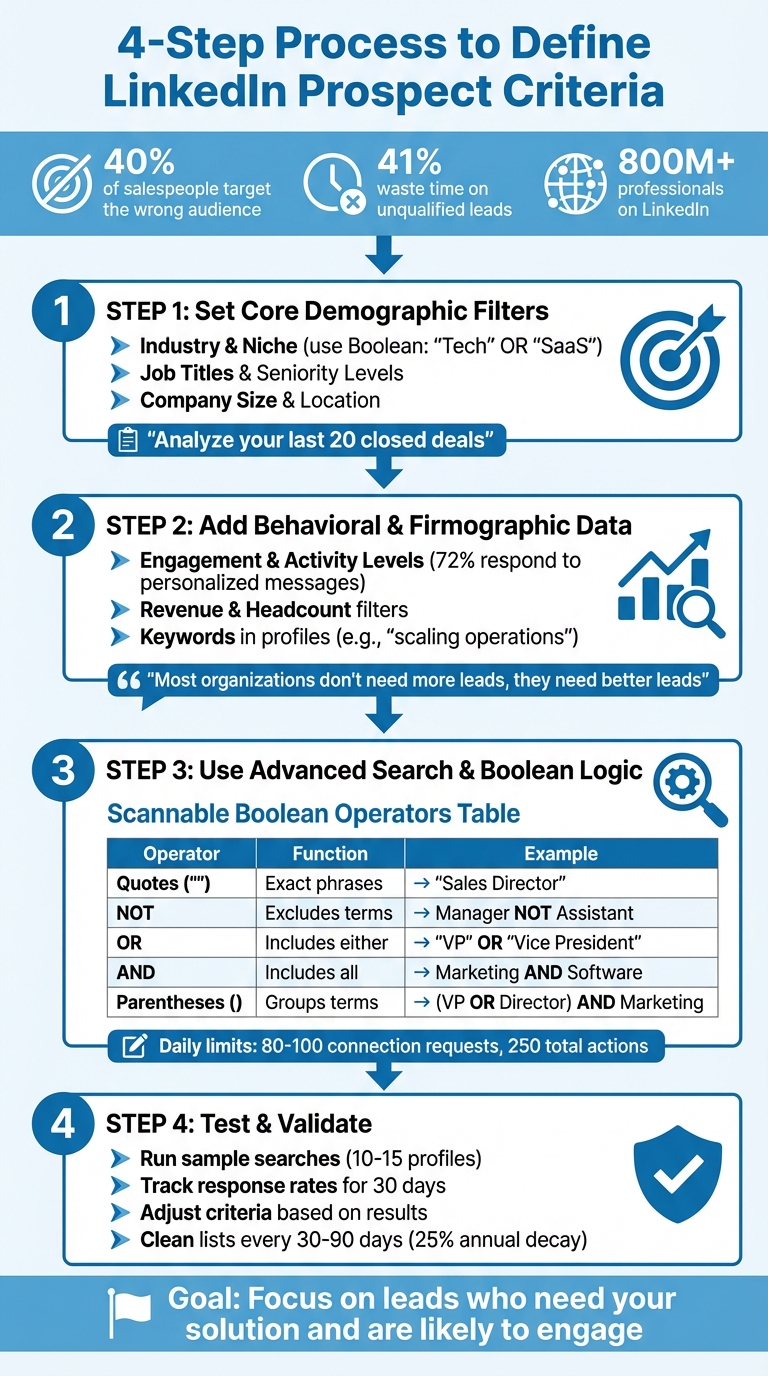
4-Step Process to Define LinkedIn Prospect Criteria
LINKEDIN PROSPECTING FOR BEGINNERS (Step-by-Step Tutorial!)
Step 1: Set Your Core Demographic Filters
Your Ideal Customer Profile (ICP) is your starting point. Without it, you're essentially flying blind. Begin by digging into your current customer base to pinpoint which sectors get the most out of what you offer. Think about it: What industries do our most successful customers belong to? From there, narrow your focus by considering industry, job roles, and company characteristics.
"Which types of contacts and accounts can most benefit from doing business with your company? If your marketing and sales teams already collaborated to define your ideal customer profile, use that as your guide."
- Alex Hisaka, B2B Content Marketing and Copywriting, LinkedIn
Choose Your Target Industry and Niche
After you've identified a thriving industry, refine your search further. Use Boolean operators like ("Tech" OR "SaaS") to zero in on specific technology niches.
LinkedIn's "People Also Viewed" feature can be a goldmine for uncovering related niches. You can also scan profiles for keywords in headlines or summaries, such as "growth mindset" or "culture-focused", to ensure their approach aligns with your target audience.
Select Job Titles and Seniority Levels
Take a look at your last 20 closed deals. Who signed on the dotted line? Knowing the job titles and seniority levels of those decision-makers can help you figure out whether to start with mid-level managers or aim straight for the C-suite.
"Engaging the right decision makers is one of the best ways to find quality prospects."
- Steve Kearns, AI & Marketing Leader, LinkedIn
Seniority often ties directly to company size. For instance, in a smaller business (20–50 employees), the President might be your go-to contact. In larger enterprises, you may need to target Directors or VPs. If you're aiming for a quicker sales cycle, mid-level managers are usually more responsive than higher-ups. Also, keep an eye out for trigger events like promotions or job changes - new roles often mean new opportunities for fresh solutions.
Once you’ve nailed down the right decision-makers, shift your attention to company size and location.
Filter by Company Size and Location
The size of a company can tell you a lot about its needs and how it operates. Small startups function differently than sprawling enterprises. Setting filters for company size ensures your team doesn’t waste time chasing leads that aren't a good fit.
Look for patterns among your top 10–20 customers - what’s their average headcount? Are they clustered in specific regions? Use those insights to fine-tune your LinkedIn filters so you're targeting businesses within your service area. Strike a balance: be specific enough to weed out poor matches but not so restrictive that you miss out on promising leads.
Finally, watch for indicators like company growth, downsizing, or new office locations. These changes can signal the perfect moment to reach out.
Step 2: Add Behavioral and Firmographic Data
Once you've set your demographic filters, it's time to refine your prospect list even further. By incorporating behavioral and firmographic data, you can zero in on leads who are not only a good fit but are also likely to engage with your outreach and have the resources to invest in your solution.
Check Engagement and Activity Levels
A prospect's recent activity on LinkedIn can tell you a lot about their accessibility and willingness to engage. Those who regularly post, comment, or share content are much more likely to respond to personalized outreach than those with inactive profiles. In fact, 72% of prospects are more inclined to reply to a customized message rather than a generic one.
Dive into their recent posts, comments, and shares to get a sense of their current priorities and challenges. Are they discussing industry trends, celebrating achievements, or addressing specific pain points? These insights can help you identify where they are in their buying journey and what issues they might be looking to solve. Additionally, participation in LinkedIn groups can offer a window into the challenges and interests of your target audience.
"LinkedIn is a highly effective platform to not just do prospecting research but to be able to start engaging with key decision makers who likely have a problem that your B2B solution can solve."
- Mario Martinez Jr., CEO, Vengreso
Filter by Revenue and Headcount
Revenue and employee count are key indicators of a prospect's budget and operational scale. For example, a startup with 15 employees will have very different needs and resources compared to a 5,000-person corporation. Tailoring your approach to these differences is crucial.
Leverage LinkedIn's filters to specify employee count ranges, such as 11–50 or 201–500, that align with your service capabilities. Pair these with estimated revenue ranges to ensure you're targeting businesses that can afford your solution.
"Most organizations don't need more leads, they need better leads."
- Ilia Markov, Digital Marketer
Look for Keywords in Profiles and Content
A prospect's priorities and challenges often shine through in the keywords they use in their LinkedIn profiles and posts. For instance, phrases like "scaling operations" or "driving digital transformation" suggest specific needs that your solution might address.
Use LinkedIn's keyword search feature to find prospects whose language aligns with your offering. Boolean operators can help refine your search; for example, you could try ("growth mindset" OR "innovation") NOT "legacy". Pay attention to profile summaries and headlines for terms that hint at values and working styles. As Alex Hisaka points out, words like "culture-focused" or "growth mindset" can reveal a lot about someone's approach to business and collaboration.
You can also explore related profiles to uncover similar keyword patterns, broadening your pool of potential leads.
These behavioral and firmographic filters lay the groundwork for the advanced LinkedIn search techniques covered in the next section.
sbb-itb-9354cf2
Step 3: Use LinkedIn's Advanced Search and Boolean Logic
Once you've sharpened your demographic criteria, it's time to tap into LinkedIn's advanced search tools and Boolean logic. These features allow you to pinpoint the exact prospects you need - without wasting time on irrelevant profiles.
Apply Advanced Search Filters
LinkedIn's advanced search goes beyond basic connections, unlocking access to 3rd-degree connections and beyond, which are often out of reach with standard search tools.
Start by focusing on the "Big Three" filters: job title, location, and industry. For job titles, always surround multi-word phrases like "Product Manager" or "Sales Director" with quotation marks to ensure LinkedIn searches for the full phrase, not individual words.
If you're using LinkedIn Premium or Sales Navigator, you can take advantage of even more granular filters, such as company size, years of experience, and seniority level. With LinkedIn boasting over 1 billion members, these filters are critical for narrowing your focus.
"The ability to do advanced searches and target very specific people is one of LinkedIn's biggest strengths."
- Ben Kniffen, LinkedIn Marketing Insights
Another powerful feature is the "Connections Of" filter. This tool lets you explore the networks of competitors, partners, or key contacts to identify similar prospects who are already part of your professional ecosystem. For even more precision, you can use field-specific operators like title:, company:, or school: directly in the search bar to target specific sections of profiles.
Once you've set up your filters, Boolean operators can take your search to the next level by refining your results with precision.
Use Boolean Operators
Boolean logic is like a cheat code for LinkedIn searches, helping you create highly specific queries that include the right prospects and exclude the wrong ones. LinkedIn processes these operators in a specific order: Quotes, Parentheses, NOT, AND, and OR.
Here's a breakdown of how Boolean operators work:
| Operator | Function | Example |
|---|---|---|
| Quotes ("") | Searches for exact phrases | "Sales Director" |
| NOT | Excludes certain terms | Manager NOT Assistant |
| OR | Includes at least one term | "VP" OR "Vice President" |
| AND | Includes all terms | Marketing AND Software |
| Parentheses () | Groups terms for complex searches | (VP OR Director) AND Marketing |
Always type Boolean operators in uppercase - AND, OR, NOT - to ensure LinkedIn recognizes them correctly.
The NOT operator can be especially useful for filtering out irrelevant profiles. For example, if you're targeting decision-makers, you might use:
director NOT (assistant OR intern OR student)
This string eliminates junior-level titles, keeping your list focused on those who have the authority and budget to make decisions.
"Boolean Search allows you to construct a customized search for your needs, like an advanced Google search."
- Amari Gonzalez, LinkedIn Sales Navigator
For the best results, combine Boolean logic with LinkedIn's built-in filters. You can insert a Boolean string in the "Title" or "Keyword" field, then layer additional filters like location, industry, and connection degree. Aim to refine your results to a manageable list of 1,000 to 2,500 prospects. Once you've perfected your search, save the browser URL so you can easily revisit those results later.
One last thing to keep in mind: LinkedIn enforces daily activity limits to prevent spam. Generally, you can send 80 to 100 connection requests and perform up to 250 total actions (including messages, requests, and comments) within a 24-hour period.
With these tools and techniques, you're ready to move on to testing your search criteria in the next step.
Step 4: Test and Validate Your Criteria
Once you've defined your demographic and behavioral criteria, the next step is testing. This ensures your list is laser-focused on the most promising leads. Skipping this step can be costly - about 40% of salespeople fail to target the right audience during prospecting. Testing your filters on a smaller sample before diving into a full-scale outreach campaign can save time and resources.
Run Sample Searches
Start by running sample searches to confirm your criteria. Look through the first few pages of results, focusing on 10–15 profiles. Check for keywords that align with your target persona and review career histories to ensure they match the backgrounds you're aiming for, whether that's startup experience, enterprise expertise, or evidence of steady career growth.
A quick way to validate your prospects is by checking if similar professionals appear in the "People Also Viewed" section of their profiles. This can confirm you're on the right track.
Track Engagement and Response Rates
After validating your sample, test your targeting through outreach. Use metrics to measure success: activity metrics like the number of emails or calls, and outcome metrics like response rates or meetings booked. This breakdown will help you pinpoint whether low performance is due to insufficient outreach volume or misaligned targeting.
Keep in mind, 41% of sales professionals waste time on unqualified leads. If your response rates are low after 30 days, it’s a sign to revisit and refine your ideal customer profile (ICP) and messaging. Also, remember that prospect lists decay over time - about 25% annually - so clean them every 30–90 days to stay effective.
Adjust Criteria Based on Results
Use the data from your initial outreach to fine-tune your approach. If high-potential leads aren't engaging, analyze their profiles for specific keywords or values that could help refine your search criteria and messaging. Implement lead scoring to prioritize prospects, giving higher scores to those who show stronger engagement and align better with your ICP.
For prospects with high engagement, leverage tools like the "People Also Viewed" section to identify similar leads who might also be a good fit. Additionally, keep an eye on trigger events such as job changes, promotions, or company announcements (e.g., mergers or funding rounds), as these can signal a higher likelihood of readiness to buy.
"The more you can qualify your leads ahead of time, the more targeted (and successful) your prospecting methods will be."
Testing isn’t a one-and-done process. Use the first 30 days of data as your baseline, then continuously refine your filters and messaging based on what you learn. Over time, this iterative approach will sharpen your targeting and improve your results.
Conclusion
Defining criteria for LinkedIn prospecting isn’t a one-and-done task - it’s a process that evolves. Start with the basics: demographic filters like industry, job titles, and company size. From there, layer in behavioral and firmographic filters to zero in on prospects who are both engaged and qualified. Use tools like Boolean logic and advanced search to fine-tune your targeting, and put your criteria to the test through sample searches and actual outreach campaigns. As we’ve discussed earlier, success in prospecting hinges on precision and the willingness to adapt.
Circumstances for prospects can shift overnight - new funding, leadership shakeups, or acquisitions can transform an unqualified lead into your dream customer. That’s why refining your targeting and aligning it with a responsive outreach strategy is crucial. Keep a close eye on the data, adjust your messaging and filters as needed, and take advantage of LinkedIn's "People Also Viewed" feature to discover similar prospects. Treat your prospect list like a living document - it needs consistent updates, not just an annual check-in.
For founders in B2B marketing who lean on content-driven strategies, a tailored approach can make all the difference. RevBoss takes this to the next level by creating systems that naturally attract qualified leads. Instead of relying on cold outreach alone, RevBoss focuses on building trust and authority through content before you even hit "connect." Their custom strategies for content creation, audience development, and lead activation help you pull in ideal prospects organically while complementing it with targeted outreach to fill your pipeline.
The key to LinkedIn prospecting is striking a balance between precise targeting and genuine relationship-building. Nail down your criteria, test and tweak as you go, and aim to serve your audience with value rather than just pitching to them.
FAQs
How do I create a strong Ideal Customer Profile (ICP) for LinkedIn prospecting?
To build a strong Ideal Customer Profile (ICP) for LinkedIn prospecting, start by digging into your top-performing customers. Identify trends in areas like their industry, company size, and the specific problems your product addresses. This hands-on data is the backbone of your ICP.
From there, outline two key sets of criteria: firmographic details - such as industry, number of employees, revenue range, and location - and role-based details, like job functions, seniority levels, or titles (think "Head of Growth" or similar). Use LinkedIn’s advanced search features to fine-tune your prospect list, ensuring it aligns with your target audience.
Once you have the framework, document your ICP in a straightforward format. Include company characteristics, ideal roles to target, common pain points, and buying signals. Test your profile with small-scale outreach efforts, track the results, and tweak as needed. A clear and focused ICP ensures you spend your time on the right leads, boosting efficiency and improving sales outcomes.
What are the best ways to use Boolean logic for LinkedIn searches?
Boolean logic can sharpen your LinkedIn searches, making it easier and quicker to find the right prospects. By using AND, OR, and NOT (always in uppercase), you can fine-tune your results. Here's how it works:
- AND narrows your search by requiring all terms to appear (e.g.,
CEO AND fintech). - OR broadens the search to include any of the listed terms (e.g.,
"head of sales" OR "business development"). - NOT excludes specific terms you don't want in your results (e.g.,
sales NOT assistant).
For even more precision, use quotation marks around multi-word phrases (e.g., "product manager") and parentheses to group terms and control the search order (e.g., ("head of marketing" OR "head of growth") AND SaaS NOT "assistant"). Start with a broad search and then refine it by adding AND or NOT to weed out irrelevant results. Also, keep your syntax tidy - LinkedIn automatically treats adjacent words as AND, so typing plumber carpenter is the same as plumber AND carpenter.
Experiment with your search terms, and once you find effective combinations, save them for future use. With a bit of practice, Boolean logic can become your go-to method for building precise LinkedIn prospect lists in no time.
How can I evaluate if my LinkedIn prospecting criteria are effective?
To see how well your LinkedIn prospecting efforts are working, keep an eye on a few critical metrics. Start with qualified leads, pipeline growth, and conversion rates - these will give you a clear picture of how effective your outreach is. On top of that, track engagement metrics like response rates and how many meetings you’re actually booking.
Make it a habit to review these numbers regularly. If something’s off, tweak your criteria to make sure they’re still in sync with your goals and delivering top-notch prospects.