How To Drive Event Attendance Through LinkedIn

LinkedIn is your secret weapon for boosting event attendance. Why? 80% of B2B leads from social media come from LinkedIn, and its precise targeting tools help you reach decision-makers directly. Here’s how to make it work for you:
- Create a killer event page: Use a clear description, high-quality visuals, and detailed info to hook attendees. Pro tip: 70% of users view events on mobile, so lead with the most important details.
- Leverage organic promotion: Post updates on personal profiles (better engagement than company pages), share in LinkedIn Groups (but don’t spam), and get your speakers/team to spread the word.
- Use LinkedIn Ads: Event Ads can cut registration costs by 40% and boost click-through rates by 131%. Combine these with Thought Leader Ads or Sponsored Messaging for maximum impact.
- Go Live and interact: LinkedIn Live generates 7x more reactions and 24x more comments than standard videos. Host pre-event sessions, create polls, and use PDF carousels to keep your audience engaged.
Start early (2–4 weeks before your event), mix free and paid strategies, and keep the momentum going post-event with follow-ups and content. LinkedIn isn’t just a platform - it’s your event’s best friend.
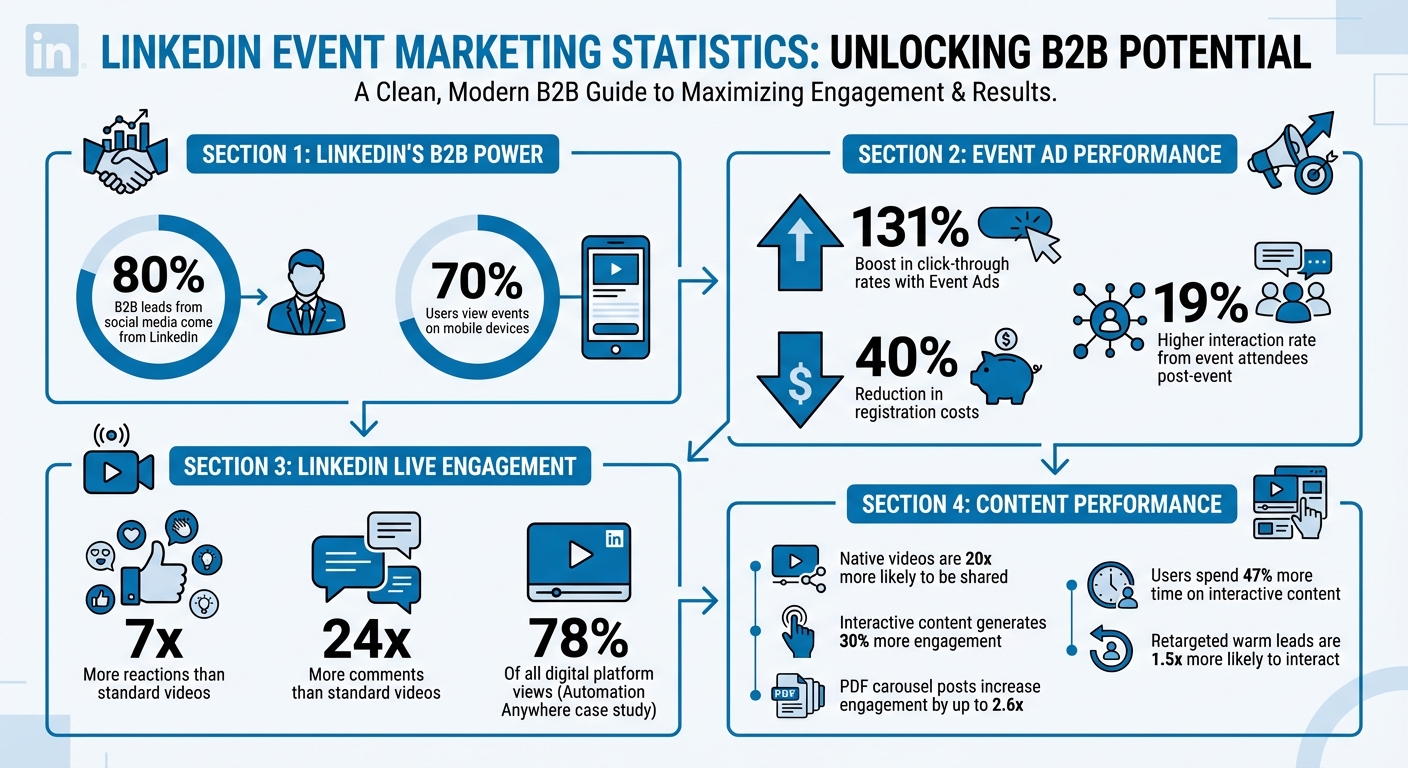
LinkedIn Event Marketing Statistics: Key Performance Metrics
LinkedIn Event Ads : LinkedIn Event Marketing Creating & Advertising an Event on LinkedIn
How to Set Up Your LinkedIn Event Page
Your LinkedIn event page sets the tone for your event - it’s the first thing potential attendees will see. To make a strong impression, focus on three essentials: a clear and engaging description, eye-catching visuals, and detailed event information that leaves no questions unanswered.
Aim to create your event page 2–4 weeks before the event. This gives you time to build interest through organic reach and promotional efforts. Since LinkedIn doesn’t allow draft saving, prepare all your content in advance to ensure a smooth publishing process.
One key reminder: once you publish, you can’t edit the organizer, event format, or event type. Double-check these settings before going live to avoid any hiccups.
Here’s how to create an event page that grabs attention and drives registrations.
Write an Event Description That Converts
Make it crystal clear why people should attend. Start with the specific topic and what attendees will gain. Follow this with a detailed agenda, including timeframes and highlights like featured speakers. Avoid vague phrases like “Learn ABM strategies.” Instead, be specific: outline the exact playbook or framework attendees will walk away with.
Boost credibility by including direct links to speakers’ LinkedIn profiles. This allows attendees to verify their expertise instantly. Also, define your audience clearly. Saying “marketing directors at B2B SaaS companies” is far more compelling than a generic “marketing professionals.”
Keep in mind that 70% of LinkedIn users view events on mobile devices. Lead with the most important information to ensure your value proposition is seen without requiring a scroll. Use relevant keywords in your event name to improve its visibility in LinkedIn’s feed.
Add High-Quality Images and Videos
Your visuals are the first thing people notice. Use a 16:9 aspect ratio with a minimum width of 480 pixels (1280x720 is ideal). This image will appear as the banner on your event page and in LinkedIn’s automated posts promoting your event.
Videos can take your event page to the next level. LinkedIn Live videos generate 7x more reactions and 24x more comments compared to standard videos from the same creators. If you’re hosting a live event, consider dropping a short teaser video three days before to encourage last-minute sign-ups.
"Professional audiences generally don't need fancy, big-budget livestreams. More often, they want interesting, authentic and timely content that provides value and helps them network."
Don’t forget to add alt text to your images in the "Add alt text" field. This ensures your event page is accessible to users relying on screen readers.
Fill Out the Event Details Section
Provide all the details attendees need to feel prepared. Include a minute-by-minute agenda so they know exactly what to expect. Add speaker bios that highlight their credentials and explain why they’re the right fit for the topic. If you’re using LinkedIn’s native registration form, attach your company’s privacy policy for transparency.
LinkedIn will automatically send reminder notifications to registrants one week, three days, and 15 minutes before the event begins.
If your speakers are 1st-degree connections, link their profiles to the event. This can tap into their networks and extend your event’s reach. As a page admin, you can send up to 1,000 event invitations per week, so start by targeting your most relevant connections first.
Free Ways to Promote Your Event on LinkedIn
Once your event page is live, it’s time to focus on spreading the word without spending a dime. LinkedIn’s organic tools can be incredibly effective for driving registrations when you tap into your own network and the connections of your speakers and team members.
Post Updates on Personal and Company Pages
When it comes to LinkedIn, personal profiles tend to generate better engagement than company pages. Why? People prefer connecting with other people rather than faceless brands. So, sharing updates from your personal profile can make your event feel more relatable and engaging.
Videos are your secret weapon here. Native videos - those uploaded directly to LinkedIn - are a powerhouse for engagement. They’re 20 times more likely to be shared and grab attention with auto-play. Keep them short, ideally between 1 to 5 minutes, and don’t forget captions for those scrolling with the sound off.
"I know that if I can get a good 30 to 90 second clip from that webinar, I'm going to probably get more eyeballs on it via social than I did in the initial event."
Get creative with your content. Share sneak peeks by repurposing highlights from past events or recording quick introductions from your speakers. Attach PDFs or slides to your posts to showcase the agenda or speaker bios - this feature is exclusive to personal profiles. For quick updates, LinkedIn Stories are perfect for countdowns or behind-the-scenes moments. If you want to go deeper, write a long-form LinkedIn article about your event topic. It’s a great way to establish credibility and give potential attendees a preview of what they’ll gain.
Share Your Event in LinkedIn Groups
LinkedIn Groups are goldmines for finding niche audiences that align with your event. But tread carefully - these aren’t places to plaster ads.
"You wouldn't walk into a room full of strangers and just start shouting a commercial for your event, so don't do the online equivalent by joining a group just to drop links."
Approach groups like you would a networking event. Start by offering value: share insights, ask questions, or give tips that tie into your event’s theme. Once you’ve built some trust, mention your event in a way that feels natural and helpful. Stick to the 4-1-1 Rule: for every self-promotional post, share four updates from other sources and one piece of third-party content.
Before you post, check the group’s rules - many prohibit outright promotion. A smarter move? Reach out to group admins and ask them to share your event. Admin posts tend to get more visibility. Customize your message for each group, using language and examples that resonate with their members. After the event, follow up within a week by sharing key takeaways or recordings. This keeps the conversation going and builds interest for future events .
Get Speakers and Team Members to Promote
Your team and speakers are your biggest allies in expanding your event’s reach. When they share the event from their personal profiles, it adds a human element that encourages sign-ups .
Make it effortless for them. Provide a short script (20–30 seconds) for video promos where they introduce themselves and tease their session. These personal videos are natural attention-grabbers in the LinkedIn feed. Speakers can also use the event’s Networking Tab to engage with attendees in the days leading up to the event.
Encourage your team to send personalized messages to their connections. For extra visibility, form an engagement pod: within the first 20 minutes of posting, have team members like and comment on each other’s updates. This boosts the post’s visibility in LinkedIn’s algorithm.
Another option? Use Thought Leader Ads to sponsor posts from your executives or speakers. These feel more authentic than traditional ads and can amplify your message .
"Nearly 80% of B2B leads come from LinkedIn, making it an ideal platform for marketing teams worldwide."
Don’t forget that both organizers and attendees can send up to 1,000 event invitations per week . That’s a lot of potential reach - use it wisely!
sbb-itb-9354cf2
How to Use LinkedIn Ads for Event Promotion
While organic promotion is a great starting point, LinkedIn's paid advertising tools can take your event outreach to a whole new level. With its precise targeting options tailored for B2B marketers, you can zero in on the decision-makers most likely to attend your event.
Choose the Right LinkedIn Ad Format
Once you've tapped into organic methods, paid ads can extend your reach even further. Event Ads are a game-changer. These dynamic Sponsored Content ads automatically adjust based on your event timeline: showcasing a static image beforehand, a livestream during the event, and a replay afterward. Event Ads have been shown to boost click-through rates (CTR) by up to 131% while slashing registration costs by 40%.
"LinkedIn Event Ads are a proven format for engagement, driving 7x more reactions and 24x more comments than standard video."
Other formats include Thought Leader Ads, which let you promote posts from your executives or speakers instead of just your company page. This approach adds a personal touch that builds trust. Sponsored Messaging - through Message Ads and Conversation Ads - delivers direct invitations straight to LinkedIn inboxes. Message Ads focus on one clear call-to-action, while Conversation Ads create interactive experiences with multiple content paths. For sharing event details like agendas or speaker bios, Document Ads allow users to view content without leaving LinkedIn.
To get the most out of your campaign, create separate ad sets targeting audiences at different stages: "Before", "During", and "After" the event.
Target Your Ideal Attendees
LinkedIn's targeting tools are designed to help you reach the right audience by focusing on professional attributes like job title, industry, seniority, company size, job function, language, and location.
Start by defining your ideal attendee. For example, if you're hosting an AI webinar, you might target Chief Technology Officers and IT Directors at companies with 500+ employees in the tech or financial services sectors.
Take it a step further with retargeting. Use custom audiences from previous registrants, ad engagers, or video viewers to re-engage warm leads - who are 1.5 times more likely to interact with your ads than cold prospects. LinkedIn registration forms also make it easy to collect attendee data, like names, contact details, and job titles, and sync it directly with your CRM.
A great example of this strategy in action is Salesforce's 2025 Dreamforce campaign. By using Event Ads and Thought Leader Ads to target business decision-makers interested in AI, Salesforce achieved impressive results: a 30% reduction in cost per 5+ minute viewer, a 24% increase in connection requests, and a 52% jump in InMail acceptance rates.
Once you've pinpointed your audience, fine-tune your budget to maximize results.
Set Your Budget and Track Performance
After narrowing down your target audience, managing your budget and monitoring performance becomes essential. LinkedIn offers two budget delivery options:
- Standard Delivery, which spreads your budget evenly across the campaign's duration.
- Accelerated Delivery, which spends your budget as quickly as possible, making it ideal for live events where timing is critical.
Start running your ads 2–4 weeks before your event. Shorter timelines work for simple virtual events, while larger campaigns may need more lead time. Event Ads can be used for various objectives, including Brand Awareness, Website Visits, and Engagement.
LinkedIn's Campaign Manager provides real-time insights on metrics like spend, impressions, views, and clicks. It also tracks key professional attributes - like job titles and industries - of those who register, ensuring your campaign is hitting the right audience. After your event, you can retarget registrants who didn't attend or those who watched the replay, guiding them further along your sales funnel. Plus, event attendees tend to remain engaged, with a 19% higher interaction rate even after the event concludes.
Use LinkedIn Live and Interactive Content
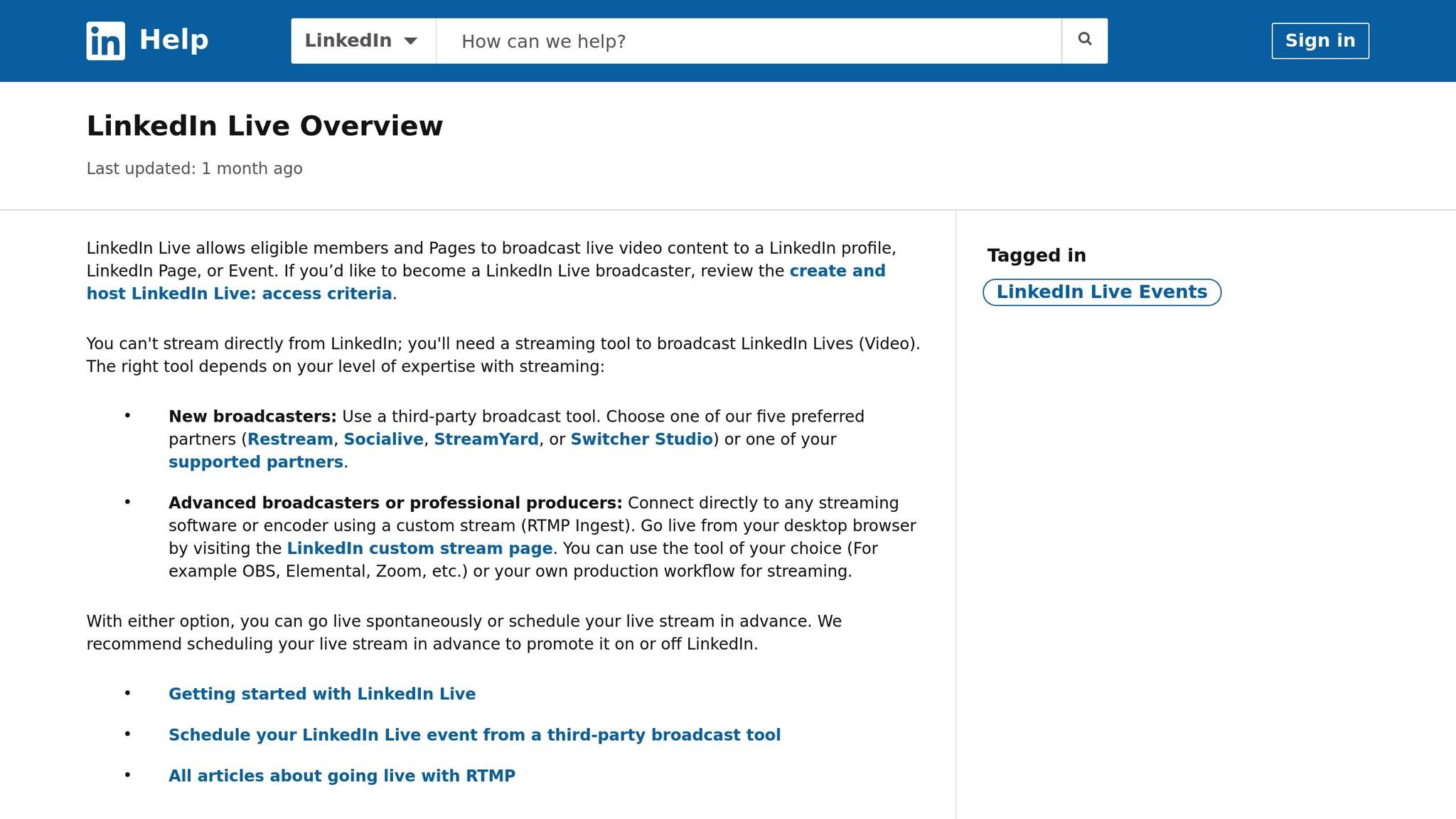
If you're looking to generate excitement for your event beyond traditional paid ads, LinkedIn Live and interactive content are two fantastic tools to explore. These formats let you connect with potential attendees in real time, creating a more personal and engaging experience.
Host Pre-Event LinkedIn Live Sessions
Here's a stat that might surprise you: live video on LinkedIn gets seven times more reactions and 24 times more comments than standard native videos. So why not leverage this for your event? Hosting pre-event LinkedIn Live sessions is a smart way to introduce your speakers, preview key topics, or even hold a live Q&A where attendees can ask questions directly. The beauty of going live on LinkedIn is that it automatically notifies registered attendees and a segment of your followers who are most likely to engage, giving your stream an instant boost.
Take a page from Automation Anywhere’s playbook. During the launch of their Enterprise A2019 platform in April 2025, they used LinkedIn Live as the centerpiece of their global engagement strategy. They paired the live broadcast with paid ads ahead of time to build anticipation. The results? Within minutes of going live, they received 400 positive comments, and by the end of their hour-long presentation, the comment count hit 1,000. LinkedIn Live accounted for a whopping 78% of all views for the product launch across digital platforms.
"When the broadcast started, within just a few minutes, we had about 400 positive comments. Then by the end of the hour-long presentation we had one thousand comments."
– Julian Foster, Global Head of Paid Social Media, Automation Anywhere
To keep your audience engaged, aim for sessions that last between 15 minutes and 2 hours. Since 70% of viewers tune in via mobile devices, make sure your visuals and text are easy to read on smaller screens. After the live session, download the recording and create short clips to share as highlights. These snippets can keep the momentum going and encourage last-minute registrations in the days leading up to your event.
Create Polls and Interactive Posts
Want to spark conversations and learn more about your audience? Polls and interactive posts are simple yet highly effective tools. Interactive content tends to generate about 30% more engagement than static posts, and users spend up to 47% more time engaging with it.
Polls are a great way to gauge your audience's interests. For example, you could ask attendees about their biggest challenges or what topics they'd like covered at your event. Including an option like "other (comment below)" can prompt even more discussion. Posting these polls a few days before your event keeps it fresh in people's minds.
Another format that performs well is the PDF carousel post. These posts can increase engagement and impressions by up to 2.6 times. To make them effective, focus on grabbing attention within the first 200 characters - before the "See more..." cutoff. Avoid placing registration links directly in the post body, as this can hurt visibility. Instead, drop the link in the first comment and pin it. Don’t forget to tag speakers and partners using @mentions to extend your post’s reach. And be sure to respond quickly to comments - this can turn your comment section into a lively discussion hub.
Conclusion
Blending organic efforts with paid strategies creates a well-rounded approach to boost your event’s success on LinkedIn. The process is straightforward: combine free tactics with targeted promotions to engage professionals at every stage of your event - before, during, and after it goes live. Start by crafting an optimized event page at least 2–4 weeks in advance. Use a keyword-rich title, a 16:9 cover image, and a detailed agenda to turn visitors into attendees.
From there, tap into LinkedIn’s free promotional tools. Share updates on your personal and company pages, post in relevant LinkedIn Groups, and encourage your speakers and team members to spread the word within their networks. These grassroots efforts help build awareness, while paid ads take your reach to the next level. When you're ready to expand your audience, LinkedIn Event Ads can significantly boost your visibility and attendance.
Don’t forget to incorporate LinkedIn Live and interactive content into your strategy. Live sessions are a game-changer - they generate seven times more reactions and 24 times more comments than standard videos, making them ideal for creating buzz before your event. Polls and interactive posts are also excellent tools to keep your audience engaged and interested as the event approaches.
FAQs
How do I make my LinkedIn event page user-friendly for mobile devices?
To make sure your LinkedIn event page shines on mobile devices, focus on features that are easy to navigate and visually appealing on smaller screens:
- Choose the right cover image: Opt for an image with a 16:9 aspect ratio and at least 480 pixels wide. This helps avoid awkward cropping or blurry visuals.
- Keep the event title short and snappy: Stick to 60 characters or fewer, using clear and relevant keywords. This ensures it’s easy to read in mobile feeds.
- Write a punchy description: Pack the essentials - topic, speakers, date, and time - into the first couple of sentences. Mobile users tend to skim, so grab their attention fast.
- Enable LinkedIn’s one-tap registration: Let attendees sign up effortlessly with LinkedIn’s built-in form, which is perfect for mobile convenience.
- Test it on your phone: Before hitting publish, check the page layout, text, and buttons on a smartphone to make sure everything looks and works as intended.
These tweaks ensure your LinkedIn event page is polished and user-friendly, helping you connect with attendees wherever they are.
What are the best free ways to promote an event on LinkedIn?
To spread the word about an event on LinkedIn without breaking the bank, make the most of the platform’s free tools and your current network. Start by setting up an inviting event page. Use a sharp 16:9 cover image, craft a clear and catchy title, and write a detailed description that outlines the event’s purpose, highlights key speakers, and shares the agenda. Launch the event page a good 2–4 weeks ahead of time to give yourself plenty of room to build buzz.
Once your event page is live, promote it with organic posts. Share it on your company’s LinkedIn page, pin it to the top for visibility, and ask employees, speakers, and partners to share it with their own personalized messages. Add relevant industry hashtags to your posts to broaden their reach, and tag collaborators to tap into their networks. Keep the energy alive with countdown posts, teasing exciting details like speaker spotlights or agenda sneak peeks.
Don’t stop there - join LinkedIn groups and use direct outreach to connect with your audience. Share your event in active LinkedIn groups where your target audience hangs out, but make sure to follow the group’s posting rules. For key prospects, send tailored connection requests and follow up with a short, thoughtful invitation to the event. Mention how it ties into their interests or role to make it more personal. Plus, every registration boosts your visibility since the event will show up in attendees’ activity feeds, helping you reach even more people - all without spending a cent.
How can using LinkedIn Live help boost engagement for my event?
LinkedIn Live is a game-changer when it comes to boosting event engagement, letting you share real-time video content directly with your audience. The numbers speak for themselves: live videos on LinkedIn generate 7× more reactions and 24× more comments than regular posts. Plus, when you promote your live sessions in advance, you can see a noticeable uptick in post-event engagement, making it an excellent way to stay connected with your audience even after the event wraps up.
Want to make the most of LinkedIn Live? Use it to share behind-the-scenes moments, run Q&A sessions, or broadcast the highlights of your event. These interactive elements not only keep your audience engaged but also invite them to actively participate, creating a more dynamic and memorable experience.