Event-Driven Activation Campaigns: How to Use LinkedIn to Fill Webinars, Workshops, and Booth Meetings

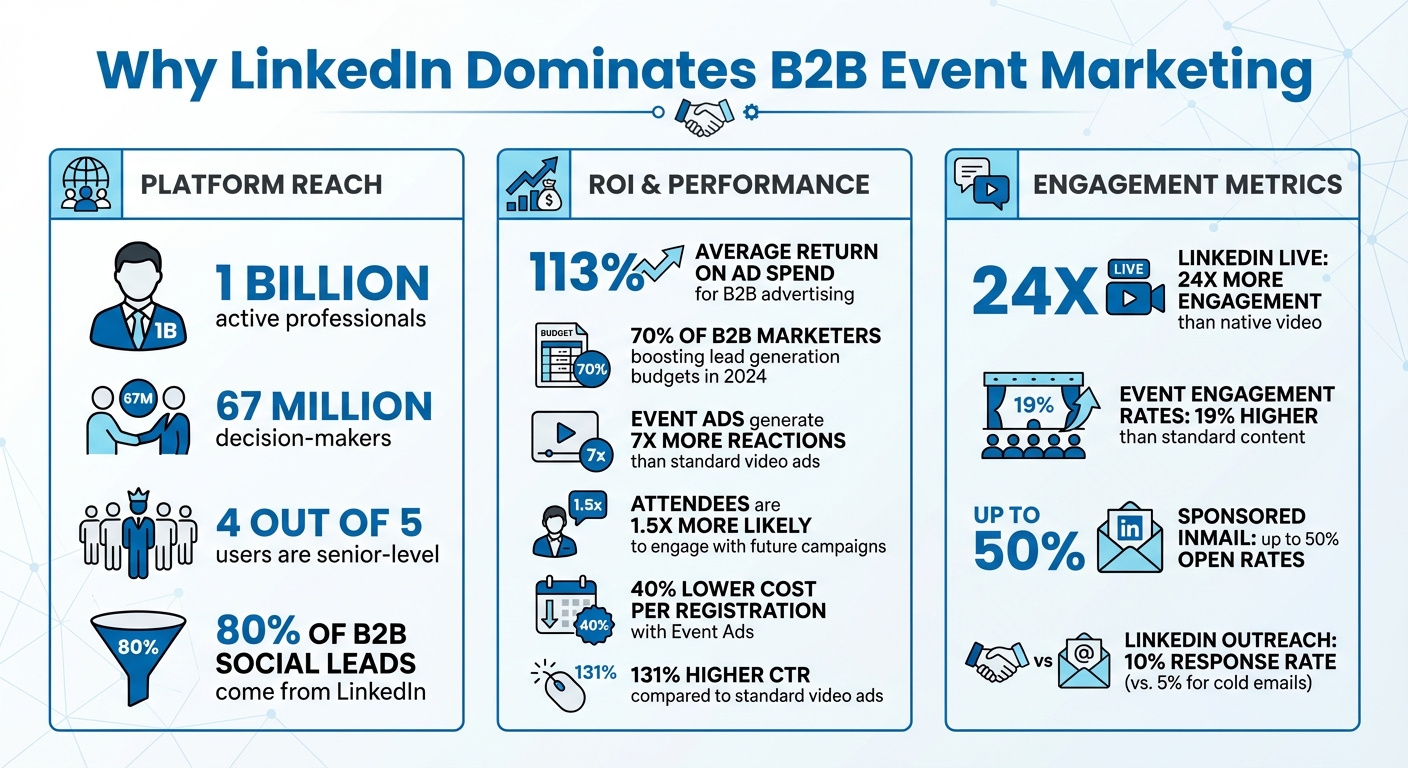
Getting people to show up for your B2B events is tough. LinkedIn makes it easier by connecting you with professionals already in work mode. Here's the deal: LinkedIn has 67 million decision-makers, 4 out of 5 users are senior-level, and 80% of B2B social leads come from the platform. Plus, tools like Event Ads and Lead Gen Forms can simplify registrations and boost attendance.
Key Takeaways:
- Target the right audience: Use LinkedIn’s job title, industry, and seniority filters to zero in on decision-makers.
- Promote smarter: Event Ads and Sponsored InMail drive registrations while Lead Gen Forms reduce friction.
- Engage throughout: Build awareness early, interact live, and follow up with replays.
- Track performance: Use LinkedIn analytics to measure ROI and improve campaigns.
LinkedIn isn’t just for networking - it’s a powerhouse for filling webinars, workshops, and trade show meetings. Let’s break down how to make it work for you.
LinkedIn Event Marketing Statistics and ROI for B2B Campaigns
LinkedIn Event Ads : LinkedIn Event Marketing Creating & Advertising an Event on LinkedIn
sbb-itb-9354cf2
Why LinkedIn Works for B2B Event Marketing
LinkedIn has become a go-to platform for B2B event marketing, and it’s easy to see why. With over 1 billion active professionals, it’s a space where people are already focused on work, industry challenges, and finding solutions. This mindset makes it ideal for filling webinars, workshops, and trade show meetings.
The stats don’t lie. LinkedIn delivers an average 113% return on ad spend for B2B advertising, and nearly 70% of B2B marketers are boosting their lead generation budgets in 2024. When it comes to events, the platform shines even brighter: Event Ads generate 7x more reactions than standard video ads, and attendees are 1.5x more likely to engage with your future campaigns.
Audience Targeting on LinkedIn
One of LinkedIn’s biggest strengths is its ability to target with pinpoint accuracy. You can zero in on audiences using verified data like job title, company size, industry, and seniority. For example, if you’re hosting a workshop specifically for CFOs in manufacturing companies with over 500 employees, LinkedIn lets you target that exact group.
But it doesn’t stop there. LinkedIn also supports account-based marketing, letting you build campaigns tailored to specific companies. You can retarget users who watched a significant portion of your last webinar, or exclude past attendees to focus on fresh prospects. For trade shows, this means you can directly reach decision-makers who have the authority to close deals.
"Targeting is what LinkedIn does best. We have the strongest set of data to get the right people to your event."
LinkedIn also allows for lifecycle targeting, meaning you can adjust your strategy as your event progresses. Before the event, focus on registrations. During the event, prioritize real-time engagement. After it’s over, follow up with replays and nurture those who registered but didn’t attend.
LinkedIn Tools for Event Promotion
LinkedIn combines its targeting power with a range of tools designed to convert interest into registrations.
Event Ads are a standout feature. They adapt throughout your event’s lifecycle - starting with static registration ads, transitioning to live streams during the event, and finally promoting replays. This dynamic approach has helped marketers achieve a 40% lower cost per registration.
Lead Gen Forms simplify registration by auto-filling user details, reducing friction - especially on mobile, where manual entry can tank conversions. Plus, the collected data syncs directly with your CRM, allowing sales teams to act quickly.
Thought Leader Ads take a different angle by promoting posts from your executives or event speakers instead of your company page. A personal invite from a CEO or industry leader carries more weight than a typical branded ad. Salesforce used this strategy for their 2024 Dreamforce event, blending Event Ads with Thought Leader Ads to target AI-focused decision-makers. The results? A 30% drop in cost per 5+ minute viewer, a 24% increase in connection requests, and a 52% boost in InMail acceptance rates.
For live events, LinkedIn Live offers real-time broadcasting directly in the feed, with notifications to followers. Automation Anywhere used this feature for a product launch, pairing paid ads with organic content. They not only generated thousands of leads but also grew their follower base by repurposing the live video for retargeting campaigns.
| Tool | Primary Use | Key Advantage |
|---|---|---|
| Event Ads | Promoting webinars and workshops | 131% higher CTR than regular video ads |
| Lead Gen Forms | Capturing registrations | Auto-filled details boost conversions |
| Thought Leader Ads | Building speaker credibility | Increases trust and registration rates |
| LinkedIn Live | Real-time broadcasting | 24x more engagement than native video |
| Dynamic Ads | Personalized invitations | Tailors content using profile data |
Another effective tool is Sponsored InMail (now Message Ads), which delivers event invites directly to users’ inboxes. These messages only appear when the recipient is active on LinkedIn, resulting in open rates as high as 50%.
"When our email invites weren't driving enough registration, Sponsored InMail saved the day."
How to Run Event Campaigns on LinkedIn
LinkedIn's precise targeting capabilities make it a powerful platform for running event campaigns. Here's how to set up and refine your approach.
Creating LinkedIn Events for Webinars and Workshops
Start by using your company page (admin access required) to create events. LinkedIn offers three formats: LinkedIn Live (streamed through third-party tools), LinkedIn Audio Events (audio-only and native to LinkedIn), or External Event Links (for webinars hosted on platforms like Zoom or GoToWebinar).
One key decision is whether to make your event gated or ungated. Gated events use LinkedIn's registration form to collect attendee details - like name, email, job title, and company - which can integrate directly into your CRM. This approach is ideal for bottom-funnel events like product demos. Ungated events, on the other hand, allow for a simple one-click RSVP, making them better suited for top-funnel content aimed at reaching a larger audience.
Set up your event page 2–4 weeks in advance. Use a 16:9 cover image (minimum 480px wide) and invite speakers early to build credibility. Keep the event feed active by posting polls and questions leading up to the event, and notify attendees up to twice weekly to maintain engagement.
During the webinar, engage with attendees by moderating comments and sharing key takeaways directly to the event feed. After the event, promote the video replay to registrants who didn’t attend. LinkedIn Event engagement rates are 19% higher than standard content, and attendees are 1.5x more likely to interact with future campaigns. These metrics highlight how a well-planned event can boost both attendance and overall campaign success.
Next, use LinkedIn Ads to drive registrations effectively.
Running LinkedIn Ads for Event Registrations
LinkedIn Event Ads adapt based on the event's status. Before the event, they use a static image; during the event, they showcase the livestream; and after it ends, they promote the video replay. This dynamic format achieves a 131% higher click-through rate compared to standard video ads and can reduce your cost per registration by 40%.
Choose a campaign objective based on your goals: "Brand Awareness" or "Website Visits" for driving registrations, or "Engagement" to boost live viewership. Note that dynamic updates work only for events hosted natively on LinkedIn - external events will display static ads throughout.
Pair Event Ads with Sponsored InMail (now called Message Ads) to send direct invitations to users' inboxes. Keep messages concise - under 100 words - with a clear call-to-action linking to the registration page.
For targeting, refine your audience using filters like job titles, company size, and industry. Build retargeting audiences from users who engaged with your previous webinar or event ads, and exclude past attendees to focus on new prospects. This targeted strategy ensures efficient ad spend and higher-quality leads.
For trade show events, shift focus to personalized outreach to schedule one-on-one meetings.
Using Personalized Outreach to Book Booth Meetings
At trade shows, securing one-on-one meetings is key. First, optimize your LinkedIn profile to showcase how you help clients - prospects often review profiles before responding.
Use Sales Navigator’s 40+ filters to create highly specific prospect lists. Look for individuals who recently changed jobs or posted content, as these activities indicate higher engagement potential. You can even use participant lists from LinkedIn events in your industry and reach out to those who RSVP’d "Attend" for competitor events.
Before sending a connection request, engage with a prospect’s content - like, comment, or view their profile - 1–2 days in advance to establish familiarity. When you send the request, include a personalized note referencing something specific, like a recent post or job change. This approach increases acceptance rates by 58%.
"Contextual short messages always receive the best responses. A reference to a specific recent post or achievement by a prospect always works. It makes the rep seem like a human being rather than a cold-calling bot."
– Andrew Franks, Co-Founder, Reclaim247
Once connected, use a three-step messaging sequence: acknowledge a recent accomplishment, share a relevant insight, and then make a soft meeting request. Keep messages under 300 characters, as shorter messages receive 19% more responses.
If you run into LinkedIn’s weekly connection limit (80–100 invites), use Open InMails available with Premium or Sales Navigator. These allow you to message users outside your network without using connection requests. Premium accounts can send approximately 800 free Open InMails per month to "Open" profiles.
Space follow-ups 2–5 business days apart. If a prospect doesn’t respond after three attempts, move on. LinkedIn outreach has an average 10% response rate, which is double the 5% typical of cold emails. This makes personalized outreach a strong strategy for securing meetings with decision-makers.
How RevBoss Helps with Event Marketing
RevBoss Event Marketing Services
RevBoss handles every stage of LinkedIn event campaigns, from attracting initial RSVPs to ensuring registrants show up and following up with both attendees and those who missed out. Their approach aims to make the most of every potential lead.
Their Content + Coaching + Activation plan, priced at $4,000 per month, combines LinkedIn content creation with tailored outreach campaigns designed around your event's specific needs. You provide targeting details like job titles, locations, industries, or specific companies, and RevBoss creates campaigns to connect with those exact prospects. For trade shows and conferences, they run pre-event campaigns to engage prospects and schedule sales meetings before you even step foot at the event. Sharing your complete marketing events calendar with your account manager ensures that LinkedIn outreach aligns seamlessly with your overall field marketing strategy.
This comprehensive service is further enhanced by personalized outreach efforts and expert sales coaching to amplify your event’s success.
Personalized Outreach and Sales Coaching
RevBoss doesn’t just automate campaigns - they actively help your team turn interest into actionable appointments. Instead of simply promoting your event and waiting for registrations to roll in, they execute direct outreach efforts through email and LinkedIn DMs, sparking meaningful conversations that can fill your sales pipeline. Their method includes precise audience targeting, customized outreach strategies, and crafting offers that resonate with decision-makers.
To keep things running smoothly, RevBoss offers weekly strategy calls that cover go-to-market planning, campaign optimization, and deal reviews. These sessions, along with ongoing updates to campaign materials, ensure your efforts stay sharp and effective. All activity is tracked on the RevBoss Platform, giving you a clear view of performance and progress in one place.
Tracking and Improving Event Campaign Performance
Using LinkedIn Analytics to Track Event Metrics
LinkedIn offers two key dashboards for tracking event campaigns. The Campaign Manager focuses on paid ad performance, providing metrics like impressions, clicks, cost per registration, and overall spending. Meanwhile, the Event Analytics tab highlights organic engagement, such as total visitors, peak live viewers, and attendee demographics [29, 30].
Before your event, keep an eye on registration rates and adjust your targeting strategies as needed. During live sessions, tracking peak concurrent viewers helps measure real-time audience interest. Post-event, dive into video completion rates at 25%, 50%, and 75% to identify where viewers drop off. Additionally, analyzing the top job functions of attendees can confirm whether you're reaching the right audience [29, 30].
"Unlock efficiency with LinkedIn Event Ads, which will dynamically change during each event stage and have been shown to reduce cost per registration by up to 40%."
- Lucy Sonter, Global Product Adoption, LinkedIn Marketing
As of April 2025, LinkedIn extended its attribution windows to 30 days for both clicks and views, giving you more time to assess campaign impact. While metrics like spend and impressions update in real time, registration data in Campaign Manager may experience slight delays.
Organic vs. Paid Campaign Results
Understanding the differences between organic and paid results is key to evaluating your event campaign's overall performance. Organic metrics, available through your event page analytics, measure engagement like visits, reactions, comments, and shares. In contrast, paid metrics from Campaign Manager focus on how much you're spending to drive specific actions, such as registrations [29, 30].
| Metric Category | Organic Event Analytics | Paid Event Ad Metrics |
|---|---|---|
| Primary Focus | Attendee engagement and demographics | Spend, ROI, and conversion attribution |
| Key Metrics | Unique visits, peak live viewers, engagement metrics, and watch time | Impressions, clicks, cost per registration, event stage breakdown |
| Audience Data | Top job functions of all visitors/attendees | Professional attributes of registrants reached via ads |
| Attribution | General attendance and engagement | 30-day click and 30-day view attribution |
One limitation is that LinkedIn does not differentiate between organic and paid registrations in your lead list since all registrations funnel through the same form. To address this, consider adding UTM parameters to external links or running A/B tests with varied creative assets. These approaches can help you identify which strategy delivers better results, providing a foundation for fine-tuning your campaigns and making smarter budget decisions [31, 34].
Conclusion
LinkedIn consistently delivers an average return of 113% on ad spend in B2B advertising, making it a go-to platform for filling webinars, workshops, and booth meetings. But the key isn’t just using LinkedIn - it’s how you use it. Instead of treating it as just another promotional tool, integrate it into every stage of your event lifecycle: build awareness before the event, engage actively during it, and follow up effectively afterward.
Today’s buyers value credibility over flashy promotion. They want expertise and genuine conversations, not just announcements. So, focus on sharing meaningful, insight-driven content that qualifies prospects early. For live engagement, LinkedIn Live videos are a game changer, generating 7x more reactions and 24x more comments than standard video posts. And don’t stop when the event ends - keeping the conversation going afterward can help push deals forward. Start promoting your event 2–4 weeks in advance, and keep an eye on engagement metrics to identify potential leads.
The most effective campaigns combine several key elements: precise targeting using job titles and company data, Event Ads tailored to your event’s timeline, Lead Gen Forms to simplify registrations, and personalized outreach to secure high-value meetings. Together, these tactics turn LinkedIn connections into real, qualified prospects.
For those looking to execute these strategies without the hassle, RevBoss offers a hands-on approach. Their services include everything from expert content creation and audience building to full-scale activation campaigns. Whether you’re looking for LinkedIn content and audience growth at $1,500 per month or a complete package with lead generation for $4,000 per month, RevBoss takes care of the heavy lifting. They handle strategy calls, post creation, outreach programs, and event support campaigns, freeing you up to focus on delivering value to your attendees.
With these LinkedIn strategies in your toolkit, you’ll be set to make your next event a success.
FAQs
How much LinkedIn ad budget do I need to fill an event?
When planning a LinkedIn ad budget for filling an event, several factors come into play, including your target audience, the type of ad you use, and your campaign goals. Many campaigns begin with just a few hundred dollars. For instance, one campaign achieved success by spending approximately $875, resulting in leads at an average cost of $3.14 each. Tailor your budget to align with your specific goals and the size of your audience.
When should I start promoting my webinar or workshop on LinkedIn?
Start spreading the word about your webinar or workshop on LinkedIn 3 to 4 weeks in advance. This gives you enough time to create buzz, spark interest, and encourage people to sign up. Leverage LinkedIn’s promotional tools like Sponsored Content, Sponsored Messaging, and Event Ads to ensure your event gets noticed. Starting early also lets you roll out your promotion in phases - think initial announcements, follow-up reminders, and those last-minute nudges - keeping your audience engaged and boosting attendance.
What’s the best follow-up plan for registrants who don’t attend?
When someone misses your event, it’s not the end of the road - there’s still a chance to connect. Start by sending a personalized thank-you email that keeps the conversation alive. Make it warm and engaging to show you value their interest, even if they couldn’t attend.
Next, segment your audience so you can fine-tune your messaging. Tailored content feels more relevant and increases the chances of re-engagement. Share additional materials from the event, like key takeaways, recordings, or slides, to provide value they might have missed.
Leverage email sequences to keep the momentum going. These can include insights from the event or even sneak peeks of upcoming opportunities. For a broader reach, consider LinkedIn retargeting ads - a great way to remind them of what they missed and invite them to stay connected.
Finally, track how these strategies perform. Keep an eye on engagement metrics and adjust your approach to make each follow-up more effective.