5 Steps to Integrate AI with Your CRM

Your CRM can do more than store data - it can become a lead-gen machine with AI. Here's the deal: AI helps you rank prospects, automate tasks, and personalize outreach. Businesses using AI in their CRMs report a 25% sales boost and faster conversions. But it’s not plug-and-play. You need clean data, clear goals, and a solid plan.
The 5 Steps:
- Review Your CRM: Check features, clean up data, and ensure integration options are solid.
- Pick the Right AI Tools: Look for tools with lead scoring, email personalization, and behavioral tracking.
- Clean Your Data: Fix errors, remove duplicates, and centralize your data for better AI results.
- Test and Train: Pilot workflows, train your team, and ensure the system works smoothly.
- Launch and Monitor: Roll out in phases, track metrics like lead response time, and tweak as needed.
Pro Tip: Start small - automate simple tasks like data enrichment, then scale up. AI is a game-changer, but only if you set it up right. Ready to level up your CRM? Let’s dive in.
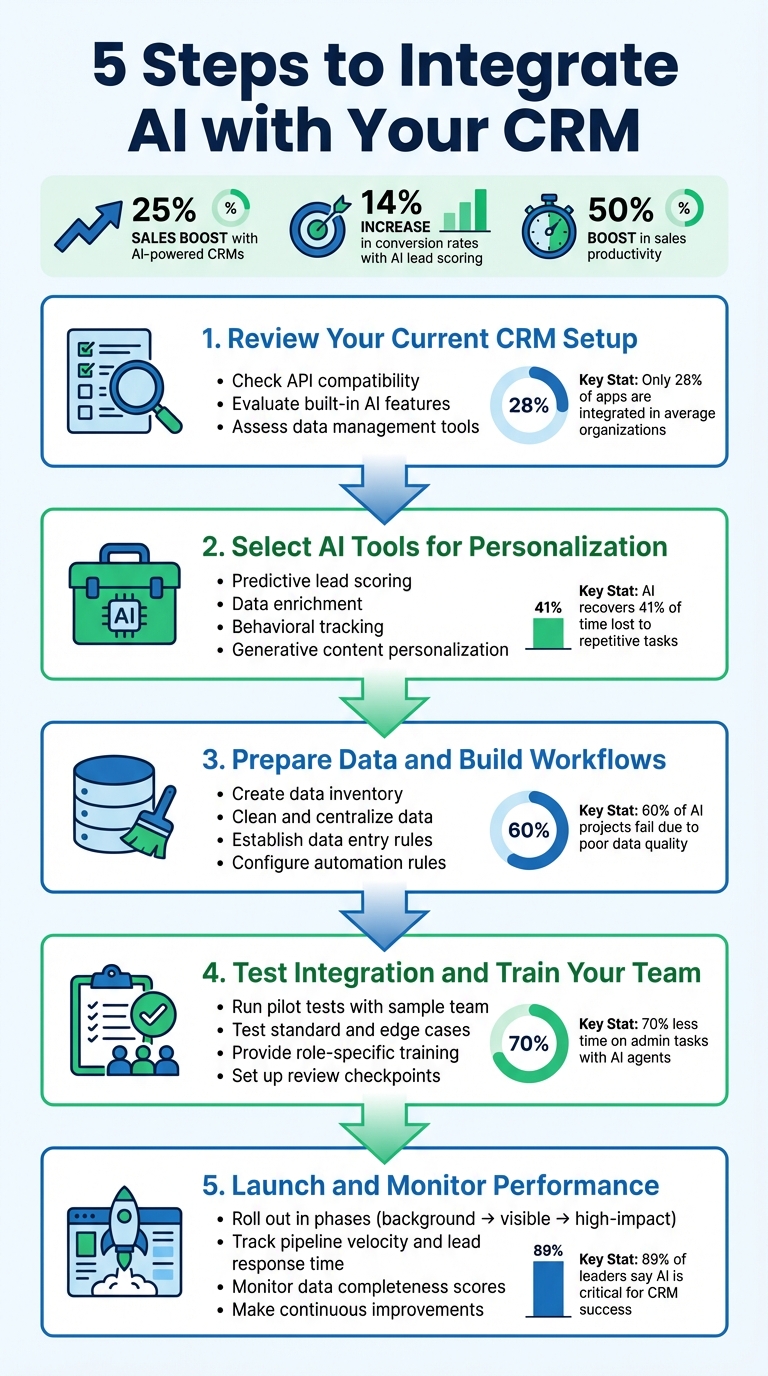
5 Steps to Integrate AI with Your CRM System
How to Integrate AI into Your CRM Strategy
Step 1: Review Your Current CRM Setup
To integrate AI effectively into your CRM, start by evaluating its features and the quality of your data. This ensures a smoother transition and maximizes the benefits AI can bring to your workflows.
Check CRM Features and Integration Options
First, take a close look at your CRM's API compatibility. Strong APIs are essential for connecting third-party AI tools and ensuring seamless data exchange between systems. Think about this: the average organization uses over 900 apps, but only 28% of them are integrated. That lack of integration creates data silos, which can severely limit AI's effectiveness before you even get started.
Also, explore your CRM's built-in capabilities. Many modern platforms already offer AI features like lead scoring, sales forecasting, and email drafting. Despite this, only 19% of sales reps take advantage of these tools, while 45% rely on external chatbots like ChatGPT. Built-in AI tools have the advantage of working directly with your CRM's data, whereas external bots often require manual data transfers, which can be cumbersome.
Pay attention to data management features as well. Tools like automatic duplicate detection, data enrichment, and custom object management can directly influence the accuracy of AI models. For instance, inconsistent data formats - like "VP Sales" versus "Vice President, Sales" - can lead to skewed AI outputs and poor performance.
When integrating AI, you'll need to decide how to connect systems. Options include:
- Native connectors for reliability.
- iPaaS platforms like Zapier or Make for flexibility.
- Custom-built connections for full control, depending on your team's technical expertise.
Once you've evaluated these aspects, it's time to shift gears and outline clear, measurable goals for your AI integration.
Set Clear Goals for AI Integration
"AI is only as effective as the workflows and data it's built on, so a careful audit sets the foundation for successful integration."
A thorough understanding of your CRM's capabilities allows you to set achievable goals that can drive real improvements in your marketing and sales processes.
Start by creating SMART goals - specific, measurable, achievable, relevant, and time-bound. For example, aim to reduce administrative tasks for each sales rep by 25% within 60 days or improve the completeness of contact data to 95% in three months.
Next, benchmark your current performance. Look at metrics like response times, conversion rates, and the number of hours spent on administrative tasks. Document repetitive activities that could potentially be automated. Without these benchmarks, it will be difficult to measure the return on investment later.
Involve leaders from sales, marketing, and customer success teams to pinpoint specific pain points. Focus on "no-regret" use cases - areas where AI can enhance existing workflows without requiring a total system overhaul. These are often tasks that are tedious, time-consuming, and repetitive. Examples include automated data enrichment, duplicate detection, and AI-generated email drafts. Starting with these quick wins can build momentum and demonstrate the value of AI early on.
Step 2: Select AI Tools for Personalization
Once you’ve nailed down your CRM goals, the next move is finding the right AI tools that align with your personalization strategy and integrate seamlessly into your workflow.
What to Look for in AI Tools
When evaluating AI tools, prioritize those offering robust native connectors or API support. Why? Because breaking down data silos is a game-changer. In fact, 81% of IT leaders say these silos are slowing down their digital transformation efforts.
Look for features that directly enhance your personalization efforts:
- Predictive lead scoring: This uses historical conversion data to help you focus on high-value prospects.
- Data enrichment: Automatically fills in gaps like job titles and company sizes, sharpening your targeting accuracy.
- Generative content personalization: Creates tailored emails and proposals based on customer-specific details.
- Behavioral tracking: Monitors email opens, website visits, and past interactions, so you can time your outreach perfectly.
- Autonomous agents: Some platforms go a step further, researching prospects, spotting buying signals, and executing multi-step workflows without needing manual input.
Here’s a stat that might surprise you: AI can recover up to 41% of the time employees lose to repetitive tasks. That’s a lot of hours saved for more strategic work.
"Integrating AI into your CRM system reshapes client interactions, automates tasks and provides deeper insights."
Scalability is another must-have. Your tools should handle growing data volumes as your business expands. But don’t skimp on human oversight - make sure the platform includes checkpoints for reviewing content and validating leads to maintain quality and trust. As of 2024, nearly half (46%) of business owners are already using AI in customer relationship management.
AI Tools That Work with CRM Systems
Several AI-powered tools stand out for their CRM compatibility:
- Salesforce Einstein: This tool combines "Data + AI + CRM" to deliver hyper-personalized emails, predictive forecasting, and autonomous agents through its Agentforce feature.
- HubSpot Breeze: Offers data enrichment via Breeze Intelligence and automates prospecting with Breeze Agents. HubSpot users have reported 129% more leads and 36% more closed deals with these capabilities.
- Pipedrive: Includes an AI Sales Assistant that acts like a virtual coach, along with an AI Marketplace featuring over 500 apps for third-party integrations.
For founder-led B2B businesses, consider tools like RevBoss (https://revboss.com). RevBoss takes a unique approach by building content marketing strategies tailored to founder-led brands. Starting at $1,500 per month, it emphasizes LinkedIn audience growth, custom content creation, and campaigns that prioritize trust and authenticity. Their platform integrates audience targeting, personalization workflows, direct outreach, and marketing asset development - perfect for businesses wanting AI personalization that feels human and builds genuine relationships instead of just automating tasks.
Interestingly, only 19% of sellers currently use AI features built directly into their CRM, while 45% rely on general-purpose chatbots that operate outside their sales workflows. Embedded tools have a clear edge - they tap into real-time data and business context, minimizing the need for manual data transfers. By reducing context switching, these tools set your team up for more impactful interactions.
Step 3: Prepare Data and Build Personalization Workflows
AI tools are only as effective as the data powering them. Before diving into personalization campaigns, it's crucial to ensure your data is in top shape. Consider this: Gartner predicts that 60% of AI projects will be abandoned due to a lack of AI-ready data. And here's another reality check: only 20% of organizations currently have data strategies advanced enough to fully leverage AI tools.
Get Your Data Ready for AI
Start by creating a data inventory - document all key data sources and formats. Prioritize cleaning the data that directly supports your AI goals.
Next, assess the accuracy of your data. Look for errors, duplicates, and inconsistencies across systems. The average business has integrated just 28% of its applications, which means your customer data is likely scattered across multiple platforms. Break down these silos by centralizing everything into a single source of truth, such as your CRM.
"AI is only as powerful as the data behind it. To unlock its true potential, organizations must ensure their data is high-quality, clean, and AI-ready."
Establish strict data entry rules - like using consistent date formats (e.g., MM/DD/YY) - and map relationships accurately, such as linking contacts to their respective companies, to avoid fragmented AI outputs. Configure your system to require mandatory fields before saving records.
Assign specific individuals or teams as data stewards to oversee quality and management. Use your CRM’s built-in tools or AI features to automatically flag and merge duplicate records regularly.
Once your data is clean and centralized, you can shift gears to focus on creating precise personalization workflows.
Configure Personalization and Automation Rules
With your data ready, it’s time to set up workflows that turn insights into personalized, automated outreach. Start by mapping out your entire marketing process, documenting every step from campaign planning to execution. Large CRM systems often uncover 80–100 steps where inefficiencies or redundancies can creep in.
"The biggest impact of AI is alignment. Before any model, prompt, or workflow touches your CRM, your first job is to force the conversations that have been quietly avoided for years."
Focus on "Jobs to be Done" instead of individual tasks. Define clear outcomes, like “personalize email content based on industry” or “validate lead quality,” and pinpoint where AI can streamline the process. Prioritize workflows by evaluating factors like task complexity, resource demands, and repetitiveness. Tasks that are resource-intensive but don’t require much human creativity are excellent candidates for automation.
Incorporate dynamic content blocks to tailor outreach - for instance, using details like webinar attendance, service history, or recent purchases. Modern AI tools can create highly customized content variations based on customer attributes, such as combining location data with purchase history. Instead of manually building SQL queries for segmentation, leverage natural language prompts to group customers by complex behaviors and traits.
Roll out your workflows in stages. Start with “no-regret” use cases that operate in the background, such as automated data enrichment, duplicate detection, or lead scoring. Once those are running smoothly, move on to customer-facing AI-driven workflows. Use AI to optimize engagement timing and frequency by analyzing customer behavior to determine the best time to connect. And always keep human oversight in the loop by setting checkpoints where staff can review AI-generated content or lead scores before they’re finalized.
sbb-itb-9354cf2
Step 4: Test the Integration and Train Your Team
With your workflows in place, it's time to make sure everything functions smoothly before launching. Start by assigning a pilot team to test the integration. This team should have clear metrics to evaluate performance and uncover any bugs, data errors, or workflow hiccups.
Test All Workflows and Features
Run tests using a mix of standard scenarios, edge cases, and even simulated failures - like intentionally disconnecting an API - to see how the system responds. Keep an eye on key metrics like sync speed, error rates, and data freshness to ensure the system is stable.
Set up checkpoints where team members review AI-generated outputs - like email drafts or lead scores - before they’re sent to customers. Track metrics such as time saved per rep, lead response time, and data accuracy. For example, companies using AI-driven lead scoring often achieve a 14% boost in conversion rates.
"AI surfaces errors immediately because machines require precision where humans can tolerate ambiguity."
Once you’re confident in the system’s stability, the next step is to get your team ready with hands-on training.
Train Your Team on the New System
After confirming the system works as expected, focus on preparing your team to use it effectively. Skip generic demos and instead use real-world examples that show AI features in action within your CRM. For instance, demonstrate how an AI-generated email draft appears in the composer right after a meeting. Walk through sample scenarios, like how AI assigns lead scores, and explain the signals it uses to make those decisions. This type of training builds understanding and trust in the tool.
Position AI as a collaborator, not a replacement. For instance, sales teams using AI agents spend 70% less time on administrative tasks, giving them more time to focus on building relationships. Provide role-specific resources like documentation and tutorial videos tailored to each team member’s daily responsibilities. Practical, clear training is the key to successful adoption and getting the most out of your AI-powered CRM.
Step 5: Launch and Monitor Performance
With the testing phase behind you, it’s time to roll out your AI-powered CRM. But don’t rush - take a measured approach and keep a close eye on how it performs in real-world scenarios.
Roll Out in Stages
A gradual rollout is the way to go. Start with background tasks that quietly improve efficiency without disrupting your team’s daily routines. For instance, begin with features like data enrichment or duplicate detection - these run behind the scenes and help build trust in the system. Once the foundation is solid, move on to more visible tools like lead scoring. Finally, introduce high-impact capabilities such as predictive forecasting.
Take Rootly’s example: in November 2025, their Founding AE, JP Cheung, teamed up with Outreach to deploy AI agents for revenue operations. By auditing workflows and automating repetitive outreach tasks, the team saw impressive results - 41% more prospects contacted, 130% more emails delivered, and a 69% increase in meetings scheduled within just a few months. These kinds of phased implementations can lead to smoother transitions and measurable wins.
As you roll out, keep performance tracking front and center so you can quickly fine-tune as needed.
Monitor Key Performance Metrics
Once live, tracking the right metrics is essential to ensure your AI-enhanced CRM is delivering on its promises. Start with metrics that tie directly to your sales and operational goals:
- Pipeline velocity: How quickly deals move through your sales stages.
- Lead response time: The speed at which your team engages new prospects.
- Data completeness score: The percentage of records with all critical fields populated.
The payoff can be substantial. Companies leveraging AI-powered CRM systems often report a 50% boost in sales productivity, while those using AI-driven lead scoring see conversion rates improve by 14%. To stay on track, set clear goals. For example, aim to improve contact data completeness to 95% within three months or reduce administrative tasks for reps by 25% in 60 days.
Make Regular Improvements
Implementing AI isn’t a “set it and forget it” process. Continuous refinement is key to long-term success. Regularly review performance data and tweak personalization rules to keep things fresh and effective. A/B testing can be a game-changer - experiment with different AI-generated email templates to see which ones resonate most with your audience.
Set up anomaly alerts, so the system flags unusual patterns, like sudden drops in team performance or deal engagement scores. And don’t skimp on quality checks - consistent reviews ensure your AI outputs remain accurate and relevant. As JP Cheung of Rootly points out:
"Understanding the data and having AI surface what actually works has been crucial to our success".
Conclusion
Blending AI with your CRM turns it into a powerhouse for predicting outcomes, automating tasks, and delivering personalized outreach. By taking these five steps - auditing your current system, choosing the right tools, cleaning your data, testing thoroughly, and keeping an eye on performance - you lay the groundwork for real, measurable results in founder-led B2B businesses.
And the numbers back it up. Companies using AI-powered CRMs report an average 25% bump in sales revenue, while AI-driven lead scoring can increase conversion rates by as much as 25%. These tools don’t just streamline workflows; they free up your team to focus on building relationships instead of slogging through routine data entry. It’s a system that works but demands ongoing attention and refinement.
AI integration isn’t a one-and-done deal - it’s a process that evolves. Angela Vega, a Marketing Transformation Leader, puts it best:
"AI readiness in marketing, especially in CRM, demands a closer look at the processes and roles behind every output. Instead of asking whether AI can write an email, ask whether that step still needs to exist".
By continuously refining your system through A/B testing, regular data audits, and monitoring performance, you ensure your CRM stays effective as buyer behaviors shift and technology advances.
For founder-led businesses, this approach strikes the perfect balance. AI takes care of the repetitive, scalable tasks, while you focus on the human connections that set your brand apart. The result? A marketing engine that builds trust, strengthens credibility, and drives a steady pipeline - all without overloading your team.
Start small to see quick wins. Use AI for low-risk tasks like cleaning up data or finding duplicate records to prove its value. Then, scale up your efforts. With 89% of business decision-makers agreeing that AI capabilities are critical for CRM success, the real question isn’t if you should start - it’s how soon you’ll take the leap.
At RevBoss (https://revboss.com), we’re here to help founder-led businesses harness AI-driven strategies that integrate seamlessly with your CRM. Together, we’ll help you build trust, spark demand, and achieve sustainable growth.
FAQs
What are the advantages of integrating AI with your CRM system?
Integrating AI into your CRM takes it from being just a database to a game-changing tool for smarter sales and marketing. Imagine automating those tedious tasks like updating contact info, scheduling meetings, or crunching data - your team gets to focus on what really matters. Plus, AI doesn’t just save time; it spots patterns in customer behavior, helping you zero in on the right leads and close deals faster.
With AI, you unlock predictive insights like lead scoring to pinpoint top prospects and sales forecasting to keep track of your goals. Automated suggestions for outreach can boost response rates, while seamless data integration means no more juggling between tools. Businesses embracing AI-driven CRM solutions often notice boosts in productivity, sharper forecasting, and happier customers. It’s all about creating a more personalized, trust-filled experience for everyone involved.
How can I prepare my CRM data for AI integration?
Preparing your CRM data for AI integration is a crucial step to ensure your tools deliver accurate and meaningful outcomes. Start by performing a data audit - this means combing through your records to spot duplicates, fill in missing details, and weed out outdated or inconsistent entries. Once you've identified the issues, it's time to clean and standardize. Fix errors, eliminate duplicates, and apply uniform formatting for things like dates, currencies (e.g., $USD), and naming conventions.
After cleaning things up, the next move is to unify your data. Pull together information scattered across different systems, like marketing software or customer support platforms, into a single, organized database. Make sure every record has a unique identifier so you can connect data seamlessly across systems. To keep everything running smoothly in the long run, establish data governance practices. This includes setting up access controls, scheduling regular quality checks, and defining clear ownership policies to keep your data accurate and consistent. For an extra edge, consider enriching your data by adding insights like firmographics or intent signals - these can supercharge AI-driven personalization.
If this all sounds like a lot to tackle, RevBoss offers services specifically designed to help founders manage this process. They’ll audit, clean, and enrich your CRM data, making it easier to get your system AI-ready. Taking these steps will minimize errors and maximize the effectiveness of your AI-powered CRM tools.
What features should I prioritize when choosing AI tools for CRM integration?
When picking AI tools to integrate with your CRM, focus on features that streamline tasks, improve decision-making, and keep your data secure.
Prioritize tools with predictive features like lead scoring and sales forecasting to zero in on high-value opportunities. AI-driven email drafting, automated scheduling, and advanced analytics that highlight churn risks or upsell chances can simplify workflows and boost efficiency.
Make sure the tools integrate effortlessly with your CRM to avoid app-hopping and reduce mistakes. Look for native integrations, solid APIs, and pre-built connectors to keep data flowing smoothly. Strong privacy controls are a must to safeguard sensitive CRM information.
For founder-led B2B companies, personalization is a game-changer. AI tools that help create tailored content and engage your audience in line with your brand’s voice can elevate your marketing. RevBoss, for instance, excels at crafting AI-powered, trust-based campaigns that reflect a founder’s unique story, helping businesses grow in a way that feels genuine and effective.