Leveraging LinkedIn for B2B Event Attendee Acquisition

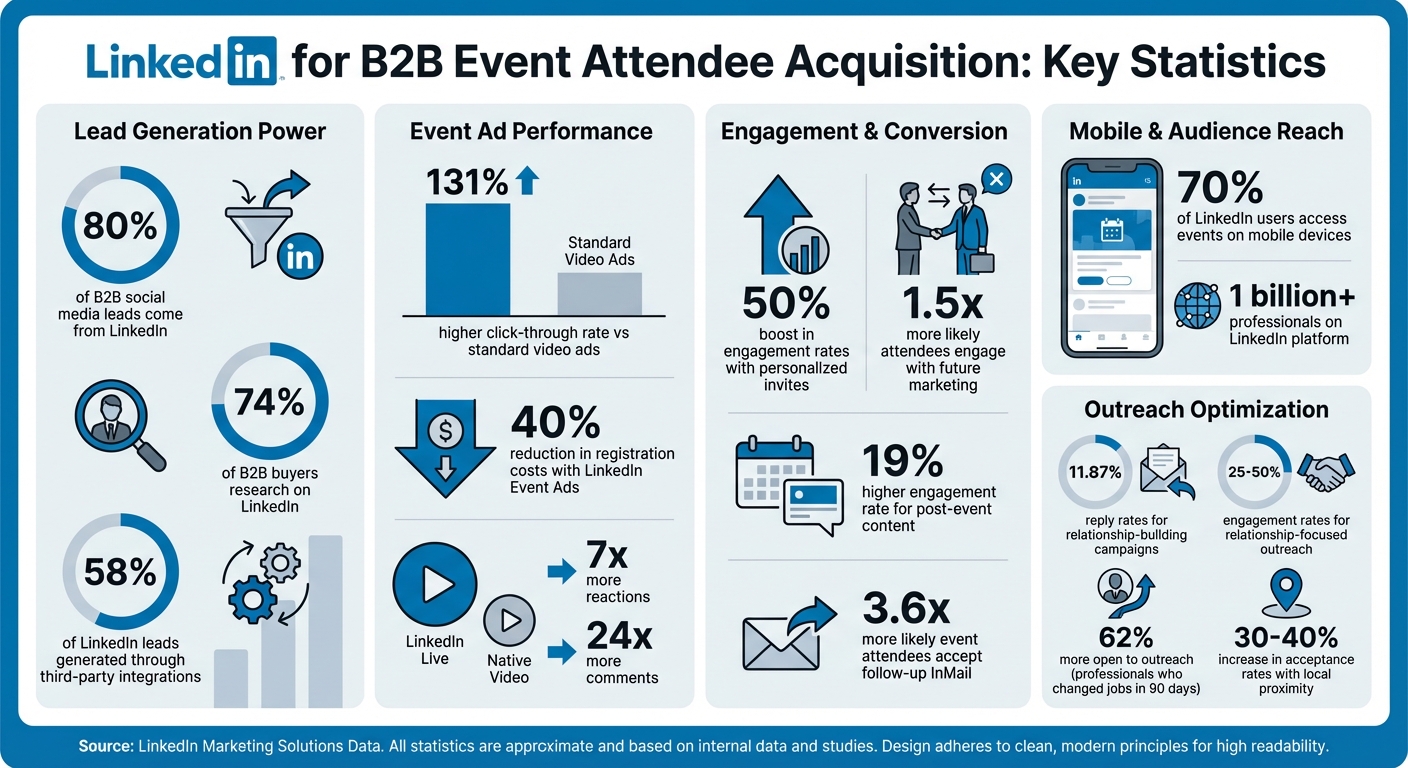
If you're planning a B2B event, LinkedIn is your best friend for getting the right people in the room. Why? Because 80% of B2B social media leads come from LinkedIn, and its targeting tools let you reach decision-makers who are already in a professional mindset. Here's the playbook:
- Target the right audience: Use LinkedIn's filters (job titles, industries, skills) to zero in on attendees who matter.
- Optimize your profile: Update your banner with event details and use your headline to highlight the event's value.
- Leverage tools: LinkedIn Event Ads can cut registration costs by up to 40%, and features like LinkedIn Live drive 7x more reactions.
- Direct outreach matters: Personalized invites and follow-ups can boost engagement rates up to 50%.
- Retarget smartly: Use LinkedIn's Insight Tag to re-engage those who showed interest but didn’t register.
Want to maximize attendance? Start with these steps today. LinkedIn isn’t just another platform - it’s where your audience already is.
LinkedIn B2B Event Marketing Statistics and ROI Metrics
How to Run High-Performing LinkedIn Ads for B2B
How to Optimize Your LinkedIn Profile for Event Promotion
Your LinkedIn profile isn’t just a digital resume anymore - it’s your personal landing page. As LinkedIn Strategist Saloni Agarwal points out:
"Your LinkedIn profile is not a resume anymore. It's your landing page. People don't come here to admire your experience. They come here to decide whether to trust you or not."
When it comes to promoting an event, your profile should answer one key question for visitors: Is this event for me? Every element should make it clear why your event is relevant to them. Let’s dive into how to make your profile a powerful tool for event promotion.
Update Your Banner and Headline
Think of your banner as prime real estate - it’s the first thing people notice, so use it wisely. Highlight the event name, date, and location prominently. Stick to your event’s branding by incorporating its colors, fonts, and logos for instant recognition. Don’t forget to include a strong call to action, like “Register below” or “Join us on March 15, 2026”.
Your headline, however, is even more critical. As LinkedIn Contributor Tai Freligh emphasizes:
"The headline on your LinkedIn profile is perhaps THE most important part of your entire profile."
While LinkedIn allows 220 characters for your headline, only the first 35–40 characters are visible in feeds and comments. This means you need to pack the most important event details up front. A simple formula could look like this: "Driving [Specific Outcome] through [Event Name] | [Your Executive Title]". For instance: "Driving AI Adoption through TechLeaders Summit 2026 | CEO, B2B SaaS." Use numbers and symbols (like $, %) to emphasize the results attendees can expect. With these updates, your profile will immediately signal relevance to event visitors.
Use the Featured Section for Event Visibility
The Featured section is where you can showcase what matters most - your event. Start by pinning the unique LinkedIn URL for your event as the first item. LinkedIn automatically generates this link for every event. If you’re collecting registrations through LinkedIn, make sure that form link is front and center so visitors can sign up without leaving the platform.
To make this section visually appealing, add assets like your event cover image (minimum 480 pixels wide, 16:9 ratio) or a promotional video. Since 70% of LinkedIn users access events on mobile devices, ensure any text in your visuals is easy to read on smaller screens. You can also feature posts that highlight your event speakers - this not only builds credibility but also taps into their networks. Aim to update your Featured section 2–4 weeks before the event.
Share Event Content and Build Credibility
Consistent, high-quality content is key to keeping your event visible and building trust. Roll out your content in phases to maintain momentum: teasers and polls 3–4 weeks out, speaker spotlights and registration links 2–4 weeks before, countdowns and urgency-driven posts the week of, and live updates or quotes on the event day. Include links to your speakers’ LinkedIn profiles so potential attendees can see their expertise firsthand.
A great example comes from Salesforce’s May 2025 Dreamforce event. They used Thought Leader Ads and precise targeting to reach AI-focused business decision-makers. The campaign led to a 30% reduction in cost per 5+ minute viewer, a 24% rise in connection requests, and a 52% boost in InMail acceptance rates. The secret? Consistent and credible content that reassured attendees they were making the right choice. As Tequia Burt, former Editor in Chief at LinkedIn, explains:
"People constantly seek confirmation, so as marketers we need to keep reassuring our audience members that they're making a smart decision."
After the event, keep the momentum going by updating your Featured section with on-demand recordings or key takeaways. This ensures your profile continues to deliver value and keeps the conversation alive. With these strategies in place, you’ll be ready to dive into targeted list-building and outreach efforts in the next steps.
How to Build Targeted Attendee Lists Using LinkedIn Tools
Once your profile is ready for event promotion, it’s time to zero in on your ideal attendees. With over 1 billion professionals on LinkedIn, narrowing down your audience is essential. LinkedIn’s filtering tools can help you create a focused list of prospects that match your ideal attendee profile. This list becomes the backbone of your outreach efforts.
LinkedIn Sales Navigator: A Tool for Precision
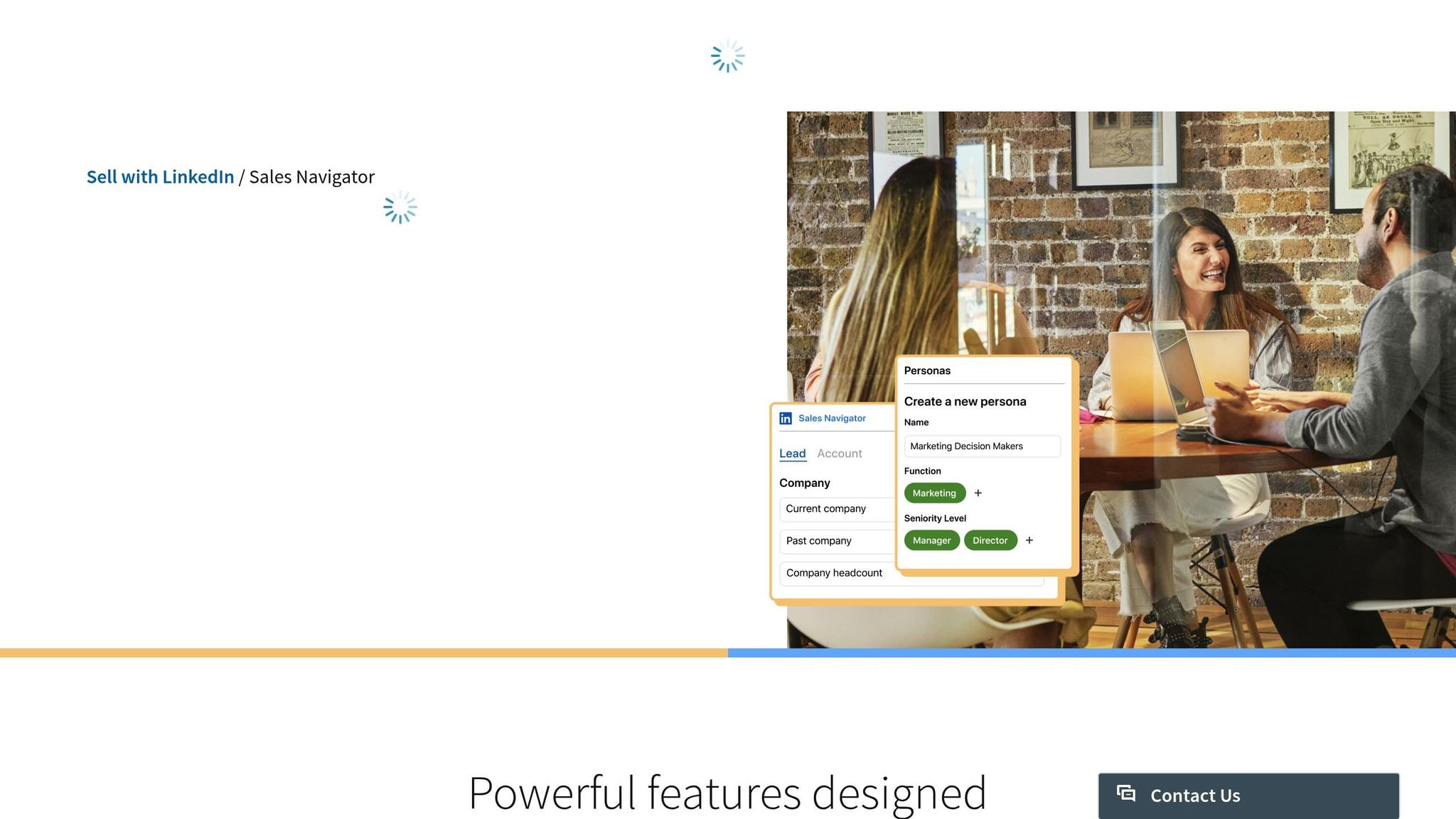
LinkedIn Sales Navigator offers more than 50 filters to help you pinpoint the right people for your event. You can filter by job title, industry, seniority, and more. For instance, if you’re hosting a marketing automation workshop, you might target Marketing Directors in the Software & IT Services sector based in New York City.
One standout feature is TeamLink, which highlights prospects already connected to your colleagues. Judy Wang, Sales Effectiveness Sr. Manager at Canada Post, shared how this feature made a big impact:
"The team struggled to break into an account until an AE used TeamLink to get a warm intro - leading to a deal worth over 2x the initial investment."
This same approach works wonders for event invitations, as warm introductions tend to grab attention. You can also use the Spotlights filter to find individuals who’ve changed jobs in the past 90 days. These professionals are 62% more open to outreach since they’re adapting to new roles and eager to expand their networks.
Once you’ve fine-tuned your search, save it. Sales Navigator will send you real-time updates whenever new prospects match your criteria, keeping your attendee list fresh and growing automatically. You can also organize your leads into custom lists based on event type, location, or engagement level. If you’re on the Advanced Plus plan, you can even sync these leads with your CRM (like Salesforce, HubSpot, or Microsoft Dynamics), saving yourself about 65 hours a year by cutting out manual data entry.
After identifying your ideal leads, the next task is to organize their information effectively.
Exporting and Managing Your Attendee List
LinkedIn doesn’t offer a built-in export option, but third-party tools like Phantombuster, Lix-it (free for up to 1,000 profiles), or Email-Researcher can help you extract data. These tools can pull names, job titles, and profile URLs into CSV or Excel files. If you’re targeting attendees from a LinkedIn Event, make sure to click "Attend" or "Register" first. This unlocks the "Networking" tab, where you can view the attendee list.
To enhance your data, use tools like Clay to find business emails and phone numbers. This allows you to connect with prospects across multiple channels, not just LinkedIn. After gathering the data, filter it against your Ideal Customer Profile (ICP). Remove anyone who doesn’t meet your criteria for seniority, job function, or company size. Adding a column for the event name or speaker they interacted with can make your outreach feel more genuine and less like a generic pitch.
Timing is everything. Reach out to prospects within a few days of the event while it’s still fresh in their minds. Use the Networking tab to send free messages to attendees right away, ensuring your message lands in front of the right people quickly.
How to Drive Event Awareness Through Organic LinkedIn Content
Once you've nailed down your targeted attendee list, the next step is creating buzz around your event - without breaking the bank. Organic LinkedIn content is a smart, cost-effective way to engage your network. Considering that nearly 80% of B2B leads from social media come from LinkedIn, it’s the perfect platform to get the word out about your event. This approach complements your targeted outreach efforts, giving your promotion strategy a solid one-two punch.
Start by sharing teaser posts that spark curiosity. Highlight major topics, announce speakers, or drop intriguing stats tied to your event theme. As the big day gets closer, ramp up your posting frequency to keep the excitement alive and registrations flowing.
Post Regular Event Updates
Consistency is everything when it comes to keeping your audience engaged. Mix up your content to keep things fresh - post speaker spotlights with links to their profiles or share quick 20–30 second video promos. These short videos can add a personal touch and grab attention in the scroll-heavy world of LinkedIn.
Countdown posts are another effective tactic to create urgency. A simple update like "Only 3 days left to register!" can nudge those who are still undecided. Don’t forget to tag guest speakers and partners in your posts - this triggers notifications to their networks and broadens your reach.
Use LinkedIn Polls to Boost Engagement
Interactive content can take your engagement to the next level. LinkedIn Polls are a low-effort way to get people involved. Posting polls up to twice a week on your event page can help you gauge audience interests. For instance, if your event is about marketing, you could ask, "Which session are you most excited about - AI tools, content strategy, or lead generation?"
Another game-changer is LinkedIn Live. According to Lucy Sonter, who works in Global Product Adoption at LinkedIn Marketing:
"LinkedIn Live videos, on average, get 7x more reactions and 24x more comments than native video produced by the same broadcasters."
Consider hosting a live Q&A session with a speaker or giving a behind-the-scenes look at your event prep. With 70% of viewers tuning in on mobile devices, make sure your live content is mobile-friendly and conversational. Lucy also emphasizes:
"Professional audiences generally don't need fancy, big-budget livestreams. More often, they want interesting, authentic and timely content that provides value and helps them network."
To keep things lively, mix in images, GIFs, and short demo videos. This variety not only keeps your event feed dynamic but also encourages shares and builds ongoing engagement. These interactive strategies set the stage for attendees to amplify your event’s visibility even further.
Get Attendees to Share Event Content
Your organic efforts can go even further when you empower your network to spread the word. Ask speakers to post in the event’s Networking tab about three days before the event. This primes the audience, addresses early questions, and gets the conversation started. When speakers share event updates from their personal profiles, their followers catch wind of it, creating a ripple effect that boosts your event's visibility.
Encourage registered attendees to share the event with their own networks as well. LinkedIn Events highlight mutual connections who are interested in attending, providing social proof that can persuade others to join. Tequia Burt, Editor in Chief at LinkedIn, explains:
"People continually scan for social clues to confirm their choices... as we gain social momentum, and maybe even a little more confidence, filling seats can become easier."
Make sharing easy by creating bite-sized, shareable content - quotes, compelling stats, or teaser polls that attendees can repost quickly. The more your content circulates, the more registrations you’re likely to see roll in.
sbb-itb-9354cf2
How to Use LinkedIn Ads to Increase Event Registrations
Organic content is great for building momentum, but when you need to put your event in front of the right audience at the right time, LinkedIn Ads are your go-to tool. They’re especially effective for reaching people outside your immediate network. In fact, LinkedIn Events drive a 131% higher click-through rate compared to standard video ads and can cut your registration costs by up to 40%. That’s a big deal when you’re trying to maximize attendance without blowing your budget.
The real magic lies in LinkedIn’s precise targeting capabilities. You can focus on specific job titles, industries, company sizes, and even seniority levels, ensuring your event reaches the decision-makers who genuinely care about what you’re offering. Take Salesforce, for example - they used LinkedIn’s Event Ad features to promote their Dreamforce conference and saw a measurable boost in registrations and attendee engagement. It’s not about casting a wide net; it’s about fishing in the right pond. Here’s how you can set up and fine-tune these campaigns to get the best results.
Set Up Sponsored Content Campaigns
First, create a LinkedIn Event page. This generates the unique destination URL you’ll need to run Event Ads. Once that’s ready, head over to Campaign Manager and select your campaign objective. Options include Brand Awareness, Website Visits, or Engagement. The cool part? Event Ads adapt to your event’s timeline. Before the event, they showcase a static image. During the live event, they switch to the video livestream. Afterward, they highlight a video replay.
You can choose between a Single Classic Ad Set, which allows dynamic ad changes, or Three Separate Ad Sets, giving you more control over each event phase. If you go with separate ad sets, consider enabling accelerated delivery during the live event to quickly maximize real-time views.
When creating your ad, keep the introductory text under 600 characters and ensure your event image follows a 4:1 aspect ratio. LinkedIn typically pulls this image directly from your Event page. For high-value webinars or conferences, gated registration using Lead Gen Forms can help you capture quality leads. On the other hand, for events focused on community-building, keeping registration ungated can reduce barriers and encourage more attendees.
Use LinkedIn Lead Gen Forms
LinkedIn Lead Gen Forms simplify the registration process by auto-filling attendee information like name, email, job title, and company based on their LinkedIn profile. This eliminates the hassle of manual entry, reducing drop-offs during registration. While you can include up to 12 fields, fewer fields typically result in higher completion rates. Use the three custom question slots wisely to qualify leads without overwhelming potential attendees.
Event Ads with a single-click registration button make signing up seamless, as users don’t even need to leave LinkedIn. Once registrations start coming in, you can integrate the data directly with your CRM or download it as a CSV file for follow-up. Just don’t forget to include a valid privacy policy link - it’s a required step when using LinkedIn’s registration forms.
Optimize Ad Performance with Retargeting
Even with streamlined ads and forms, not everyone will register on their first encounter. That’s where retargeting comes into play. LinkedIn allows you to create highly specific audiences based on website visits (using the Insight Tag), video ad views, Lead Gen Form interactions, or engagement with your Event page. By re-engaging these warm leads, you can often drive longer engagement and reduce churn.
For example, you can create a retargeting audience of users who opened a Lead Gen Form but didn’t complete it. Serve them a follow-up ad featuring a demo or a comparison sheet to nudge them toward registering. After your event, retarget attendees with video replays or engage users who interacted with your ads but didn’t attend. This not only extends your event’s lifecycle but also ensures your initial ad spend keeps working for you. Keep in mind that the LinkedIn Insight Tag requires a minimum audience size of 300 members before you can launch a retargeting campaign.
Here’s a bonus: Event attendees are 1.5x more likely to engage with your future marketing efforts, and post-event content sees a 19% higher engagement rate. So, retargeting isn’t just about salvaging missed opportunities - it’s a way to build lasting relationships with your audience.
How to Execute Direct Outreach for Personalized Attendee Engagement
Direct outreach is a fantastic way to complement your organic and paid strategies, adding a personal touch to the registration process while boosting attendee commitment. Think of each message as a way to start a meaningful conversation, using the event itself as a natural icebreaker. Sophie Kompaniiets, Content Writer and Strategist at Belkins, sums it up perfectly:
"Event attendance signals active interest in a topic. Shared event context provides natural conversation starters and removes the 'cold' from cold outreach".
When done right, campaigns that mix relationship-building messages with actions like profile visits or post likes can hit reply rates as high as 11.87%. Engagement rates for relationship-focused outreach typically range from 25–50%, compared to 15–25% for direct pitch campaigns. The secret? Warm up your prospects before going in with the registration ask. Here are three strategies to turn initial interest into confirmed RSVPs.
Send Personalized Connection Requests
Your connection request is your opening move - make it count. Keep it short and genuine, focusing on building a connection instead of pitching right away. Reference something specific about the person, like their role, a recent post, or a shared interest tied to your event. For example, if your webinar is on demand generation and you notice a prospect discussing lead quality issues, mention that in your message.
Timing is everything. Reach out 2–3 weeks before your event or within 24–48 hours after it ends, while the content is still fresh. Newly hired professionals are especially receptive - they’re 3x more likely to explore new solutions in their first 90 days on the job. If you’re targeting local prospects, proximity can increase acceptance rates by 30–40%.
Focus most of your efforts - 70–80% - on Tier 1 and Tier 2 leads for better engagement. If you’re using automation tools, start small with 15 connection requests per day and gradually increase to 20–30 over two weeks to avoid LinkedIn’s spam filters.
Use LinkedIn Event Invites to Secure RSVPs
Once you’ve warmed up your connections, take advantage of LinkedIn’s event tools. As a Page admin, you can send up to 1,000 event invitations per week to your 1st-degree connections. LinkedIn also sends automatic reminders to registrants - one week, three days, and 15 minutes before the event - so your event stays top-of-mind with minimal effort.
Create your event page 2–4 weeks ahead of time to give yourself room for outreach and follow-ups. Instead of inviting everyone, focus on connections who’ve shown interest in your event’s topic to boost RSVP rates. Sharing the event’s unique URL directly via LinkedIn Messaging adds a personal touch. Plus, as the organizer, you can message attendees for free, even if they aren’t 1st-degree connections.
Make use of the "Notify Attendees" feature to share updates, but don’t overdo it - limit notifications to twice a week to avoid overwhelming your audience. Encourage your speakers to post in the event’s networking tab a few days before the event to spark conversations and build excitement. Lucy Sonter, from LinkedIn Marketing, emphasizes:
"Professional audiences generally don't need fancy, big-budget livestreams. More often, they want interesting, authentic and timely content that provides value and helps them network".
Follow Up with Engaging DMs
Your follow-up messages are where the magic happens, converting interest into actual registrations. Mention the event name or topic to establish a shared context and avoid sounding generic. Personalize each message by referencing the recipient’s company, role, or something they’ve shared during the event or in the feed.
Ask open-ended questions to encourage dialogue. For instance: "Great to see you at [Event Name] - what was your key takeaway?". This not only builds rapport but also gives you insight into what your audience values most. For those who registered but didn’t show up, try: "We missed you at [Event Name] - here’s the on-demand recording and key takeaways." This keeps the relationship alive and positions you as helpful rather than pushy.
Add value by including concise resources like summary documents, slide decks, or survey links in your follow-ups. Since around 80% of B2B marketing leads from social media come from LinkedIn, these follow-up messages are a vital part of your conversion game plan.
How RevBoss Can Help with B2B Event Marketing
Managing LinkedIn campaigns for event attendee acquisition can feel like a full-time job. RevBoss takes the pressure off by streamlining your LinkedIn event campaigns. They handle the heavy lifting, from crafting engaging posts to executing personalized outreach workflows designed to boost registrations. RevBoss integrates seamlessly with your LinkedIn strategy, enhancing everything from content creation to outreach, so you can focus on running a successful event.
Use RevBoss for Content and Coaching
RevBoss's Content + Coaching + Activation plan is perfect for founders looking to grow their LinkedIn audience without burning out. For $4,000 per month, this plan includes weekly strategy calls, 8–12 LinkedIn posts each month, and audience growth workflows that position you as a thought leader. It also supports event-specific campaigns for trade shows, webinars, and in-person gatherings, ensuring your message reaches the right audience at the right moment.
The coaching aspect is particularly valuable - it helps you craft compelling sales offers and marketing materials tailored to your event's goals. This is crucial in today’s landscape, where 58% of LinkedIn leads are generated through third-party integrations. Partnering with experts who understand LinkedIn’s nuances can be the difference between a few attendees and a full house. This plan doesn’t just help with outreach; it sets the stage for a streamlined and effective event marketing strategy.
Simplify Outreach with RevBoss Workflows
RevBoss’s automated workflows take the hassle out of outreach by managing connection requests and follow-ups with precision targeting. These workflows use LinkedIn’s tools to focus on high-intent prospects, filtering by industry, company size, job title, and even signals like recent hiring activity or product launches.
To keep your LinkedIn account in good standing, the platform automatically withdraws connection requests after 7–14 days. Plus, LinkedIn event attendees are 3.6× more likely to accept a follow-up InMail from the organizer. With RevBoss, you’re not just filling seats - you’re building lasting relationships that extend well beyond the event itself.
Conclusion
LinkedIn isn’t just another social platform - it’s the powerhouse for B2B lead generation, driving a staggering 80% of all B2B social media leads. By aligning an optimized profile, engaging organic posts, targeted ads, and direct outreach, you create a well-rounded system that not only fills event seats but also builds long-term business connections. This approach takes you from sparking awareness to fostering meaningful engagement.
The numbers speak for themselves: LinkedIn Event Ads boast a 131% higher click-through rate compared to standard video content and can slash registration costs by up to 40%. Plus, event attendees are 1.5 times more likely to engage with your future marketing efforts, creating a ripple effect for ongoing campaigns. With 74% of B2B buyers actively researching on LinkedIn, you’re meeting them exactly where they’re looking for solutions.
To put this into action, start with the essentials: update your profile banner, share regular event updates, and engage with your network through organic interactions. Then, add LinkedIn Ads with built-in lead generation forms to make sign-ups seamless. Use tools like Sales Navigator to craft highly targeted attendee lists and personalize your outreach, turning cold prospects into confirmed guests. Together, these strategies form a complete cycle - from generating interest to post-event follow-up.
If managing all of this feels like too much to juggle, there’s help. RevBoss offers a streamlined solution with weekly strategy calls, automated outreach workflows, and targeted event support, so you can focus on delivering an outstanding event experience instead of stressing over registrations.
The ideal time to start promoting your event? Four weeks ago. The next best time? Right now. Pick one strategy from this guide and take action today.
FAQs
How can I use LinkedIn’s targeting tools to promote my B2B event effectively?
To get the most out of LinkedIn for promoting your B2B event, tap into its advanced audience targeting tools. These features let you zero in on professionals by job titles, industries, company sizes, locations, and more. This way, your event promotions land directly in front of decision-makers and high-value prospects who are most likely to take interest.
For an extra layer of precision, LinkedIn’s Matched Audiences is a game-changer. You can retarget people who’ve visited your website, upload your contact lists, or hone in on specific account-based segments. For instance, if your event is geared toward senior marketing leaders in mid-sized tech companies, you can fine-tune your audience to match that exact group. Don’t forget to regularly experiment with and tweak your targeting criteria to drive better results, increase registrations, and maximize the success of your campaigns.
How can I optimize my LinkedIn profile to attract attendees for my event?
To make your LinkedIn profile work harder for event marketing, focus on building a polished and engaging presence. Start with a sharp, professional profile photo and pair it with a background image that reflects your industry or personal brand - think something that visually ties to events or creativity. Your headline is prime real estate, so craft a clear and compelling one that showcases your expertise in event organizing. Make it easy for people to instantly grasp what you're all about.
Use the Featured section to shine a spotlight on your best work - whether that's highlights from past events, glowing testimonials, or standout achievements. Stay active by posting updates about your events, sharing industry tips, and interacting with your network. Keeping your skills, certifications, and recommendations current adds an extra layer of credibility, showing you're the real deal. These tweaks will help you grab attention and draw in the right audience for your events.
What’s the difference between using LinkedIn Ads and organic content to drive event registrations?
LinkedIn Ads offer a powerful way to drive event registrations, letting you zero in on specific professional audiences based on job titles, industries, and locations. This kind of precision ensures you're reaching the right people quickly, making it a great tool for connecting with new prospects beyond your current network. Plus, paid ads can be fine-tuned to encourage immediate sign-ups - perfect for those time-sensitive events where every second counts.
Meanwhile, organic content depends on engagement from your existing followers and connections. While it’s fantastic for nurturing trust and building long-term awareness, its reach can be more limited and harder to predict. If you're looking for faster results or trying to stand out in competitive or niche B2B markets, LinkedIn Ads typically deliver better performance than organic efforts when it comes to filling seats for your event.