LinkedIn Profile Optimization for Founder-Led Growth: Checklist + Before/After Examples

Your LinkedIn profile isn’t just a resume - it’s your 24/7 sales machine. Founders who optimize their profiles attract investors, generate leads, and build trust. Here's the playbook:
- Profile Picture: Use a high-quality headshot with a neutral background and a genuine smile. Avoid selfies.
- Banner: Design a banner with a clear value statement, client logos, or a speaking engagement photo. Keep it mobile-friendly.
- Headline: Focus on results. Use a formula like: [Role] | [Who You Help] | [Outcome] | [Proof Point]. Example: "Founder | Helping SaaS Teams Close $500K+ Deals | Ex-Stripe | Raised $12M."
- Featured Section: Pin 3–6 key items like case studies, lead magnets, or booking links. This is your proof vault.
- About Section: Write in first person. Address your audience’s pain points, highlight measurable results, and end with a clear CTA.
- Experience: Showcase results, not tasks. Use metrics like revenue growth, team expansion, or efficiency improvements.
- Recommendations: Collect testimonials from clients, investors, or advisors to validate your expertise.
Stats to know:
- Profiles with professional photos get 14x more views.
- Optimized profiles increase recruiter visibility by 71%.
- Founder posts get 561% more reach than company pages.
Your LinkedIn profile is a landing page, not a bio. Optimize it to convert visitors into leads - and let it work while you sleep.
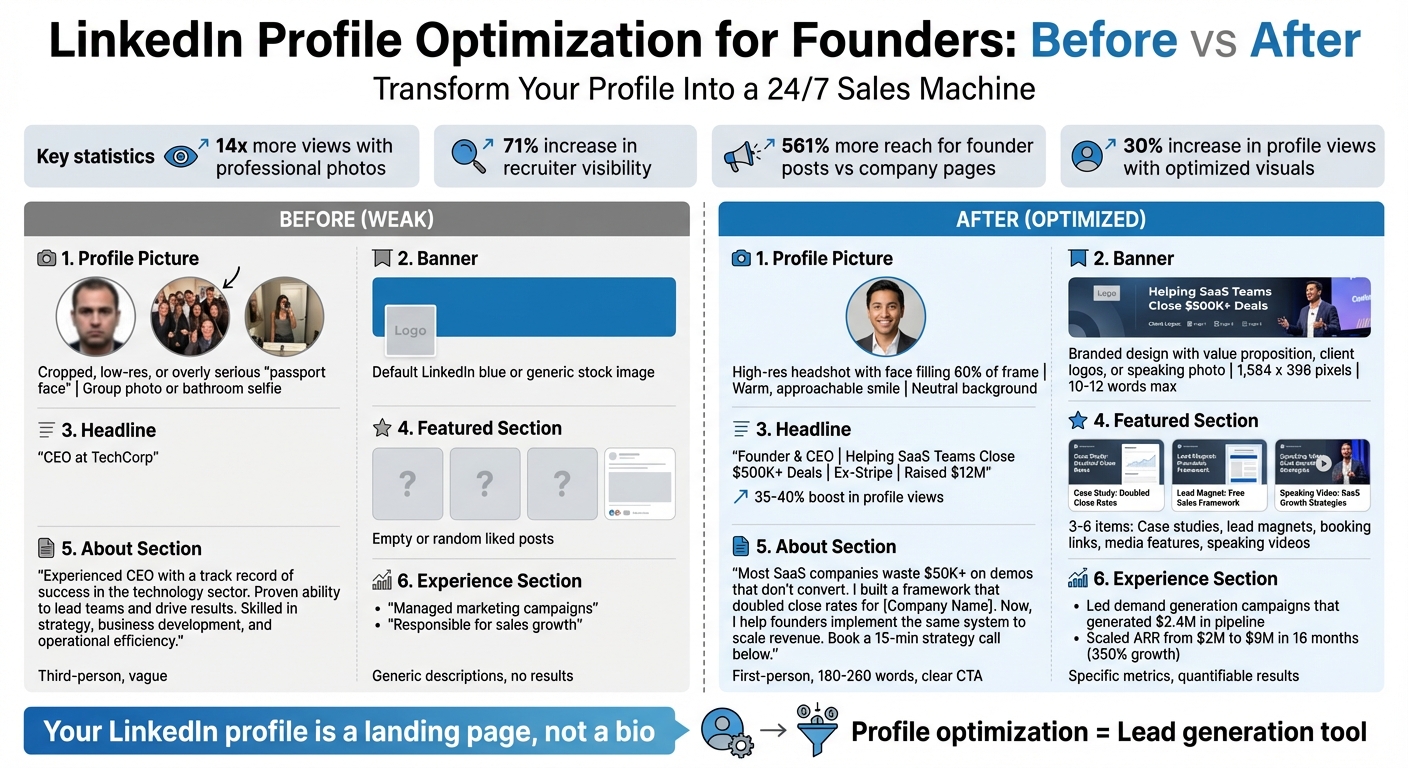
LinkedIn Profile Optimization: Before vs After Comparison for Founders
How to optimize your LinkedIn Profile to get clients in 2026
sbb-itb-9354cf2
Profile Picture and Banner
Your profile picture and banner are the first things people notice - even before they glance at your headline. These visuals play a key role in whether someone scrolls past or pauses to learn more. A polished headshot can instantly boost credibility and attract more views. With 84% of investors researching founders on social media before meetings, your visuals work 24/7 to make a strong first impression.
Profile Picture Requirements
A great headshot follows a straightforward formula: your face should fill about 60% of the frame, taken from roughly three feet away. Use soft, natural lighting - stand near a window or head outside on a cloudy day for the best results. Direct eye contact with the camera helps build trust, and a genuine, toothy smile can make you appear twice as approachable compared to a closed-mouth expression. Keep the background neutral or slightly blurred to keep the focus on your face.
"If you don't look like this in person, get a new photo. Trust breaks happen in first meetings."
Skip the selfies. Instead, ask a colleague to use the rear camera on your phone for better quality. Wear professional attire that reflects your typical work wardrobe - solid colors and bold tones tend to photograph better than busy patterns. If the uploaded image looks blurry, try a different file. While hiring a professional photographer ($200–$400) is an option, a well-lit photo taken with a smartphone can work just as well if done right.
Banner Design Guidelines
Your banner is 1,584 x 396 pixels of prime attention-grabbing space. Think of it as a mini landing page. It should quickly answer three core questions: Who are you? Can people trust you? And what can you offer them? The best banners feature a clear value statement (e.g., "I help SaaS founders close enterprise deals in 90 days"), social proof like client logos, or even a photo of you speaking at a professional event.
Keep the text short - 10 to 12 words max - and use high-contrast colors to ensure readability on mobile screens. Remember, your profile photo overlaps the bottom-left corner on desktop, so keep the key design elements centered or aligned to the right. Posts from founder accounts see 561% more reach than company pages, so aligning your banner’s colors and fonts with your brand creates instant visual consistency.
"Your LinkedIn profile is either a powerful asset or a digital resume gathering dust. Most profiles are built to impress recruiters. Yours should be built to convert prospects."
These tweaks might seem small, but the results speak for themselves.
Before/After Visual Comparisons
When comparing generic visuals to optimized ones, the difference is clear in both appearance and engagement. A group photo or bathroom selfie sends the wrong message, while a professional headshot with proper lighting and framing shows you’re someone worth paying attention to. The same principle applies to banners - default LinkedIn blue or a generic stock image wastes valuable space.
| Element | Generic Visuals | Optimized Founder Visuals |
|---|---|---|
| Profile Photo | Cropped, low-res, or overly serious "passport face" | High-res headshot with your face filling 60% of the frame and a warm, approachable smile |
| Banner | Default LinkedIn blue or generic stock image | Branded design featuring a value proposition, client logos, or a speaking engagement photo |
| Background | Distracting or cluttered | Neutral, solid, or subtly blurred office background |
| Mobile Readability | Text too small; face barely visible | High-contrast text and clear facial features |
Optimizing these visuals can lead to a 30% increase in profile views, and with 42% of B2B buyers checking LinkedIn before responding to outreach, your visuals are the gateway to meaningful connections and opportunities.
Headline and Featured Section
Your headline is the most important 220 characters on your LinkedIn profile. It’s what people see in search results, connection requests, and comments. A generic headline like "CEO at TechCorp" doesn’t stand out. On mobile, only the first 68 characters are visible - so those words really count. An optimized headline can boost your profile views by 35–40%. That’s a lot of power packed into a tiny space.
If you want your profile to attract leads and opportunities, nailing your headline and Featured section is a must.
Writing a Results-Focused Headline
Here’s a formula that works: [Role] | [Who You Help] | [Outcome] | [Proof Point]. For example, instead of "Founder at SaaS Company", try something like: "Founder & CEO | Helping B2B SaaS Teams Close Enterprise Deals in 90 Days | Ex-Stripe." It’s clear, specific, and credible.
Take Justin Welsh as an example. His headline reads: "Solo Creator | B2B Solopreneurship | 1M+ Audience." It tells you exactly who he is, his niche, and why you should care. Sahil Bloom takes a similar approach, using keywords like "creator", "investor", and "builder" to maximize search visibility while showcasing authority.
"Your headline is not a bio; it is a balance sheet. It is the first asset an investor audits before writing a check."
Avoid buzzwords like "Visionary" or "Guru." They don’t inspire trust. Phrases like "Looking for Funding!!!" are even worse - they scream desperation. Instead, reframe it as: "Raising Seed Round to Scale Pilot." Keep it clean with separators like "|" or "•" for readability, and include 1–3 keywords to improve search rankings.
Once your headline grabs attention, the next step is to back it up with proof in your Featured section.
Featured Section Setup
Think of the Featured section as your proof vault - a quick way for investors, journalists, or prospects to see your traction at a glance. Pin 3–6 high-impact items here: case studies with measurable results, lead magnets like industry playbooks, links to book strategy calls, media features, or videos of speaking engagements.
Dave Gerhardt, for instance, uses the Featured section to link directly to his podcast and newsletter. Richard van der Blom highlights posts packed with industry insights to establish credibility.
Enable Creator Mode to move this section higher up on your profile, so it’s one of the first things visitors notice. Adam Robinson of Retention.com shared specific growth metrics and revenue numbers in his Featured section, helping his company generate $4M in annual recurring revenue. Your goal? Use this space to convert visitors into leads - consistently.
Before/After Headline and Featured Examples
Let’s compare a weak setup with an optimized one. A headline like "CEO at Stealth Startup" doesn’t tell visitors anything useful. An empty Featured section is a missed opportunity. On the other hand, a results-driven headline paired with curated, high-value assets can transform your profile into a lead-generating machine.
| Element | Weak Profile | Optimized Founder Profile |
|---|---|---|
| Headline | "CEO at TechCorp" | "Founder & CEO | Helping SaaS Teams Close $500K+ Deals | Ex-Stripe | Raised $12M" |
| Featured Section | Empty or random liked posts | Case study with 3x ROI results, lead magnet (industry playbook), booking link, podcast interview |
| Mobile View | Generic title cut off at "CEO at..." | Value visible in first 68 characters |
| Search Visibility | No keywords; hard to find | 1–3 key terms; appears in targeted searches |
Here’s the kicker: posts from personal founder accounts get 561% more reach than company pages. Your headline and Featured section aren’t just profile details - they’re your 24/7 lead generation tools. Use them wisely, and they’ll work harder than any ad campaign.
About Section: From Bio to Sales Tool
After refining your visuals and headline, your About section should take on a new role: a sales page that converts. Many founders fall into the trap of stuffing this space with job history, but here's the deal - this section should work like a sales funnel. It needs to grab attention, establish trust, provide proof, and drive action. Within five seconds, visitors should know who you are, why they should trust you, and how you can help them.
"Your LinkedIn profile is not a resume. It is a landing page."
Kick things off with a positioning statement, share a quick origin story about the problem you solved, explain your process, highlight measurable results, and wrap it up with a clear next step. Amanda Natividad, VP of Marketing at SparkToro, nails this approach by using a conversational tone that showcases her expertise without sounding like a boring job description. This setup ensures you're speaking directly to your audience's pain points.
Writing for Your Target Audience
Focus on your audience's challenges - not your resume. Use the PAS framework: define the Problem your audience faces, Agitate the consequences of ignoring it, and present your company as the Solution. For instance, instead of saying, "I've worked in SaaS for 10 years", try something like: "Most B2B teams struggle to close enterprise deals in under six months. I built a system that slashes that timeline in half and helped three companies scale past $10M ARR."
Write in first person, like you're having an informal chat. Keep it brief - 180 to 260 words is ideal for depth while staying mobile-friendly. Use specific numbers to build credibility fast, like "Grew ARR by 300% in 12 months" or "Led a team of 25 to $4M in revenue".
"Founder profiles should not read like résumés. They should communicate vision, traction, systems, and leadership philosophy."
Formatting for Readability
Once you've nailed the content, make sure the layout is easy to skim. Use short paragraphs (2–3 sentences) and bullet points to make it scannable. Most mobile users won’t stick around if they can’t quickly find what they need. Place your key phrases in the first two lines - before the "See more" link - to hook readers and improve search visibility.
End with a low-pressure call-to-action like: "Message me to discuss scaling strategies", "Book a 15-minute strategy call", or "Download our playbook at [link]". This turns profile views into leads without coming across as pushy.
Before/After About Section Examples
A weak About section sounds like a generic job description: "Experienced CEO with a track record of success in tech startups. Passionate about innovation." It’s vague, written in third-person, and offers no value. A stronger version flips the script:
| Element | Weak Profile | Optimized Founder Profile |
|---|---|---|
| Opening | "I'm a CEO with 15 years of experience..." | "Most SaaS companies waste $50K+ on demos that don't convert. I built a framework that doubled close rates for three Series A startups." |
| Structure | Chronological job history | Problem → Solution → Proof → CTA |
| Tone | Stiff, third-person | Conversational, first-person |
| Proof | "Led successful teams" | "Helped scale B2B revenue to $12M in 18 months" |
| CTA | None or buried at the end | "Message me to request an audit" |
Switching from a "resume mindset" to a sales-focused approach can deliver real results. Founders who use this structure often see a jump in inbound messages and more qualified leads reaching out directly. Your About section isn’t just a bio - it’s a powerful sales tool.
Experience Section and Recommendations
Your Experience section should showcase the impact you’ve made, not just the tasks you’ve handled. Many profiles fall into the trap of listing duties like a job description instead of focusing on results. For instance, rather than saying, "Managed marketing campaigns", you could write, "Led demand generation campaigns that generated $2.4M in pipeline".
The first two or three lines of each entry are crucial since they appear before the "See more" button. Start with your most impressive accomplishments to grab attention immediately. Using the STAR method (Situation, Task, Action, Result) can help structure your entries effectively. Highlight systems you’ve built, teams you’ve led, and the measurable results you’ve delivered. For example, instead of saying, "Improved the sales process", try, "Reduced average sales cycle from 90 to 60 days."
Highlighting Measurable Results
Numbers tell a story better than vague statements. Use percentages to show growth, dollar figures for revenue or pipeline, and timeframes to demonstrate efficiency. Comparing before-and-after scenarios is particularly compelling. For instance, "Grew team from 4 to 12 over 18 months while maintaining 90% retention" is far more impactful than "Managed a growing team." Adding context, like "Series A SaaS startup", helps clarify the scale of your achievements.
Here’s a real-world example: In April 2024, Amy, a marketing professional, revamped her LinkedIn Experience section to focus on results. She replaced generic responsibilities with metrics, such as leading demand generation campaigns that generated $2.4M in pipeline and increasing MQLs by 180%. Within three weeks, recruiters reached out, and she even landed a fractional CMO opportunity specifically referencing her updated profile.
| Metric Type | Weak Example (Task-Oriented) | Strong Example (Results-Driven) |
|---|---|---|
| Revenue | Responsible for sales growth. | Scaled ARR from $2M to $9M in 16 months (350% growth). |
| Team | Managed a team of 12. | Grew team from 4 to 12 while maintaining 90% retention. |
| Efficiency | Improved the sales process. | Reduced average sales cycle from 90 to 60 days. |
| Marketing | Created marketing campaigns. | Generated $2.4M in pipeline and 180% increase in MQLs. |
To boost credibility, consider embedding supporting media like case studies or product demos in your experience entries. If you’re linking to external sites, use UTM parameters to track traffic and conversions through tools like Google Analytics.
Getting Client Recommendations
Recommendations add a layer of validation to the achievements listed in your Experience section. Aim for three to five recent testimonials from credible sources such as customers, investors, advisors, or board members. These endorsements strengthen your profile by showcasing leadership skills and building trust, especially when they align with your core expertise and career goals.
"Recommendations from customers, advisors, partners, executives, or team members... signal leadership capability, credibility, and trustworthiness."
The easiest way to get recommendations? Give them first. Writing a thoughtful testimonial for a peer often encourages them to return the favor. When requesting recommendations, ask for personalized feedback that highlights specific projects or skills, particularly those from the last 12–18 months. This strategy ensures the testimonials are relevant and impactful.
Before/After Experience and Recommendations Examples
Generic entries lack punch. To stand out, focus on specific metrics and achievements. For instance, instead of writing, "CEO at TechStartup. Responsible for overseeing company operations and driving growth initiatives", try this: "CEO at TechStartup (Series A SaaS). Scaled ARR from $2M to $9M in 16 months (350% growth). Led a team of 12 to launch an AI feature that boosted user engagement by 40%. Featured in TechCrunch for innovative go-to-market strategy."
Justin Welsh, a prominent founder and solopreneur, exemplifies this approach. His Experience section highlights his role in growing two startups to over $50M in revenue and building a personal audience of 1M+ followers as of December 2025. By using clear identity markers and benefit-driven statements, he converts profile viewers into customers. Profiles with fully optimized Experience sections receive 30% more weekly views, and adding specific metrics can further boost views by 35% to 40%.
When founders combine measurable achievements with strong recommendations, they often see a surge in inbound opportunities. This mix of quantifiable results and third-party validation builds trust quickly, turning profile visitors into potential leads.
Conclusion
Your LinkedIn profile isn’t just a digital resume - it’s your around-the-clock sales funnel. Every detail, from your profile picture to your headline, plays a role in turning profile views into meaningful opportunities. By following this checklist, you shift your profile from a static summary of your career to a dynamic tool that builds trust and attracts investors, partners, and leads. The key difference between a basic profile and one that drives growth lies in intentional positioning: using headlines that highlight value, crafting first-person summaries with clear calls-to-action, showcasing measurable results, and leveraging the Featured section to convert curiosity into action.
"If you are a founder, CEO, or high-level executive, your profile is not a CV. It is a landing page. It is a sales funnel that works while you sleep."
The numbers back this up. Profiles with professional photos get 14x more views, and a well-optimized profile can increase recruiter visibility by 71%. These improvements lay the groundwork for a content strategy that amplifies your reach even further.
But profile optimization is just the starting point. Regular content creation is what drives traffic to your profile. Posting 2–3 times per week keeps you active in the feed and signals LinkedIn’s algorithm that you’re a thought leader worth following. Of course, for busy founders, maintaining this consistency can feel like a full-time job. That’s where outsourcing comes in.
Services like RevBoss take the pressure off by managing content strategy, audience growth, and lead activation. With packages starting at $1,500/month, they provide weekly strategy calls, 8–12 LinkedIn posts per month, and workflows designed to turn profile visitors into sales conversations.
To stay ahead, update your profile quarterly to reflect your evolving goals. While optimization delivers quick wins, consistent updates and content creation build momentum over time. The founders thriving on LinkedIn in 2026 won’t just have optimized profiles - they’ll have content engines that establish authority, generate inbound leads, and grow their personal brand alongside their business.
FAQs
What’s the fastest LinkedIn profile change that increases inbound leads?
The fastest way to ramp up inbound leads is by sharpening your visuals. Start with your banner - make sure it highlights a clear value proposition and includes some social proof. This simple tweak can boost profile views and connection acceptance rates. Pair this with well-chosen keywords in your "About" section, and you'll see a noticeable jump in leads. These small adjustments can make a big difference in how your profile performs.
How do I write a founder headline that converts without sounding salesy?
To craft a headline that grabs attention and drives results, focus on clarity and impact. Spell out the value you bring, the people or businesses you serve, and what makes you stand out. Forget vague titles or overused buzzwords - zero in on outcomes. Show how you solve problems or create meaningful results, making your headline both compelling and relatable.
What should I pin in Featured to attract investors and B2B buyers?
Pin content that underscores your expertise, leadership, and the strengths of your business. Think about case studies that show real-world results, product demos that highlight functionality, thought leadership articles that position you as an authority, or media mentions that add credibility. Share client success stories, emphasize what sets your company apart, or celebrate recent milestones. These elements help build trust and make your company more appealing to investors and potential buyers by showcasing your accomplishments and growth potential.