The Pre-Event Meeting Campaign: A Repeatable Team Workflow

Hook: Events eat up a massive chunk of marketing budgets - 20–30% - but most teams are still winging it when it comes to turning that spend into revenue. Spoiler: hope isn’t a strategy.
Value Summary: High-performing teams don’t wait for magic to happen at the event. They secure 50–70% of their meetings before the event even starts. This guide breaks down how to create a repeatable process for pre-event campaigns that actually deliver results - think booked meetings, real ROI, and fewer wasted leads.
Quick Overview:
- Set clear goals: Define success with SMART KPIs (e.g., “25 meetings with VP-level decision-makers by March 1, 2026”).
- Target the right people: Focus on high-value accounts using a three-layer ICP framework (firmographics, persona, and behavior).
- Use tools wisely: Platforms like RevBoss streamline attendee data, outreach, and follow-ups.
- Craft personalized messaging: Tailor outreach to roles, challenges, and motivations. Start 4–6 months ahead.
- Run multi-channel outreach: Combine email, LinkedIn, and phone in a structured 3–4 week sequence.
- Track and refine: Monitor KPIs like booking rates and show rates. Learn from every campaign to improve the next.
Bridge: If you’re tired of throwing money at events and crossing your fingers for ROI, here’s the playbook to fix that.
From 10x10 Booth To 116 Meetings: Pre Show Strategy That Actually Works
sbb-itb-9354cf2
Set Campaign Goals and Identify Target Attendees
Most event campaigns stumble right out of the gate because teams dodge the toughest question: What does success look like? Without a clear definition, you’re left wondering if hitting 20 meetings is a triumph or a red flag. While over 90% of event professionals rely on data to gauge success, only about half feel confident they’re tracking the right metrics.
Pre-event marketing isn’t just about creating buzz or racking up registrations. It’s about engineering outcomes - carefully filtering who attends and ensuring their presence aligns with your business goals. As Prachee Mishra from Samaaro explains:
"Event ROI is usually treated as a measurement problem. It isn't. It's a timing problem. Post-event metrics are lagging indicators; they explain what happened, not why it happened".
High registration numbers mean little if the audience isn’t aligned with your goals. Instead, focus on intent density - targeting high-priority attendees. This approach builds a stronger pipeline than simply chasing large numbers.
Define Objectives and KPIs
Your campaign objectives should tie directly to your business goals, whether that’s generating leads, retaining customers, or increasing brand visibility. Once you’ve zeroed in on your primary goal, apply the SMART criteria to your KPIs: make them Specific, Measurable, Achievable, Relevant, and Time-bound. For example, instead of vaguely aiming to "book meetings", aim for something concrete like "secure 25 pre-event meetings with VP-level decision-makers at mid-sized companies (100–500 employees) by March 1, 2026."
To keep things manageable, focus on 2–3 main objectives per campaign. This avoids data overload and keeps your team on track. Set performance benchmarks using a "good–better–best" framework. For instance, if your baseline is 15 meetings, aim for 15 (good), 20 (better), and 25 (best). This flexibility allows you to adjust tactics without branding the campaign a failure.
Track the entire KPI chain to pinpoint weak spots in your process: Connect rate → Conversation rate → Meeting set rate → Show rate → SQL rate. Regular evaluations and adjustments can improve event ROI by as much as 45%. Pre-event metrics like registration intent act as leading indicators that set the stage for post-event ROI, which serves as a lagging indicator.
Once your KPIs are locked in, it’s time to figure out exactly who can help you hit those targets.
Identify and Segment Ideal Customer Profiles (ICPs)
After defining success, the next step is identifying who you need to reach. Strategic targeting delivers results you can measure. For example, at the Manifest logistics event, focusing on high-intent prospects led to 42 pre-event meetings and four new deals, resulting in a 180% ROI.
Use a three-layer targeting framework to build your Ideal Customer Profile (ICP):
- Layer 1: Firmographics - Filter by company size, industry, funding stage, geography, and tech stack.
- Layer 2: Persona - Pinpoint the specific role (e.g., Sales, Marketing, Ops) and their key performance metrics.
- Layer 3: Behavioral Signals - Look for timing-based triggers like recent funding, hiring sprees, or competitor activity.
This framework reinforces the importance of "intent density", ensuring your outreach focuses on high-value prospects. Instead of chasing hundreds of low-quality leads, focus on a "Top 50" list of high-value accounts. A carefully curated list of 500 verified contacts will outperform a bloated list of 5,000 any day. Why? Because your team spends time on meaningful conversations, not chasing dead ends.
Test your targeting strategy with a 7-day experiment. Build a list of 50–100 prospects that fit your initial ICP criteria, then measure their responses. Use this feedback loop to refine your approach and zero in on prospects who are ready to engage - right now.
Build and Organize Attendee Lists in RevBoss
Once you've set your target audience, the next step in your pre-event meeting campaign is turning raw attendee data into actionable segments. This is where many campaigns stumble - badge scans and registration lists often end up as chaotic spreadsheets that no one uses. RevBoss eliminates this problem by providing tools to import, enhance, and organize attendee data, ensuring your outreach stays sharp and your pipeline remains tidy. Here's how to effectively manage and prioritize your contacts.
Import and Segment Attendee Data
Think of your attendee lists as raw data that needs refinement. Whether you're working with pre-event registrations, purchased attendee lists, or post-event badge scans, the first task is to bring that data into RevBoss and enhance it. Use data enrichment to fill in missing details like emails or phone numbers, ensuring every contact is verified. At about $0.01 per verified email, this step is a no-brainer for maximizing accuracy.
RevBoss offers two ways to manage your attendee data: static lists and dynamic audience workflows. Static lists are ideal for fixed segments, like one-time campaigns or post-event analysis. On the other hand, dynamic lists update automatically based on buyer behavior, firmographics, or funnel stages. For example, if a prospect's engagement score changes or they move to a new funnel stage, dynamic workflows adjust in real-time - no manual effort required.
Fine-tune your segmentation with filters based on key go-to-market factors such as engagement scores, industry, company size, and even custom CRM attributes. For instance, you could create a segment of VP-level decision-makers at mid-sized SaaS companies who visited your pricing page within the last 30 days. Once your segments are in place, sync them to your CRM, marketing automation platform, or LinkedIn ad account to execute multi-channel campaigns.
With your data cleaned and segmented, the next step is to focus on identifying and engaging with your most promising prospects.
Prioritize High-Intent Prospects
Not every attendee deserves equal attention - zero in on a "Top 50" list of high-value accounts to make the most impact. This approach underscores the importance of focusing on quality rather than quantity.
Divide your attendees into three groups based on their roles to fine-tune your messaging:
- Decision-Makers: C-level leaders with budget authority. They get personalized, high-touch outreach.
- Influencers: Specialists and technical experts who shape buying decisions. Send them technical content and case studies.
- Information Seekers: Junior staff gathering information. Place them into long-term nurture campaigns.
Set a 48-hour Service Level Agreement (SLA) to follow up with qualified leads. Timing is critical - reaching out within five minutes makes a lead 21 times more likely to convert compared to waiting 30 minutes. Delays beyond a week can reduce the effectiveness of your outreach by 70%. Start with your top-quality contacts and ensure swift follow-ups to maximize your chances of conversion.
Create Event-Specific Messaging and Assets
Your attendee list is segmented, and your priorities are clear - now it’s time to craft messaging that actually grabs attention. The key is to create event-specific assets that align with your prospect's role, challenges, and motivations. These assets should make it easy for them to say "yes" to a meeting. Here's how to develop personalized messaging that drives results.
Develop Personalized Messaging
To make the most of your pre-event meeting campaign, your messaging needs to connect with each member of the buying committee while staying aligned with your goals. Start your outreach 4–6 months before the event - this helps you build familiarity before inboxes get flooded. Stick to a proven structure: Hook (show you understand their needs), Insight (offer a fresh perspective), Value (tie it to your solution), Proof (back it up with data), and CTA (make the next step simple).
Personalization is about using business context, like recent funding announcements or industry shifts. For instance, reaching out to a CFO at a Series B SaaS company? Highlight how similar businesses are rethinking tech stack investments after securing funding. This approach shows you're informed without being intrusive.
Tailor your messaging to the buying committee’s priorities. CFOs care about ROI and cost management, so lead with something like, "This investment pays for itself within a quarter." CTOs are focused on integration and scalability: "It fits seamlessly with your stack and grows with you." RevOps leaders value efficiency: "This eliminates manual tasks and saves your team hours every week". By addressing specific roles, you boost engagement - B2B buyers are twice as likely to respond when outreach aligns with their industry or role.
Streamline your research with the 3-Minute Signal Hunt: spend one minute on LinkedIn activity, one minute on the company website or careers page, and one minute reviewing intent data or tech stack. This quick method ensures enough context for personalization without overanalyzing. For high-value Tier 1 accounts, try pattern interrupts like AI-generated videos featuring the prospect’s website in the background. These stand out in crowded inboxes and show you’ve done your homework.
Use low-friction CTAs like "Worth a quick chat?" to lower barriers to engagement. Keep in mind, it often takes 4–8 touchpoints to convert meetings, so plan a multi-channel sequence that combines email, LinkedIn, and phone calls over 3–4 weeks.
With your messaging locked in, the next step is leveraging RevBoss’s tools to scale your outreach.
Use RevBoss Content Processes
Personalizing messaging for dozens - or even hundreds - of prospects might sound overwhelming, but RevBoss simplifies the process. Its automated content tools draft role-specific emails, adapt case studies for different personas, and integrate business context in just minutes.
RevBoss uses AI to speed up research and drafting, while keeping humans involved to fine-tune tone, empathy, and timing. The platform pulls in deep account intelligence - like leadership updates, annual reports, or recent news - and automatically incorporates it into your outreach. This level of personalization, grounded in real business metrics, resonates with prospects and meets today’s expectations.
For scaling Account-Based Marketing (ABM), RevBoss supports tiered workflows. High-value accounts receive in-depth research and custom video outreach, while lower-tier prospects get hybrid sequences that still feel personalized. Given that 81% of B2B buyers expect companies to understand their needs and 73% actively avoid irrelevant outreach, this approach isn’t optional - it’s essential. Companies that manage to personalize effectively at scale see 40% more revenue from their marketing efforts.
"AI is an accelerator, not a replacement. The best results happen when humans handle the nuance - tone, empathy, timing - and AI handles the heavy lifting."
With your messaging and assets ready, you’re set to roll out a coordinated outreach campaign that turns attendee lists into confirmed meetings.
Execute a Multi-Channel Outreach Campaign
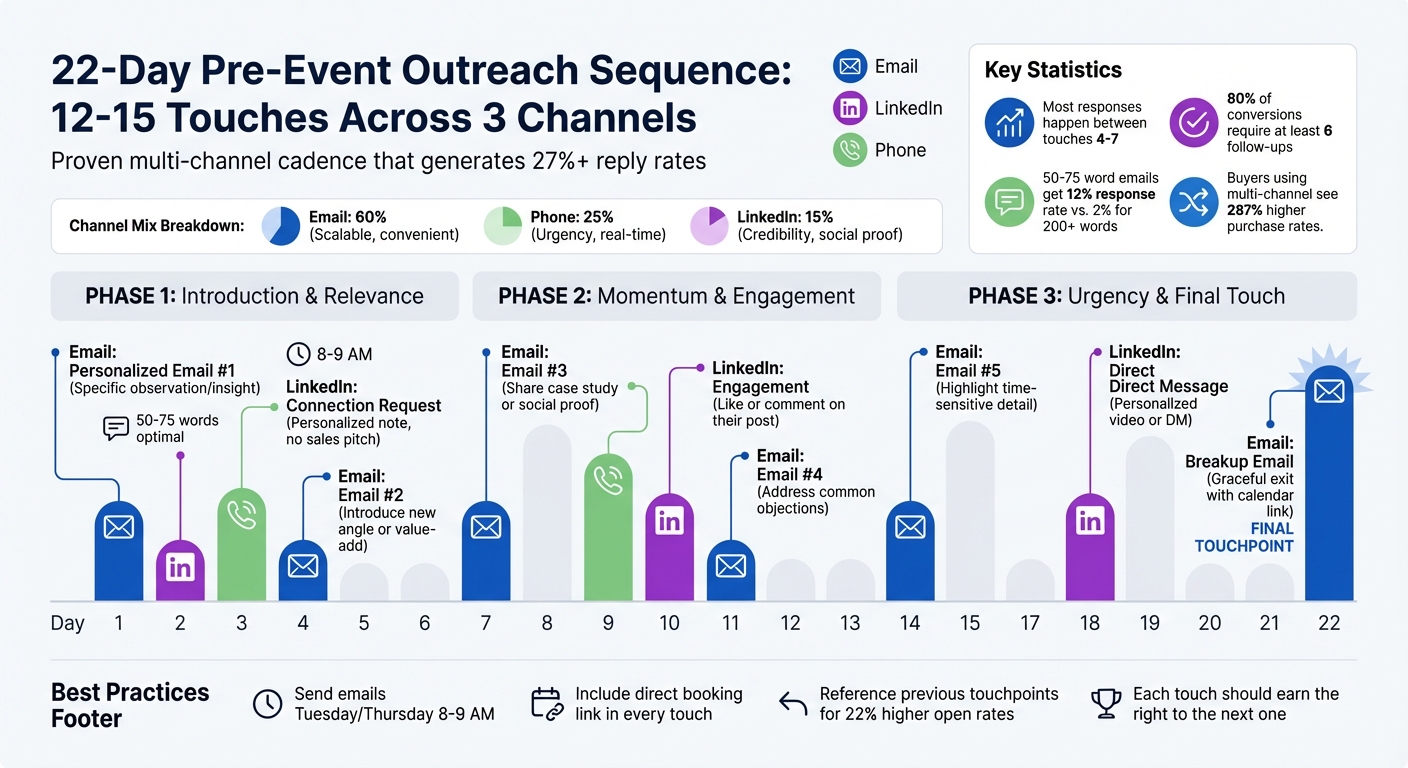
Pre-Event Meeting Campaign 22-Day Multi-Channel Outreach Sequence
It’s time to roll out a coordinated multi-channel outreach campaign. Buyers interact across various platforms, and businesses that embrace a multi-channel approach see purchase rates soar by 287%. The secret lies in balancing outreach across email, LinkedIn, and phone in a way that builds familiarity without overwhelming prospects. A well-thought-out sequence helps guide potential buyers step-by-step toward engagement.
Plan a 3-4 Week Outreach Sequence
A typical pre-event campaign runs for 18–22 days, involving 12–15 touches spread across different channels. The goal isn’t to bombard prospects but to earn the right to continue the conversation with every interaction. To do this, divide your outreach into three phases that gradually establish rapport and urgency:
- Phase 1 (Days 1–4): Start by introducing yourself and establishing relevance. Use a personalized email, send a LinkedIn connection request, and follow up with a call that includes a voicemail.
- Phase 2 (Days 7–11): Keep the momentum going by sharing success stories, engaging with their LinkedIn activity, and addressing potential concerns.
- Phase 3 (Days 14–22): Wrap up by emphasizing time-sensitive details about the event and ending with a "breakup email" that puts the ball in their court.
Here’s an example of a proven 22-day outreach rhythm. The final "breakup email" provides one last opportunity to re-engage while giving the prospect control over the next steps:
| Day | Channel | Action | Focus |
|---|---|---|---|
| 1 | Personalized Email #1 | Specific observation/insight | |
| 2 | Connection Request | Personalized note, no sales pitch | |
| 3 | Phone | Call with Voicemail | Reference Day 1 email |
| 4 | Email #2 | Introduce a new angle or value-add | |
| 7 | Email #3 | Share a case study or social proof | |
| 9 | Phone | Call with Voicemail | Use a curiosity-driven hook |
| 10 | Engagement | Like or comment on their post | |
| 11 | Email #4 | Address common objections | |
| 14 | Email #5 | Highlight a time-sensitive detail | |
| 18 | Direct Message | Send a personalized video or DM | |
| 22 | Breakup Email | Graceful exit with a calendar link |
Keep your emails short and to the point. Messages between 50–75 words perform best, with a 12% response rate, compared to only 2% for emails over 200 words. Reference earlier touchpoints in follow-ups to create a sense of continuity - mentioning a voicemail in an email, for example, can increase open rates by 22%. Most responses happen between touches 4 and 7, and 80% of conversions require at least six follow-ups.
"The difference between a sequence that generates 27%+ reply rates and one that gets flagged as spam isn't the number of touches or the cadence timing. It's whether each touch earns the right to the next one."
– Brandon Briggs, Fractional CRO & Founder, It's Just Revenue
For better engagement, send emails on Tuesday or Thursday mornings (8–9 AM) when executives are more likely to check their inboxes. Always include a direct meeting booking link in every interaction, making it easy for prospects to take the next step.
Use RevBoss for Campaign Execution
RevBoss simplifies the process of managing multi-channel campaigns. It lets you create and control custom sequences across email, LinkedIn, phone, and manual outreach - all in one platform. By automating repetitive tasks like email drafting, follow-up scheduling, and optimizing send times, RevBoss frees your team to focus on building meaningful connections. Plus, it integrates seamlessly with your CRM, ensuring no leads slip through the cracks.
Use automated emails for consistent messaging while reserving manual actions - like LinkedIn connection requests or direct messages - for a personal touch. Configure your sequences to operate only during business hours, and set up reply detection to automatically remove contacts who respond, avoiding awkward follow-ups. For large-scale campaigns, features like mailbox rotation distribute sends across multiple accounts, protecting your sender reputation and staying within delivery limits.
RevBoss also enables A/B testing for subject lines, messaging strategies, and calls-to-action, so you can fine-tune your approach. Its AI-driven insights even schedule touches during each prospect’s peak activity hours, potentially increasing open rates by 15%. For high-priority prospects, RevBoss routes them for immediate human follow-up, ensuring your team connects at the perfect moment.
Coordinate Team Roles and Monitor Progress
A pre-event campaign can quickly fall apart without clear ownership and real-time tracking. Defining roles and keeping tabs on key metrics turn potential chaos into smooth execution. Using your segmented attendee data as a foundation, ensure every team member knows their responsibilities to boost the campaign’s chances of success.
Assign Roles and Responsibilities
For an effective campaign, responsibilities need to be split across three main areas:
- Marketing takes charge of strategy, ICP segmentation, and content creation.
- Sales oversees staffing, account selection, and running the meetings.
- Revenue Operations handles automation, scheduling systems, and data management.
This structure ensures every critical task is covered.
When dealing with large events, a relay workflow can be a game-changer. Start with SDRs qualifying prospects during pre-event outreach or booth conversations. Once high-value opportunities are identified, they are passed to Account Executives to close deals. For conferences, segment your team by expertise: executives handle CXO-level meetings, sales reps focus on product demos, and technical staff address custom requirements.
To prevent missed opportunities, assign a "Pipeline Czar" to manage the booth. This person ensures every interaction is logged, and no high-fit prospect leaves without a follow-up meeting scheduled.
Additionally, block out travel days for your booth crew using administrative "Holiday" settings to avoid accidental bookings while in transit. Use balanced round-robin lead distribution to ensure fairness across the team. The most successful teams prioritize high-value prospects and roles, with 78% of their qualified leads booked into meetings, compared to the median of 62%.
Track KPIs with RevBoss
Once roles are defined, a tool like RevBoss can help monitor progress in real time. RevBoss offers full-funnel visibility, tracking prospects from "Invited" and "Registered" to "Attended" and "Closed-Won". Its routing logs provide detailed audit trails, including enrichment data and distribution rules, so meetings are properly attributed - even when they land on an AE’s calendar.
Keep an eye on critical KPIs like meeting booking rates, show rates, and pipeline value. With automatic CRM syncing, RevBoss updates meeting statuses, ownership changes, and rescheduling details to keep your data clean. Slack alerts can notify reps instantly when a prospect requests a demo but doesn’t book a meeting. For account-based approaches, roll up engagement data to the account level to gauge intent across enterprise buying committees. Sharing performance dashboards with Sales, RevOps, and Finance helps align everyone on pipeline impact beyond simple attendance metrics.
"The inbound orchestration blueprint isn't a single tool or tactic. It's an operating philosophy that prioritizes speed, personalization, and continuous improvement."
– Charanyan, Co-founder, RevenueHero
With roles clearly defined and performance closely monitored, you can refine and improve your process over time.
Add Paid Activation and Reminder Campaigns
After running your multi-channel outreach campaign, it’s time to double down on making sure those scheduled meetings actually happen. Organic outreach gets the ball rolling, but paid activation and reminders are what drive attendance. These tactics keep prospects engaged and ensure they show up when it counts.
Run LinkedIn Audience Activation Ads
LinkedIn ads shine when they’re laser-focused on specific decision-makers already in your CRM, rather than casting a wide net over general account lists. This approach uses targeted advertising to display personalized ads to confirmed contacts who’ve already booked meetings with your team. Tools like RevBoss make this seamless by syncing CRM contacts into ad audiences the moment a meeting is scheduled or an opportunity is created.
A great strategy here is the "face to the name" approach. Design your ad creative to include the Account Executive (AE) who will be meeting with the prospect. This adds a personal touch and builds familiarity before the conversation even begins. Direct these ads to a landing page featuring the AE’s calendar, relevant case studies, and product information to keep the momentum going.
"When we compared targets who engaged with our 'Show Up' campaign to those who were not served any ads, the actual show-up rate increased by 50%."
Even if prospects don’t click on the ad, just seeing it can boost show-up rates by an average of 15%. For buying committees, this strategy can be expanded to target not just the primary contact but also key influencers and gatekeepers within the organization. And if someone misses the meeting, you can follow up with automated "no-show" campaigns featuring product tours or case studies to re-engage them - without coming across as pushy.
Once your ads are working to reinforce pre-booked meetings, the next step is to lock in attendance with well-timed reminders.
Schedule and Send Timely Reminders
Reminders are the glue that holds your outreach together, ensuring prospects follow through on their commitments. They don’t just jog memory - they also reinforce the value of the meeting, reducing no-shows by 34% to 50% on average. A sequence of 3–5 reminders strikes the right balance between staying top-of-mind and avoiding unsubscribes.
Here’s how to structure your reminders:
- Use email to highlight the value of the meeting and share logistical details.
- Switch to SMS for last-minute reminders. With over 90% open rates compared to 20–25% for emails in the final hour, SMS is your best bet for ensuring prospects are ready to join.
Every reminder should include a one-click "Magic Link" and an "Add to Calendar" button compatible with Google, Outlook, and Apple formats.
| Timing | Channel | Purpose |
|---|---|---|
| 1 week before | Email/LinkedIn | Reconfirm value and share logistics |
| 1 day before | Email/SMS | Direct reminder with join link |
| 1 hour before | SMS/Email | Immediate reminder to ensure readiness |
| 1 minute before | SMS | Final "join now" link |
A check-in 3–4 hours before the meeting can also help surface any scheduling conflicts early, giving your team enough time to fill empty slots. For high-value enterprise deals exceeding $100,000 ACV, a quick phone call within 60 minutes of a no-show can work wonders, converting 45% of prospects back to a scheduled status - far outperforming email, which converts only 15–20%. Make sure your sequences are automated to stop once a prospect replies, avoiding any awkward double-sends.
"A registration is just an expression of interest. A reminder email converts that interest into action."
Analyze Results and Create a Repeatable Workflow
After wrapping up an event, take the time to document both what worked and what didn’t. This step is the key to moving from a one-time success to a repeatable revenue system. Without proper documentation, you’re essentially starting from scratch every time.
Measure Key Metrics and ROI
Focus on tracking metrics that truly matter. For example, a booked meeting doesn’t mean much if it’s never held or fails to qualify. Prioritize meeting outcomes like upcoming, completed, not booked, canceled, or no-show meetings. On average, the no-show rate for B2B sales demos is 6.5%, but this varies significantly by industry - Education Software sees rates as high as 18.1%, while Developer Tools hover around just 1.2%. If your no-show rate is higher than expected, break it down by region, sales rep, or lead source to identify trends.
"In 2026, a 'booked meeting' is a vanity metric. A 'held meeting' is revenue."
Next, pinpoint where prospects are dropping off in your funnel. Use automated CRM updates and touchpoint reports to identify "funnel leakage." For instance, are leads stalling after the SDR call or during the AE demo? Touchpoint reports can reveal the last campaign activity before an opportunity was lost. Additionally, measure pipeline influence - the total dollar value generated or influenced by the event, broken down by stages from MQL to Closed-Won. Inefficiencies like no-shows or poor handoffs can cost businesses 5–10% of their annual revenue.
| Metric Category | Key KPIs to Track | RevBoss/CRM Tracking Method |
|---|---|---|
| Activity | Emails sent, calls made, LinkedIn touches | Sequence reports and activity logs |
| Engagement | Open rates, response rates, link clicks | Magic link tracking and email analytics |
| Conversion | Meeting booking rate, show rate, qualification rate | Automated meeting status updates (Completed vs. No-show) |
| Outcome | Pipeline created, ROI, revenue-to-spend | CRM attribution dashboards and ROI forecasting |
These metrics will guide adjustments and improvements for future campaigns.
Standardize Processes for Future Campaigns
Once you’ve analyzed your results, use the insights to create a standardized approach for future events. Schedule a 3-week post-mortem after the event to allow time for pipeline activity and gather sales feedback. Compare the journeys of "Closed-Won" deals versus "Closed-Lost" ones to determine the ideal outreach cadence and touchpoints - this becomes your go-to template. Clearly define roles for Marketing, Sales, and RevOps to avoid delays in lead follow-ups. Assign a "Pipeline Czar" to oversee event operations, ensuring every conversation is logged with notes on fit and follow-up actions.
To avoid scheduling mishaps, create a dedicated "Event Meeting Type" in your scheduling tools with date-restricted availability. Use tools like RevBoss to automate data cleanup, update ownership records, and track outcomes seamlessly. AI-powered workflows can cut manual segmentation and planning time from 12–20 hours to just 30 minutes. For prospects who cancel or fail to book, deploy automated workflows with "magic links" that follow round-robin rules and reassign leads.
| Channel | Recommended Mix Ratio | Primary Function in Workflow |
|---|---|---|
| 60% | Scalable and allows prospects to respond at their convenience. | |
| Phone | 25% | Adds urgency and enables real-time qualification. |
| 15% | Builds credibility, offers social proof, and aids in research. |
The best-performing companies book 78% of their qualified leads into meetings, compared to the median rate of 62%. If your numbers fall short, review your qualification criteria and adjust your reminder schedules. Use spend-response modeling to find the point where additional investment in a channel no longer delivers meaningful returns. By refining and documenting your workflow, you can turn your event strategy into a repeatable system that reliably drives revenue.
Conclusion
Pre-event meeting campaigns don’t have to feel chaotic or overwhelming. With a clear workflow, defined goals, and structured outreach, you can transform expensive brand engagements into reliable revenue generators. The secret? It’s all about process, not luck.
RevBoss equips you with the tools to manage every step of this workflow - whether it’s importing and segmenting attendee lists, running targeted multi-channel campaigns, or tracking the touchpoints that actually lead to meetings. Thanks to AI-powered automation, tasks like manual segmentation, which used to take 12–20 hours, can now be done in just 30 minutes. This means your team can spend more time on what really matters: having meaningful conversations, not wrestling with spreadsheets.
This streamlined approach can have a massive impact on your event success. Consider this: 80% of event leads never receive meaningful follow-up. And if you wait more than five days to follow up, those leads are ten times less likely to convert. High-performing teams know this, which is why they secure 50%–70% of their meetings before the event even begins. They treat their event campaigns with the same precision and focus they bring to every other part of their marketing strategy.
"Events represent 20–30% of your marketing budget. They deserve the same rigor you apply to the other 70–80%."
To get started, map out your next campaign step by step. Assign someone to oversee the pipeline (your “Pipeline Czar”), create designated meeting types, and prioritize follow-ups starting on Day Zero. After the event, take three weeks to review your results, identify areas for improvement, and tweak the process. Each event becomes an opportunity to refine your strategy, making the next one even more efficient and profitable. By embedding these practices into your event playbook, you’ll build a repeatable system that drives consistent revenue.
FAQs
How do I pick the right attendees to target?
To make your pre-event meeting campaign effective, zero in on prospects that align closely with your ideal customer profile (ICP) and demonstrate a strong likelihood of engaging with your outreach. Leverage data and sales intelligence tools to dig into key accounts, paying particular attention to those adopting technologies or solutions relevant to your offerings. By focusing on high-value prospects, you can ensure your efforts are targeted and have a better chance of driving meaningful conversions.
What should my team do if we’re starting late?
If your team is getting a late start, zero in on what matters most to make up for lost time. Focus your energy on high-priority accounts and use automation tools to craft personalized messages quickly and effectively. Make sure your sales and marketing teams are working in sync to amplify results. AI-powered tools can be a game-changer here, helping you streamline sales prep and outreach to save precious time. Put your efforts into activities that spark immediate engagement, rather than trying to do everything at once.
How can we prove event ROI beyond booked meetings?
To truly showcase event ROI beyond just scheduled meetings, it's important to follow the entire participant journey - everything from pre-event engagement to post-event actions. Tools like CRM systems and marketing platforms can help you dig into account-level interactions, while AI-powered attribution models can tie your event efforts directly to pipeline growth and revenue. Pay close attention to post-event metrics, such as follow-up engagement, content interactions, and pipeline conversion rates. These are especially critical within the first 48 hours after the event to paint a clearer picture of ROI.