Website Intent and Retargeting for Practical Teams: A Simple Setup

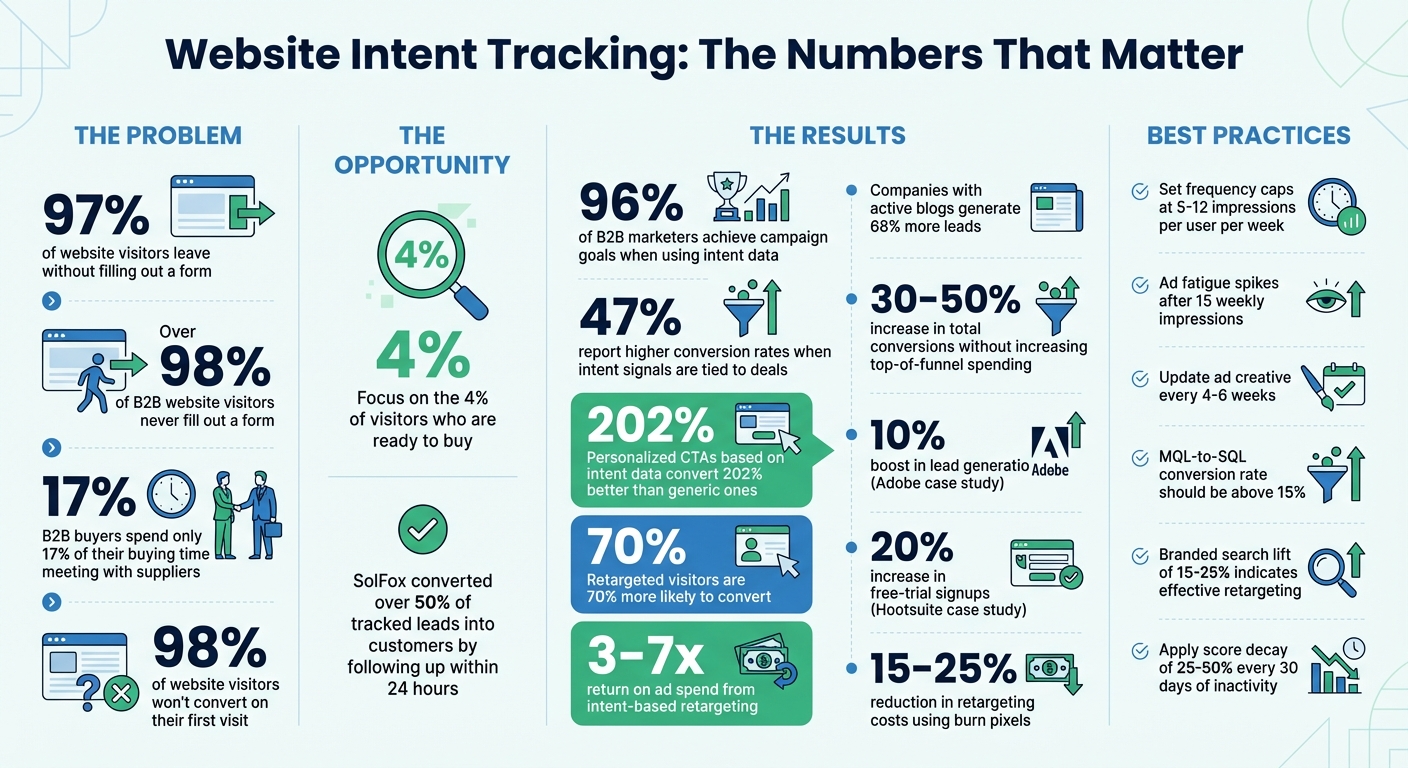
97% of your website visitors leave without filling out a form. That’s a lot of missed opportunities. But here’s the good news: identifying what visitors are doing on your site - and acting on it - can turn those anonymous clicks into actual leads.
This guide shows you how to:
- Spot high-intent behaviors like pricing page visits or demo requests.
- Use simple tools to track activity and score leads.
- Run retargeting campaigns that match where visitors are in their buying journey.
Take SolFox, for example. By tracking visitor activity and following up within 24 hours, they converted over 50% of those leads into customers.
You don’t need expensive software or a massive team. With a few practical steps, you can focus on the 4% of visitors who are ready to buy and stop wasting time on cold leads. Let’s get into it.
Website Intent Tracking: Key Statistics and ROI Metrics for B2B Teams
Why Website Intent Matters
What Website Intent Means
Website intent is like a digital breadcrumb trail that visitors leave behind, showing how ready they are to buy. For instance, spending five minutes on your pricing page, visiting multiple times in a week, or downloading a case study are clear signals of buyer intent.
Think of it as online body language. A quick stop at your homepage might just mean someone is curious. But when someone repeatedly checks out your "how to get started" guide and then heads over to the pricing page, it’s a strong sign they’re seriously considering their options.
Here’s the catch: over 98% of B2B website visitors never fill out a form. Instead, they’re busy researching, comparing, and making decisions in what’s often called the "dark funnel." This is the part of the buyer’s journey that traditional lead capture methods can’t see. That’s where intent tracking comes in. By using IP address intelligence, it identifies the companies behind these anonymous visits and provides firmographic details like company name, size, and industry.
Spotting these signals is crucial - and here’s why B2B teams need to pay attention.
Why B2B Teams Should Care
For small marketing teams, every minute counts. Chasing every visitor or wasting time on cold outreach isn’t an option. Tracking intent allows you to zero in on the visitors most likely to buy, while keeping others engaged through retargeting.
The stats speak for themselves: 96% of B2B marketers achieve their campaign goals when they use intent data to guide their strategies, and 47% report higher conversion rates when intent signals are tied directly to deals. Even better, personalized calls to action based on intent data convert 202% better than generic ones.
"It's the difference between using a map to find potential fishing spots and using a high-tech sonar that pinpoints exactly where the fish are swimming."
Traditional targeting asks, “Who could buy from us?” based on static profiles like company size or industry. Intent-based targeting flips that question to “Who is buying now?” by focusing on real-time actions. And this shift matters because today’s B2B buyers only spend about 17% of their total buying time meeting with suppliers - the rest is spent on digital research.
This approach also helps distinguish between two key types of website visitors: anonymous visitors and known accounts.
Anonymous Visitors vs. Known Accounts
Website traffic usually falls into two categories: anonymous visitors and known accounts. Anonymous visitors haven’t identified themselves yet, but you can still figure out their company through IP lookup. Known accounts, on the other hand, are already in your CRM or have shared their contact details.
Both types of traffic are valuable, but they serve different purposes. Anonymous visitors help build your top-of-funnel pipeline, as they’re often in the early stages of researching solutions. Meanwhile, activity from known accounts can signal that an existing lead is warming up and might be ready for further engagement.
"By the time they finally reach out, your competitor has probably already identified them and started a conversation."
- Adam Statti, RevPartners
Treat high-intent anonymous visitors with the same urgency as known leads. For example, if an ideal account visits your pricing page three times in five days, that’s a clear priority. To avoid wasting time on accidental clicks, set minimum thresholds - like 2–3 visits within a week - and then prioritize based on both fit and behavior.
sbb-itb-9354cf2
How to Set Up First-Party Intent Tracking
First-Party Signals to Track
Website actions can reveal how close a visitor is to making a decision. High-intent signals - like visits to pricing pages, demo requests, free trial signups, or downloads of technical documentation - indicate someone is nearing a purchase decision. Medium-intent signals, such as multiple visits in a week, downloading case studies, comparing product features, or clicking links in emails, suggest they’re actively researching. Meanwhile, early-stage signals include interactions with blog posts, educational resources, or general "What is [X]?" type articles.
It’s also important to track group signals, like when several people from the same company visit your site within 48 hours - this often points to a buying committee forming. Another key factor is behavioral depth: a 20-minute visit shows far more interest than a quick two-minute glance. Metrics like active session time (when the site is in the foreground), scroll depth, and video completions can provide deeper insights into engagement.
Referral sources are another layer to consider - they help contextualize a visitor’s intent.
"One of the most important signals for intent scoring is how much active session time has been spent by your prospect."
- Tido Carriero, Co-Founder & CEO, Koala
With these signals in mind, the next step is setting up your tracking tools.
Tools and Setup Steps
Intent tracking tools typically use a lightweight JavaScript snippet, which can be installed in about 10–20 minutes via your website’s header or through Google Tag Manager. Start by focusing on high-value pages like pricing, product comparisons, ROI calculators, and demo request forms - these pages often provide the clearest buying signals.
Google Tag Manager can help ensure tracking pixels fire only after users give consent, keeping you compliant without requiring direct code adjustments. Many systems automatically track page views, form submissions, and active session times, reducing the need for manual tagging. These tools can also be configured to exclude sensitive data, such as passwords or payment information, for added security.
The real magic happens when you integrate intent data with your CRM system. Feeding this data into platforms like HubSpot or Salesforce allows sales teams to act quickly. For instance, you can set up Slack or email alerts when a target account visits key pages, like the pricing page, more than once in a week. By segmenting data based on firmographic details - like industry, company size, or location - you can prioritize leads that align with your Ideal Customer Profile.
Don’t forget to exclude internal office IPs, bots, and test environments to avoid skewing your data. Before a full rollout, run a 10-to-30-day pilot to test data quality and ensure everything is functioning as expected.
To avoid common pitfalls, check out the next section.
Common Setup Mistakes to Avoid
One major misstep is failing to track all high-intent pages. Pages with product details, case studies, or solution overviews are often overlooked, yet they’re critical for understanding buyer intent. Don’t ignore your blog either - companies with active blogs generate 68% more leads on average. Even your homepage provides valuable insights, such as referral data and the visitor’s initial path.
Another mistake is trying to do too much too soon. Launching multiple features at once can lead to inconsistent results. Instead, focus on one or two key use cases to start, then expand gradually.
Integration with sales is another common stumbling block. Without proper coordination, data silos can form, stalling the entire system. Be cautious with CRM data as well - pushing unverified enrichment data can overwrite trusted fields. Use tools that fill in gaps without altering existing information. Lastly, buyer behavior evolves, so regularly update your intent scoring rules to reflect what correlates with current closed deals - not outdated trends from six months ago.
How to Run Retargeting Campaigns Based on Intent
How to Segment Audiences by Intent
After gathering intent data, the next step is to group your visitors into three categories: high-, mid-, and low-intent. High-intent visitors are the ones showing clear signs of being ready to buy - things like visiting pricing pages, requesting demos, or using tools like an ROI calculator. Mid-intent visitors are usually checking out case studies, attending webinars, or exploring product features. Meanwhile, low-intent visitors are still in the early stages, browsing blog posts or general industry content.
To refine these groups further, apply firmographic filters to focus on your Ideal Customer Profile (ICP). For example, prioritize visitors from industries, revenue ranges, or company sizes that align with your goals. A VP exploring your pricing page is likely a higher-value lead than an intern skimming your blog. Also, pay attention to recency and frequency. Someone who’s visited your pricing page three times in the past week is far more engaged than someone who stopped by once two months ago.
Considering that nearly 98% of website visitors don’t convert on their first visit, retargeting becomes essential. Retargeted visitors are 70% more likely to convert. By segmenting your audience effectively, you can deliver messaging that matches where they are in their buying journey.
How to Personalize Campaigns Across Channels
Once your audience is segmented, tailor your messages to match their intent. For high-intent users, focus on direct calls to action like "Book a Demo" or "Start Your Free Trial." These can be delivered through LinkedIn ads, Google Search retargeting, or even SDR outreach. Reinforce these messages with case studies, testimonials, or risk-free offers to help them make a decision.
For mid-intent users, stick to educational content. This could include LinkedIn or YouTube video ads showcasing customer success stories, comparison guides, or ROI calculators. Email campaigns can also address common questions to nurture their interest further. For low-intent users, aim to build awareness with display ads on Google or sponsored LinkedIn posts. Share infographics, industry reports, or blog content to engage them without asking for an immediate commitment.
To keep your campaigns effective, set frequency caps - limit impressions to 5–12 per user per week. This prevents ad fatigue, which can cause engagement to drop by 40%. Also, coordinate efforts across channels so your sales team gets notified when high-intent prospects engage, allowing for timely outreach.
Retargeting Examples
Let’s look at how these strategies work in action. In March 2025, Adobe added LinkedIn retargeting to its usual acquisition campaigns. The result? A 10% boost in lead generation and a lower cost per lead. Hootsuite also saw success by retargeting website visitors who hadn’t converted yet, leading to a 20% increase in free-trial signups.
Here’s another scenario: Imagine a visitor downloads a marketing automation whitepaper (a mid-intent action). You could retarget them with a LinkedIn carousel ad showcasing customer success stories and follow up with an email offering a free ROI calculator. If they use the calculator, move them into the high-intent segment and show ads with a clear "Talk to Sales" CTA. Sync this activity with your CRM so your sales team can jump in with personalized outreach.
"Retargeting doesn't win by showing more ads - it wins by showing the right next message at the exact moment the buyer is ready to move."
To maximize efficiency, use exclusion lists to remove existing customers or prospects who’ve already converted. This avoids wasting ad spend and prevents redundant messaging. Additionally, update your creative every 4–6 weeks to keep engagement levels high and avoid stagnation.
How to Measure and Improve Your System
Metrics to Track
When assessing your system, focus on pipeline-centric outcomes like meetings booked, opportunities created, and closed-won deals. These metrics directly tie your retargeting efforts to revenue impact.
One key metric is your signal-to-meeting ratio, which measures how many high-intent signals translate into sales conversations. For instance, if you flag 100 high-intent visitors but only secure 5 meetings, it may be time to revisit your scoring thresholds. Also, track view-through conversions, which capture users who saw your ad but didn’t click, yet converted within 1–7 days. This helps you gauge the broader influence of your retargeting efforts.
Another important metric is your MQL-to-SQL conversion rate. If this rate falls below 15%, it’s a sign that your scoring model might need an overhaul. Additionally, monitor branded search lift - a 15–25% increase in direct searches for your company name suggests your retargeting is effectively building awareness. Lastly, measure engagement depth by analyzing metrics like time on page, scroll depth, and repeat visits.
"Most lead scoring models fail not because the math is wrong, but because they score too many things, never decay, and set MQL thresholds that nobody trusts."
- Rome Thorndike, RevOps Expert
How to Refine Scoring and Campaigns
Use these metrics to fine-tune your scoring model and improve campaign performance. Start with monthly audits comparing intent scores to actual conversions. If your high-intent segment converts at less than 10%, you may need to adjust signal weights or reevaluate thresholds. Watch for patterns in false positives (high scores that don’t convert) and false negatives (low scores that do convert) to uncover overlooked trends.
Introduce a score decay of 25–50% every 30 days of inactivity to keep your sales team focused on active leads rather than stale ones. Assign higher weights to actions that strongly correlate with conversions, ensuring your scoring reflects behaviors that matter most.
For campaigns, keep things fresh by updating your ad creative every 4–6 weeks. This prevents engagement from plateauing. Set frequency caps at 5–7 impressions per user per week, as ad fatigue tends to spike after 15 weekly impressions. To save on budget, use a "burn pixel" to exclude leads who’ve already converted - this can reduce retargeting costs by 15–25%.
Working With Sales Teams
Once your scoring model is refined, make sure these insights integrate seamlessly into your sales process. Push intent signals directly into your CRM or Slack so sales reps can act quickly. For example, if an account visits your pricing page three times within five days, automatically trigger a task for your SDR team to follow up.
It’s also crucial to explain what behaviors triggered each lead alert. Sales teams respond better when they understand the specific actions - like repeated visits to a pricing page - that flagged a prospect as high intent. Set up notifications for these high-intent actions so reps can engage while prospects are actively researching.
Establish a feedback loop where sales teams regularly share which high-scoring leads convert and which don’t. This collaboration sharpens your scoring model and helps both teams identify the signals that truly indicate buying intent. When sales and marketing align on what "high intent" means, the results can be significant - 47% of companies report improved outcomes when intent signals are directly tied to opportunity records. By fostering this alignment, your system stays focused on driving revenue and delivering measurable results.
How to Use Intent Signals to Find Ready-to-Buy Leads | Shira Simmonds x Smartlead
Conclusion
You don’t need a massive team or a hefty budget to set up website intent tracking and retargeting. The process is straightforward: install tracking pixels, identify key intent signals (like visits to your pricing page), segment audiences based on behavior, and tailor your outreach to how visitors engage with your site. This strategy turns anonymous clicks into actionable insights.
By focusing on high-intent signals and segmenting audiences effectively, you can create personalized outreach that aligns with real buying behaviors. This approach can boost conversion likelihood by 70% and deliver a 3–7x return on ad spend. Better yet, it can drive a 30–50% increase in total conversions without adding to your top-of-funnel spending. For founder-led teams juggling limited resources, that kind of efficiency is a game-changer.
Keep it simple: track behaviors that lead to closed deals - not vanity metrics - and give your sales team the tools to act on active prospects. And don’t forget, 98% of website visitors won’t convert on their first visit. Retargeting ensures you stay on their radar throughout the lengthy B2B decision-making process.
FAQs
What’s the fastest way to define “high-intent” on my site?
To spot visitors who are likely ready to buy, pay attention to specific behaviors that show intent. These include checking out pricing pages, comparing features, requesting demos or trials, or returning to your site multiple times in a short period. Assign intent levels to your website pages - pricing and product details typically signal strong buying interest. Also, keep an eye on patterns like three or more visits within a week to segment and follow up effectively.
How do I connect intent signals to my CRM without messing up data?
To link intent signals to your CRM without causing data chaos, stick to a clear process. Start by using AI-powered tools to pick up on relevant signals - things like website visits or content downloads. Add tracking pixels to capture this activity, and enhance the data with firmographic details to get a clearer picture of your audience. Next, connect these signals to your CRM using APIs or integration platforms, making sure to validate and deduplicate the data along the way. Finally, run detailed tests to ensure everything is accurate and runs smoothly, avoiding any mismatched or incomplete records.
How do I avoid wasting retargeting budget on the wrong visitors?
To get the most out of your marketing efforts, focus on attracting visitors who show clear buying intent. Look for behaviors such as checking out pricing pages, comparing features, or returning to your site multiple times. Use these signals to create audience segments and prioritize those who are more likely to convert. Skip retargeting users with low engagement, as they’re less likely to take action. Regularly update your audience lists to keep your focus on active, high-potential prospects. This way, you’ll make smarter use of your budget and boost your ROI.