Database Re-Engagement: How to Wake Up Old Leads

Re-engaging dormant leads is one of the smartest moves for your sales strategy. Why? Because it’s cheaper, faster, and more effective than chasing brand-new prospects. Leads that went quiet aren’t dead - they’re just waiting for the right moment (or nudge) to come back to life. The numbers back this up: re-engagement campaigns can convert at 15–20% (compared to 2–3% for cold outreach), and reactivated leads often spend 25% more than before. Here’s the playbook to wake them up:
- Segment and prioritize: Use your CRM to identify high-potential leads based on past activity and reasons for going quiet (e.g., bad timing vs. no budget).
- Personalize outreach: Reference past interactions, address specific challenges, and craft emails that feel human - not generic.
- Go multi-channel: Combine email, LinkedIn, and phone for a coordinated approach that boosts response rates by 287%.
- Automate smartly: Use tools like RevBoss to manage workflows, track engagement, and send follow-ups based on behavior (e.g., when they open emails or visit your pricing page).
The key takeaway? Your CRM is a goldmine of untapped revenue. Stop ignoring dormant leads and start turning them into opportunities. Let’s dive into how to make it happen.
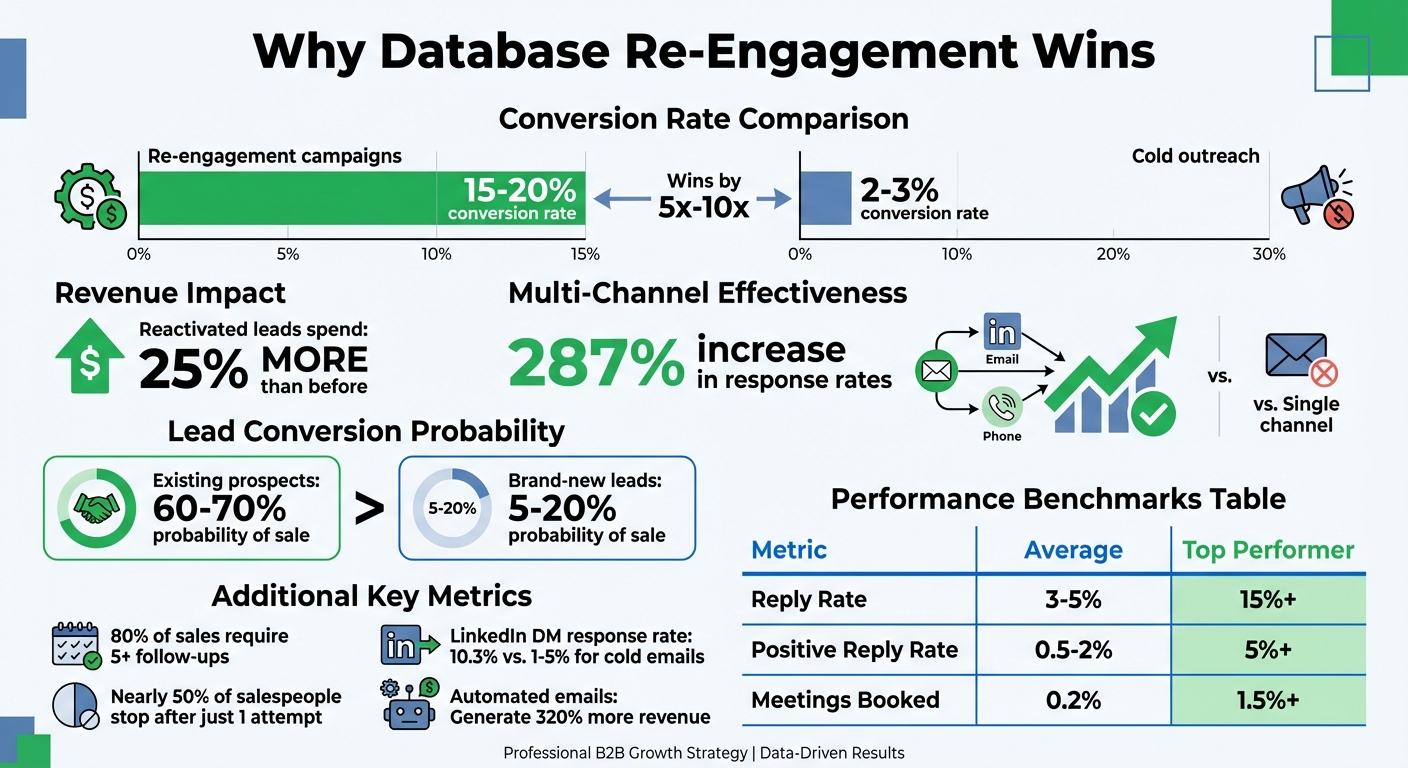
Database Re-Engagement Statistics: Conversion Rates and ROI Comparison
How to re-engage cold leads as a small business (without feeling pushy)
sbb-itb-9354cf2
Segment and Prioritize Dormant Leads
Not every dormant lead is created equal - your CRM can help you pinpoint which ones are worth revisiting. By segmenting these leads, you can better tailor your scoring and outreach efforts.
Use CRM Data for Segmentation
Start by filtering your CRM for leads that have been inactive for over 90 days - no email opens, calls, or meetings. Then, dig into their last interaction. Did they attend a demo, receive a proposal, participate in a discovery call, or just download a whitepaper? Each action offers clues about their level of interest and where they were in the buying process.
Take a close look at the "Closed-Lost" reasons in your CRM. Leads marked as "no budget" are quite different from those marked as "bad timing." Timing issues may resolve over time, making those leads ripe for re-engagement. Break your list down further by industry, company size, and job title. For example, a VP at a 500-person SaaS company will need a different approach than a manager at a 50-person manufacturing firm. In B2B sales, it’s smart to evaluate account-wide activity rather than focusing solely on one contact - interest from one stakeholder often reflects broader organizational interest. These filters help you score engagement more accurately.
Apply Lead Scoring
Once segmented, scoring helps you prioritize leads with the most conversion potential. Assign scores based on two key factors: "Fit" (e.g., company size, industry) and "Engagement" (e.g., demo requests, pricing page visits). This ensures you’re not chasing leads that were never a good match, even if they showed some initial interest.
Focus on high-intent actions when assigning scores. For instance, a pricing page visit or demo request should carry more weight than a blog read or newsletter open. Dormant leads who made it to the proposal or contracting stage before going quiet deserve extra attention - they’ve already shown serious buying intent. Use score decay to keep your data fresh: reduce engagement scores by 20% after 30 days of inactivity, 50% after 60 days, and reset to zero after 90 days. As Rome Thorndike points out:
"Most lead scoring models fail not because the math is wrong, but because they score too many things, never decay, and set MQL thresholds that nobody trusts".
Focus on High-Potential Leads
Zero in on the leads with the highest scores. Pay particular attention to deals that stalled 60 to 120 days ago or newer leads that were in the discovery stage. By now, objections like budget freezes or internal changes may have resolved, and these leads still remember your brand.
Keep an eye out for job change triggers - when a key contact moves to a new company, they might bring your solution with them. These leads often convert at a much higher rate since the relationship is already established. Maura Rivera, CMO at Qualified, highlights the importance of efficiency:
"AI should be taking the lift of what would have otherwise been a very time-intensive manual task. An SDR should be forming a strategic point of view - not working through a list of 10,000 old leads one by one".
To maintain focus, send out manageable batches of 200 to 300 contacts each week. This keeps the volume of replies reasonable for your sales team and ensures follow-ups are thoughtful and effective.
Create Personalized Email Outreach
When you've pinpointed those dormant leads with strong potential, the next step is crafting personalized emails that reignite interest and spark conversations. By combining your segmented and scored leads with thoughtful messaging, you can transform raw data into meaningful dialogue.
Key Elements of a Personalized Email
Start with a subject line that grabs attention or directly addresses a challenge. Lines like "Noticed [Pain Point] is still unresolved" or "We built the thing you asked for" outperform generic ones like "Following up" or "Checking in." Keep it short - concise subject lines perform better.
Your opening line should briefly acknowledge the lapse in communication without dwelling on it. For instance, "It's been a while since we last spoke about [specific topic]" works well as a segue into the value you're offering. The body of your email should answer one key question: Why should they care right now? Share a relevant case study, highlight a product update that addresses their problem, or provide a resource tailored to their needs. Avoid jargon and write as if you're speaking directly to one person.
Wrap it up with a low-pressure call-to-action (CTA) that makes it easy for them to respond. Instead of pushing for a "30-minute demo", try something like, "Does this approach make sense for your situation?" or include a one-click calendar link. Research from Nutshell shows that personalized emails result in 6x higher conversion rates compared to generic ones. Tailor your content to the recipient's role - CFOs care about ROI, while IT directors focus on security and integration details.
Reference Past Engagements
Once you’ve nailed the email structure, make each message resonate by referencing past interactions. Use your CRM data to personalize every email, building on the history you’ve already established. For example, if a lead attended a demo but didn’t move forward, mention the specific feature they were interested in. If they went quiet after receiving a proposal, acknowledge it: "I know budget was a concern back in September - has that situation changed?".
For those who downloaded a resource but didn’t follow up, bring it up directly: "You grabbed our ROI calculator last quarter but didn’t finish the setup - here’s an updated version with benchmarks from companies like yours." Addressing "Closed-Lost" reasons directly shows you're paying attention. If timing was an issue, try: "When we last spoke, you mentioned Q1 was too busy to implement new tools. Now that we’re in Q2, would it make sense to revisit?" Selling to an existing prospect has a 60-70% probability, compared to just 5-20% for brand-new leads.
Use RevBoss Email Workflows
Automation tools like RevBoss can help you scale personalized outreach while keeping it personal. Starting at $1,500/month, RevBoss email workflows use behavioral triggers to adapt to how leads interact with your content. Instead of relying on fixed schedules, you can send follow-ups based on actions like opening an email, clicking a link, or visiting your pricing page.
Design a 5-touch sequence that builds urgency over time. Begin with a casual check-in, follow with valuable content, add social proof, introduce a limited-time incentive, and close with a final "breakup" message that lets them opt out easily. Set clear criteria for entry (e.g., 90 days of inactivity), and remove leads as soon as they respond or book a meeting. Keep outreach to a maximum of three emails per week to avoid overwhelming them or triggering spam filters.
As Randee Sheppard from Nutshell highlights:
"Automated emails generate 320% more revenue than non-automated campaigns, particularly when those campaigns use behavioral triggers to deliver relevant content at the moment leads are most engaged".
RevBoss workflows also let you address multiple stakeholders within the same account. For example, a message to a VP of Sales might focus on revenue growth, while a CTO would appreciate details about technical capabilities and integrations. This tailored approach ensures your outreach remains relevant to each decision-maker.
Deploy Multi-Channel Re-Engagement Sequences
Using a multi-channel strategy - combining email, LinkedIn, and phone - can increase response rates by an impressive 287% compared to relying on a single channel. The secret lies in coordination. Every touchpoint should feel connected, as though you're having a seamless conversation, not sending random, disconnected messages.
Use LinkedIn Outreach
Start with a warm-up phase before sending connection requests. Spend 3–6 days engaging with your prospect's posts - like, comment, or share their content. This builds familiarity without asking for anything upfront. On Day 7, send a personalized connection request. Keep it low-pressure by referencing something specific from their profile or a post they recently shared.
Once connected, stay visible with content-led nurturing. Share case studies, updates, or insights that remind them of the challenge they initially wanted to solve. After 2–4 days, follow up with a LinkedIn DM referencing your earlier email: “Saw you opened my email about [topic] - wanted to follow up here in case it got buried.” This approach reinforces your message without being repetitive.
LinkedIn DMs tend to perform better than cold emails, boasting a 10.3% response rate compared to the 1–5% average for emails. The warm-up phase is a game-changer. As Lead Spice highlights:
"Warm outbound achieves a 47% reply rate compared to just 8% for purely cold outreach".
Keep an eye on job changes using LinkedIn Sales Navigator. Leads in new roles often look for quick wins, making them more likely to convert. To avoid LinkedIn restrictions, limit connection requests to 20–25 per day. Once you've built this connection, phone calls can take the relationship to the next level.
Add Phone Follow-Ups
Phone calls add a personal dimension, especially when they reference earlier email or LinkedIn interactions. A typical 22-day sequence includes phone calls on Day 3, Day 9, and Day 16. Keep voicemails short - under 30 seconds - and mention your previous email by name to spark curiosity rather than pitching outright.
When you get someone live, follow a four-step framework: greet them by name, ask open-ended discovery questions, deliver a value-driven pitch, and outline the next steps clearly. Including phone calls in your sequence can boost reply rates to 27% or higher, tripling the results of single-channel outreach. Even leaving a voicemail can increase email open rates by 22%.
Timing matters. Make your calls around trigger events like a lead's first 90 days in a new role, budget planning periods, or after 210 days of inactivity. Use your CRM to review past purchase history and notes about stakeholders before dialing, so you can reference specific details. As Brandon Briggs, Fractional CRO & Founder at It's Just Revenue, says:
"Revenue comes from relevance, not volume".
To make managing these efforts easier, consider integrating them into a single workflow.
Use RevBoss Integrated Campaigns
RevBoss offers a combined LinkedIn and email content system ($2,500/month) that centralizes your multi-channel outreach. Instead of juggling separate tools, this platform automatically syncs follow-ups across channels. For example, a LinkedIn reply can trigger or pause actions on email, keeping everything coordinated and eliminating data silos.
RevBoss also saves time. Its AI tools can analyze a prospect's LinkedIn profile and recent company updates in under 60 seconds - what used to take 15 minutes per account.
Implement a 12-touch sequence over 22 days, spacing interactions by 24–48 hours to avoid overwhelming prospects. End with a "breakup" email on Day 22, which often pulls in 15–20% of total replies by giving prospects the option to opt out. As Namit Jindal from Aerosend explains:
"Automation does not create demand. It amplifies your positioning, your targeting, and your messaging".
Automate and Track Campaigns for Optimization
Automation isn't a substitute for strategy - it’s a way to amplify it. Once you’ve built your multi-channel sequences, the next step is to implement systems that run consistently and deliver actionable insights. This approach can help revive leads that might otherwise go cold. Consider this: 80% of sales require at least five follow-ups, yet nearly half of salespeople stop after just one attempt. Automation bridges this gap.
Set Up Automated Follow-Ups
Start by defining what "dormant" means in your CRM - usually, this refers to leads that have been inactive for 60–90 days. Use conditional workflows to address specific reasons for dormancy, whether it’s budget concerns or a lack of follow-up after a demo.
Tools like RevBoss Activation Campaigns (priced at $4,000/month) simplify this process by managing email and LinkedIn DM workflows in one place. Behavioral triggers are key here - set up follow-ups to go out within 0–5 minutes of high-intent actions like a visit to your pricing page or a resource download. Research shows prospects are 21 times more likely to convert when you respond that quickly. You can also use LinkedIn Sales Navigator to monitor job changes and automatically reach out when a former contact moves to a new company. These leads often convert faster since they’re eager to make an impact in their new role.
Don’t forget to include a final "breakup" email, which often prompts last-minute responses. Afterward, automate rules to move non-responders to a "To Be Cleaned" list, which helps protect your domain reputation.
With automation in place, the next step is tracking performance to refine your strategy.
Track Key Metrics
When evaluating your campaigns, focus on reply rates and meetings booked rather than open rates. Open rates are better for diagnosing deliverability issues - if yours is below 15%, you may have a spam problem, not a poor subject line. Dive into step-level analytics to pinpoint weak spots. For instance, if Step 1 in your sequence has a 6% reply rate but Step 3 drops to 2%, you know where adjustments are needed.
Keep an eye on bounce rates (aim for under 2%) and reply latency. As Hans Dekker from Instantly.ai aptly notes:
"The money is made in the reminders you measure correctly".
Here’s a quick look at how top performers stack up against averages:
| Metric | Average | Top Performer |
|---|---|---|
| Open Rate (Reminder) | 15–19% | 30%+ |
| Reply Rate | 3–5% | 15%+ |
| Positive Reply Rate | 0.5–2% | 5%+ |
| Bounce Rate | <2% | <0.5% |
| Meetings Booked | 0.2% | 1.5%+ |
Source: Instantly.ai
These benchmarks provide a clear path for optimizing campaigns.
Optimize Campaigns Over Time
Improvement comes from experimentation. Run A/B tests on subject lines, send times, and levels of personalization to boost reply rates. Use frequency throttling - stick to a maximum of three emails per week - to keep unsubscribe rates in check. If your 4th follow-up email causes unsubscribe rates to spike, it’s a sign to adjust your frequency or messaging.
Segment your leads based on behavior. For example, those who opened but didn’t reply require a different approach than those who never opened at all.
Set up automated stop rules to pause sequences as soon as a lead replies, books a meeting, or opts out. This ensures your outreach still feels personal, even when automated. When launching reactivation campaigns, start small - send about 50 emails per day during business hours - and scale up based on the quality of responses.
Automation, when paired with continuous measurement and iteration, can lead to impressive results, with automated emails generating 320% more revenue than their manual counterparts. By constantly refining your multi-channel tactics, you can significantly improve re-engagement outcomes.
Conclusion and Key Takeaways
Recap of Strategies
Reviving dormant leads isn't just about sending a few emails and hoping for the best. It's a structured process that starts with treating your CRM as a treasure chest of untapped potential. The key steps include segmenting your audience, crafting personalized outreach, using multi-channel strategies, and automating the process for consistency. Many dormant leads are more convertible than they seem, making your database a hidden revenue source. As Philip Kubinski, Co-founder of RevPack, aptly notes:
"Your CRM is a revenue goldmine".
Implement with RevBoss
RevBoss simplifies re-engagement by bundling content creation, audience targeting, and activation campaigns into one streamlined platform. Their Content + Coaching + Activation plan ($4,000/month) takes the hassle out of running LinkedIn DM workflows and email sequences, making multi-channel campaigns manageable without jumping between tools. With features like direct outreach, event-based campaigns, and audience segmentation workflows all handled through the RevBoss app, founders can focus on closing deals while the platform handles execution and performance tracking. It’s a hands-off way to turn dormant leads into active opportunities.
Next Steps for Success
Start small with a pilot campaign. Pull a list of 100–500 dormant leads, verify their contact info, and group them based on why they went cold - whether it’s budget, timing, or product fit. Roll out a simple five-day sequence: acknowledge the time gap, share something new (like a case study or feature update), and connect on LinkedIn with those who don’t respond. Set up CRM alerts to notify you when dormant leads show signs of interest, like visiting your pricing page or when a key contact switches jobs. Book a consultation with RevBoss to kickstart your re-engagement plan and turn those untapped leads into fresh opportunities for growth.
FAQs
Which dormant leads should I re-engage first?
To maximize your re-engagement efforts, concentrate on dormant leads who’ve previously shown interest. These could be individuals who opened your emails, clicked on links, or interacted with your content within the last 6–12 months. Such actions indicate they might still be considering a purchase. Another valuable group to target includes leads who engaged with your business recently but didn’t convert. Interestingly, many leads that were initially disqualified often end up making a purchase within 24 months. Zeroing in on these groups can significantly boost your chances of re-engagement success.
How do I personalize re-engagement without spending hours per lead?
To streamline your outreach efforts, start by segmenting dormant leads based on their past interactions or expressed interests. This allows you to craft messages that feel personal and relevant. Set up workflows that automatically send these tailored messages, referencing their history and offering something that genuinely adds value to them.
Leverage tools like AI and automation to handle these sequences seamlessly, cutting down on manual work while still keeping the approach personalized. Want to go a step further? Incorporate high-response channels like SMS into the mix. It’s a direct and efficient way to boost engagement without requiring extra effort.
What should I do if my reactivation emails hurt deliverability?
If reactivation emails are putting your deliverability at risk, it’s time to shift gears and safeguard your sender reputation. Start by cutting back on frequent or irrelevant emails to inactive subscribers - this helps lower the chances of spam complaints. Dive into potential problems like weak list segmentation or lackluster email content.
Make sure your email list is clean and verified, and don’t skip setting up SPF, DKIM, and DMARC protocols to authenticate your messages. Gradually warm up your sending reputation to avoid overwhelming ISPs. Keep a close eye on bounce rates and spam complaints, tweaking your campaigns as needed to keep your domain’s reputation intact.