Post-Event Conversion: Routing, Sequences, and Sales Enablement

Turning event leads into revenue is tough but doable - if you act fast and stay organized. Most trade show leads go to waste because follow-ups are slow, generic, or poorly routed. Here’s how to fix that:
- Route leads smartly: Use a 3-tier system to prioritize hot leads (demo requests) for immediate attention.
- Follow up fast: Leads contacted within 5 minutes are 9x more likely to convert. Use email, LinkedIn, and phone within 24-48 hours.
- Equip your team: Create tools like personalized microsites, clear messaging templates, and qualification rubrics to streamline sales.
- Automate everything: Tools like RevBoss handle lead routing, follow-ups, and analytics, saving time and reducing errors.
The first 48 hours after an event are your "golden window." Miss it, and competitors will swoop in. Nail your process, and you’ll turn those conversations into deals.
How to Maximize Lead Generation and Conversion at Events | Goldcast Insider
Lead Routing Frameworks for Founders
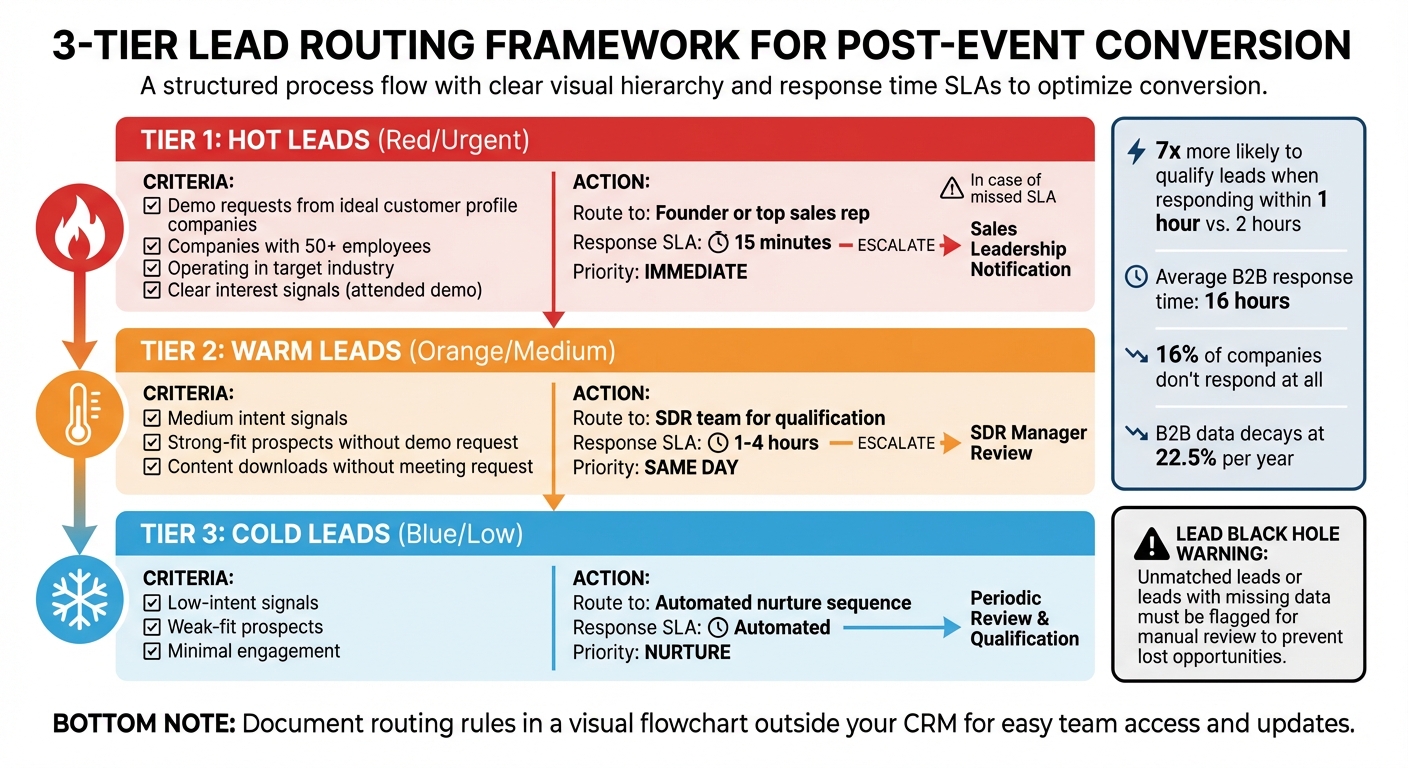
3-Tier Lead Routing Framework for Post-Event Conversion
As a founder, handling leads can feel like a never-ending battle. Some founders try to personally manage every lead, while others let them gather dust in the CRM, unassigned. Both approaches are a surefire way to tank your conversion rates. When you're balancing product decisions, investor calls, and customer meetings, manually sorting leads is not just inefficient - it’s a revenue drain. The numbers tell the story: companies that respond to leads within an hour are nearly seven times more likely to qualify them than those that take two hours. Yet, the average B2B response time for demo requests is a sluggish 16 hours, and 16% of companies don’t respond at all.
Common Lead Routing Mistakes
One of the biggest pitfalls in lead routing is the dreaded "lead black hole." This happens when leads don’t match any predefined rules and end up unassigned in a queue. Another warning sign? Constantly reassigning leads manually. If your team is always shuffling leads around, it’s a clear indicator that your routing logic isn’t aligned with your sales territories or expertise. On top of that, if more than 10% of your leads are hitting a default route, it means your primary rules aren’t specific enough.
Stale data is another silent killer. B2B data decays at a rate of 22.5% per year. If your routing depends on outdated information - like old job titles or incorrect company sizes - you’re sending leads to the wrong reps. The fix? Enrich your data before your routing logic kicks in.
A 3-Tier Lead Routing Model
To avoid these pitfalls, here’s a straightforward lead routing framework that ensures every lead gets the attention it deserves without wasting your team’s time.
- Tier 1 (Hot): These are high-intent, strong-fit leads - think demo requests from companies that match your ideal customer profile. Route these directly to yourself or your top sales rep, with a 15-minute response SLA.
- Tier 2 (Warm): These leads show medium intent or are strong-fit prospects who haven’t requested a demo yet. Assign them to your SDR team for qualification within 1–4 hours.
- Tier 3 (Cold): These are low-intent or weak-fit leads. Instead of tying up your sales team, drop them into an automated nurture sequence.
The secret sauce is defining clear criteria for each tier. For Tier 1, you might prioritize leads from companies with over 50 employees, operating in your target industry, and showing clear interest (like attending a demo). For Tier 2, downloading content without requesting a meeting could be enough. Document these rules in a visual flowchart outside your CRM so anyone on your team can easily understand and update the process. With this structure in place, you’re ready to layer on automation.
Automating Lead Routing with RevBoss
Manual lead routing slows everything down. That’s where tools like RevBoss come in. This platform integrates with your CRM to handle the entire process automatically. It enriches missing data - like company size and industry - detects new leads, and assigns them instantly based on your 3-tier framework. For example, when a Tier 1 lead comes in, RevBoss sends an instant Slack alert so you can respond within minutes. If you miss your SLA window - say, 30 minutes - the system escalates the lead to a fallback rep.
RevBoss also tracks lead activity across multiple channels. It can show you which booth conversations turned into demo requests, which follow-up emails were opened, and which leads have gone cold. This data lets you refine your routing rules on a monthly basis. By automating these steps, you not only speed up response times but also set the stage for smarter, more effective follow-ups.
Building Post-Event Follow-Up Sequences
Getting leads routed quickly is just the start - what really seals the deal is following up at the right time and in the right way. Research shows that 73% of leads go cold if they aren't contacted within 72 hours. Even more concerning, nearly 80% of trade show leads don't receive proper follow-up. Without timely, personalized outreach, potential customers can lose interest fast. Let's look at how timing and tailored communication can turn those leads into conversions.
The Importance of Timing and Relevance
Timing isn't just a detail - it’s the whole game. Reaching out to leads within 24–48 hours makes them around 60% more likely to convert compared to waiting a week. Even more compelling, 78% of leads go with the first company that follows up. For high-intent leads - like those asking for pricing or demos - responding the same day, ideally within a few hours, is critical.
But speed alone isn’t enough. A rushed, generic email won’t cut it. Your follow-up needs to tie back to the conversation you had at the event. Did they ask about integrations? Mention budget concerns? Request a case study? These details matter. Capturing this context during the event is key - after all, memories fade quickly. Using a "Four-Context Model" can help you keep things organized: note the lead’s Problem, their Priority (timing), the Proof they requested (like ROI data), and the agreed-upon Next Move. This approach transforms a forgettable email into a meaningful, engaging message. And while timing sets the tone, using multiple communication channels makes sure your message actually gets through.
Multi-Channel Follow-Up Strategies
Relying only on email won’t get you far. A strong follow-up sequence combines email, LinkedIn, and phone outreach over a 7–10 day period. Here’s an example:
- Day 0–1: Send a personalized thank-you email that references your event interaction.
- Day 1–2: Follow up with a LinkedIn connection request, adding a quick note about the event.
- Days 3–5: Share a value-driven resource, like a case study or checklist, and include a clear call to action (e.g., scheduling a call).
- For high-intent leads, consider adding an immediate phone call to secure their attention.
Small tweaks can make a big difference. Personalized subject lines, for instance, boost open rates to 46% compared to 35% for generic ones. Avoid vague phrases like "Just checking in." Instead, try something specific like "Follow-up from [Event Name]" or "[First Name] – about [specific topic we discussed]." Keep your emails short and to the point, skipping bulky templates that distract from the message.
Persistence also pays off. Half of all sales happen after the fifth contact, but most reps give up after just two. That said, don’t overdo it - sending four or more emails to the same lead can triple your unsubscribe rate. Balance is everything.
Using RevBoss to Automate Follow-Up
Managing dozens (or even hundreds) of leads manually? That’s a recipe for burnout. This is where automation tools like RevBoss come in. RevBoss lets you scale your multi-channel follow-up strategies while keeping them personal. The platform syncs event data directly into your CRM, segments leads by intent (hot, warm, cold), and triggers automated workflows. For instance, if a high-intent lead requests a demo, RevBoss can instantly notify your sales team and send a tailored email.
RevBoss also tracks engagement across channels - like who’s opening your emails, viewing your LinkedIn profile, or clicking on shared resources. This real-time feedback helps you tweak your messaging on the fly. The result? You stay top-of-mind during that crucial 72-hour window, ensuring no lead slips through the cracks.
sbb-itb-9354cf2
Sales Enablement for Founder-Led Selling
Once you've nailed fast lead routing and timely follow-ups, the next challenge is turning interest into actual deals. Your sales process should work like a well-oiled machine, where every piece plays a role in converting event leads into revenue. Even with quick follow-ups, without the right tools and preparation, your efforts might fall flat. Many founders assume they can "wing it" during conversations, but when you're juggling 50+ post-event leads, having an organized, repeatable system is a game-changer.
Core Sales Enablement Assets
Before you even pick up the phone, make sure you have the essentials in place. Start with intent-based messaging templates customized to match each lead's interaction at the event. Next, create personalized microsites for leads. These microsites should reference your event conversation, include three relevant resources (like a video walkthrough, case study, or ROI calculator), and feature one clear call-to-action. This approach is far more effective than sending generic PDFs that often get ignored.
You'll also need a qualification rubric to quickly assess leads. A simple scoring system - assigning 0–2 points across four categories (Problem Match, Role, Urgency, and Next Action) - helps you prioritize leads into "Hot" or "Warm" tracks. On top of that, implement CRM tagging models with pre-set options for event name, interest area, buying role, and next steps. This keeps your data organized and searchable.
A Simple Toolkit for Founders
With your assets ready, a streamlined toolkit helps you turn preparation into action. Save time with tools like automated multi-channel sequencers. These allow you to execute a "Triple Tap" by reaching out via email, phone, and LinkedIn within 24 hours. This multi-channel approach cuts through the noise far better than relying on email alone. Add smart scheduling links to your emails, so high-intent leads can book meetings right away.
Set up detailed notifications through Slack or your CRM to give you a heads-up about form submissions, web activity, and account history before you reach out. Finally, don't underestimate the value of pipeline dashboards. These visual tools track lead aging, SLA breaches, and MQL-to-SQL conversion rates, ensuring nothing slips through the cracks. Considering the average response time for B2B demo requests is 16 hours - and 16% of companies never respond at all - your toolkit can make sure you're ahead of the pack. These systems not only keep you efficient but also elevate the quality of your sales interactions.
How RevBoss Supports Sales Enablement
RevBoss takes the heavy lifting off your plate, so you can focus on building relationships. The platform automates campaign-specific content creation, multi-channel outreach, and CRM updates with enriched data. When a lead comes in from an event, RevBoss can instantly trigger personalized sequences, assign the lead to the right team member, and track engagement across email, LinkedIn, and your website - all from one dashboard. This eliminates the need to juggle multiple tools or manually update spreadsheets. For founder-led teams managing post-event sales, this kind of seamless integration can mean the difference between closing deals and losing them to follow-up fatigue.
Measuring and Improving Post-Event Conversion
Once you've nailed down efficient routing, follow-ups, and sales tools, it's time to focus on measurement. Why? Because measurement is the key to figuring out what works and what doesn't. After spending big on an event, you need to know which strategies actually bring in revenue. Tracking how many leads you gathered is a start, but it doesn’t tell the full story. The real question is: how many of those conversations at the event turned into qualified opportunities or closed deals?
Key Post-Event Metrics to Track
To get the full picture, start with funnel metrics that map the journey from registrant to closed deal. These metrics help you spot where prospects drop out and where your process might need fixing. Then, dive into efficiency metrics like Speed-to-First-Touch (how quickly you follow up with a lead) and Meeting Rate (the percentage of leads that schedule a demo within 14 days).
Don’t stop there - keep an eye on financial metrics too. These include Cost per Lead (CPL), Cost per Opportunity, Pipeline per Attendee, and Revenue-to-Spend ratio. For instance, if you spend $5,000 on a trade show and generate $150,000 in pipeline, that’s a 30:1 return. Another critical metric is your Lead Quality Index, which measures how many of your leads match your Ideal Customer Profile (ICP) in terms of company size, industry, and role. Chasing a high volume of low-quality leads? That’s a fast track to wasting time and resources.
Building a Feedback Loop
Set up a 30-minute weekly review with both marketing and sales to evaluate lead aging, conversion rates, and why leads are being rejected. These meetings help you spot patterns. For example, by analyzing "Closed Lost" deals, you can pinpoint issues like delays in follow-ups or over-reliance on one outreach channel. Compare these findings to "Closed Won" deals to understand what’s working. When sales reps reject or recycle leads, have them tag the reason - like "Timing", "Budget", or "Not ICP". This feedback sharpens your targeting for future events and helps refine your qualification process. Also, conduct monthly reviews of lead routing rules to ensure they align with current team capacity, territory shifts, or new product launches. This constant feedback loop feeds into performance tracking tools like RevBoss.
Using RevBoss for Analytics and Reporting
RevBoss simplifies tracking by offering a single dashboard that monitors outreach performance across email, LinkedIn, and phone channels. You’ll see which touchpoints are converting and where prospects are stalling in the pipeline. The platform also tracks engagement at every stage, so you can fine-tune your follow-up timing and messaging. Plus, RevBoss connects event leads directly to closed deals, making it easy to calculate ROI and justify future event budgets. For founder-led teams juggling multiple campaigns, this level of visibility takes the guesswork out of post-event follow-up and turns it into a repeatable, data-driven strategy.
Conclusion: Converting Event Leads into Revenue
Hosting or attending events comes with a hefty price tag - booth rentals, travel expenses, giveaways, and staff hours all add up quickly. Yet, around 64% of trade show leads are never followed up on effectively. That’s not a sales team issue; it’s a systems problem. The difference between walking away with a solid ROI or a drained budget boils down to three essentials: structured lead routing, timely follow-ups, and equipping your sales team with the right tools.
Lead routing isn’t just a back-office task - it’s a safeguard for revenue. When a high-potential prospect scans their badge, they need to be connected with the right salesperson immediately, armed with the right context. Timing is everything here: your chance of converting a lead can plummet by 80% if you wait longer than an hour. This is why automation has become non-negotiable.
After routing is handled, the next critical piece is follow-up timing. The first 48 hours post-event are the "golden window" when attendee interest and details are still fresh. Sending a generic “great to meet you” email days later won’t cut it. Instead, you need a multi-channel approach - email, LinkedIn, calls - that references specific conversations, sessions, or questions. This is where sales enablement makes all the difference. When your team has access to detailed, relevant data, they can craft outreach that feels personal and trustworthy, not like a cookie-cutter template.
For founder-led teams with limited bandwidth, managing all of this manually is overwhelming and often leads to missed opportunities. That’s where RevBoss steps in. The platform automates the entire process - from instant lead routing to multi-channel follow-ups and analytics. Pricing starts at $1,500/month for content and audience programs, with full-service options at $4,000/month. It transforms the chaos of post-event lead management into a streamlined, repeatable system.
The leads are already in your hands; the challenge is converting them. By implementing structured routing, acting quickly on follow-ups, and equipping your team with the tools to personalize their outreach, you can turn event leads into dependable revenue streams. Don’t let potential deals slip through the cracks - your process should work as hard as your team does.
FAQs
What info should we capture at the event to personalize follow-ups?
When crafting follow-ups, make them personal by jotting down essential details like the attendees' roles, their main challenges, budgets, and decision-making timelines. Also, pay attention to specific points from your conversations - things like their goals, pain points, or any useful insights they shared. Using this information helps you create follow-ups that feel relevant and customized, which can lead to better response rates and more conversions.
How do we set Tier 1, 2, and 3 lead rules for our ICP?
Set clear rules to prioritize leads by their quality, readiness to buy, and how well they align with your ideal customer profile. Establish lead scoring thresholds - for instance, leads scoring over 60 might automatically move forward for immediate action. Use a structured routing system: Tier 1 leads go to your best-performing reps, Tier 2 leads are assigned to newer reps or specialized teams, and Tier 3 leads are directed to nurturing campaigns for further development. Make sure your CRM can handle these routing rules effectively and includes backup plans for leads that don’t meet qualification criteria.
Which post-event metrics best prove event ROI?
The best ways to measure post-event success and demonstrate ROI are through full-funnel engagement tracking - such as monitoring attendee interactions, registrations, and attendance - lead conversion rates, and revenue attribution. These data points tie event performance directly to measurable business results, offering a clear picture of its impact.